


munyaprinceamini
Members
-
Joined
-
Last visited
Everything posted by munyaprinceamini
-
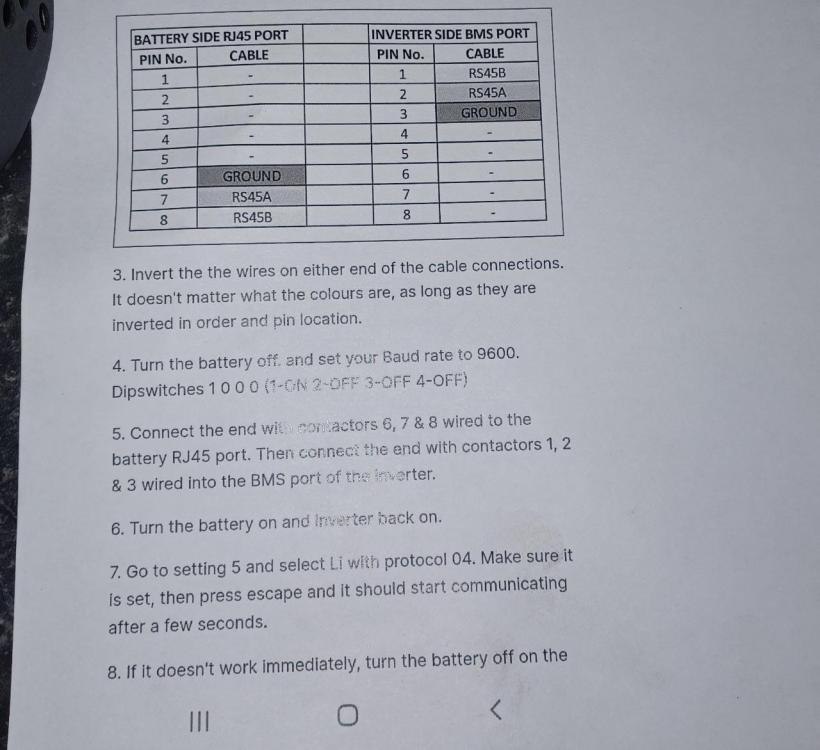
Good day, thank you for your assistance. I managed to make the Growatt 5000TL and the new Pylontech US3000C communicate . The attached picture showing all what is needed to make a successful connection.
-
Hi. Can anyone assist here. I have replaced gel batteries with US3000C and UP5000 Pylontech batteries on two separate installations respectively. It looks like the new US3000C and UP5000 Pylontech Batteries (coming with serial numbers on top) are not communicating with the Growatt 5000TL inverters. With the old Pylontechs these inverters are communicating. I also did firmware upgrade with the latest version i got from Growatt China but still the inverters are not communicating with the batteries. The dip switch is set 1000 and the communication cable is running from RS485 port on master battery to BMS on the inverter. The protocol is set L02. If there is anyone who knows how to solve this problem, i will greatly appreciate.
