Robert1981
Members
-
Joined
-
Last visited
Everything posted by Robert1981
-
Just an update on this. Tried to google my issue via the Gemini AI app. It suggested an reboot since it can happen that firmware updates don't usualy go according to plan. So I tried and it actually worked. Now I can press any arrow and make changes directly on the inverter without any issues.
-
Hi Everyone. Whilst I like to keep my 5KW updated with the latest firmware, I am hesitant to do it the 3rd time. The first update, the inverter was incorrectly confirgued and warning sounds came from it. It turns out it wanted to recognize my battery as an 200A. The second time and current version COMM:E43D - MCU:3387-0513 caused the up arrow to "stick" Its not that I have to press the up button at all. If I press on a setting it ramps up. I had to make all my changes via the Solarman App and avoid the touch screen at all costs. I have to come clean though. This happend last year and since I am now on holiday for 2 weeks. It seems the best time to try and sort this out. Though I have no other issues at all. Any suggestions? Though I tink upgrade most likely will fix it.
-
Ok. I don't have that under my current firmware. I will just get a quick update then. Luckily I am 1 who likes updates. Phone, PC, whatever. 🤣 Not at this stage. I have a gut feeling that Loadshedding will make a return. But for now, I just want to discharge the battery at night (22:00 - 06:00). But i think it will discharge the battery to the grid then unless I check back the zero export. Am I right to assume that?
-
Hi Everyone. So finally I got the go ahead from my local municipality to feed back into the grid but according to them I have to limit my export. See extract from the letter they provided. Setup is as follows. 5KW Synsynk 7 x 380W JA Solar panels 5.5KW Hubble Battery. So I dont see a setting as to "limit" the export. Although the last firmware update was some time ago. I am currently on Ver. MCU3382-0513 Appreciate everyone's help.

-
Hi everyone. So last night my battery died. But what I cannot understand is that according to the Solarman app I was still at 55% and our usage is between 300 - 450 w. It happened just after 22:30. On the PBMS tools it shows a BL error at Vcell 1. with the reading in red now that the battery is fully charged. If I remember correctly last night. It was in yellow and a VL message was displayed next to it. Any Ideas
-
Hi Everyone. Mods can move to correct section if needed. I recently purchased the single phase meter in order for me to feed back into the grid. The only problem currently is that I cannot find any User Manual apart from the Brochure on the internet. With the purchase of the meter I did get a 4 page pamphlet of said meter but it only gives instructions on how to install and describes the screen display. Can anyone assist please with a copy of said User Manual?
-
Hubble Firmware update V2.05 for Hubble 5kw battery. Includes the BMS upgrade app to update the Firmware. Password 541800 Only use this if you're 1000% sure this update if for your battery.
-
Does it mean that I have to set my Sunsynk inverter to 105Ah at the Battery Capacity?
-
end.

-
part 2


-
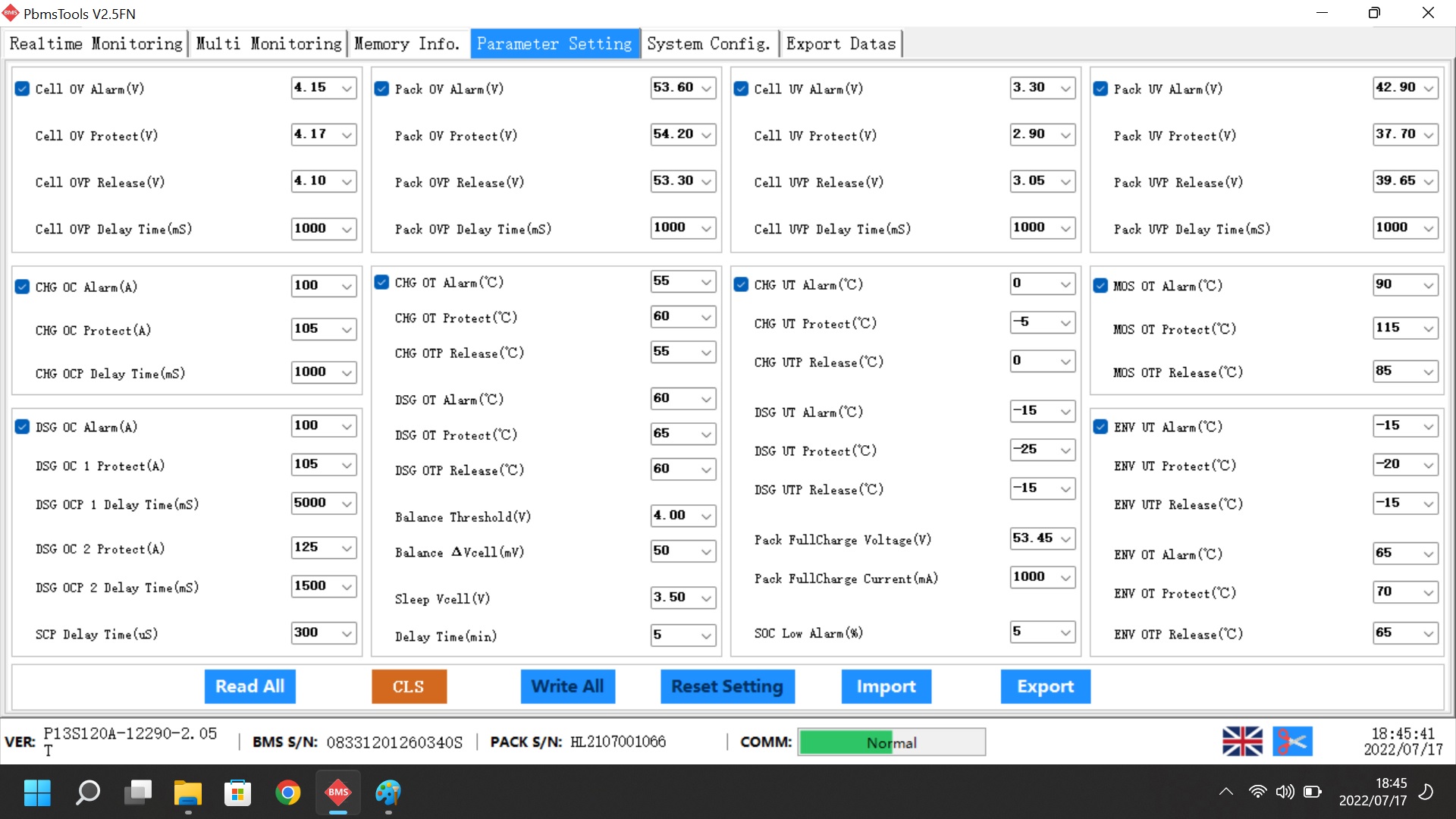
Ook maar lekker stupid. Shoud have Maximised the window. So everything seems fine here on my side. Thou the calibration on the percentage is going slowly. Now at 91% assuming its full capacity. Can anyone please confirm if my other settings are correctly set? Part 1


-
So some good news. The installer provided me with a cable and I have also updated the firmware. So unfortunately I will not be able to test the update via the RJ45 cable. Changed the settings back on the inverter and also got 85% SOC with no charging. Switched on the timer and from 22:00 to 04:00 had a slow drop to 63% Playing it safe for now cause 06:00 is load shedding here. The PBMS tools also work thanks. I just need to know where to look to confirm everything is fine with the firmware and what values I need to check. I just see a bunch of numbers and I get all dizzy. 😖
-
Thanks. This is the cable I got. Will test it then over the weekend.

-
Basically my question as well. Then I can just drag my desktop pc to the battery and update the inverter via the PC's COM port. Will try over the weekend and update here.
-
Hi all. I too have a problem with my 5kw hubble battery and was suggested to update the firmware. Quick question. I do have a Rs232 cable (com > RJ45) and a desktop PC with a com port running Windows 8. (Sluggish but good with watching video) Can I use that cable? 2ndly. If I strip a RJ12 and USB cable and join them together is there any drivers that I need to download for the Laptop to think it has a serial port. (As I understand it on the pinout it goes strait through. pin 1 to pin 1, 2 to 2 etc.)