


KnottyBuoy
Members
-
Joined
-
Last visited
Everything posted by KnottyBuoy
-
Thanks for the feedback guys. Some food for thought here. Hmmm.
-
 Hi @plonkster sorry about the delay to respond to your query. Life happens around us and I had to take some closeup photos for you. The frame is home made and consists of lengths of lip-channel and flat bar. The lip-channel is mounted horizontally and is screwed through the IBR into the brandering below with long Tek Screws. Then from top to bottom I ran flat bar fixed onto the lip-channel, also with Tek screws. To mount the panels onto that, I drilled holes into the flat bar and ran an 8 mm tap through it for the bolts.
 -
Hi All the clever guys out there, Here is a question for you... a good one if you ask me. (you can be the judge though) How big of a battery bank is too big? I have 5 Axpert 4KW / 5kva inverters and 45 x 295W Yingli pannels feeding them. (3 pannels in series and 3 strings in parallel X 5) One bank wired to each inverter. For storage, I have at this stage) 16 Omnipower 260-12 batteries. Wired in a 48V config 4 in series and 4 strings in parallel. (see diag). I want to add storage capacity to the system and want to do it sooner rather than (later. The system has only been online for about 2 months and adding new batteries now is way better than adding them a year from now. Charging the batteries to SOC = 100% happens fairly quick. By late morning they are full and are being maintained throughout the rest of the day (while the sun is up) The supplier seems hesitant and recommend I don't add more than 4 extra, (at a push a max of 8 extra), quoting the internal resistance of the batteries getting too high to grow it even bigger. Now with my limited understanding of electricity and circuits, if one add resistance to a parallel circuit the overall resistance of the circuit decreases. ie. Lets say the internal resistance of a 4 series battery set is 5 ohm and I have 4 strings in parallel. I apply the formula 1/Rt = 1/R1 + 1/R2 + 1/R3 + 1/R4 . R1 - R4 @ 5ohm each , then the Rt value is 1,25ohm. Adding 2 more strings we get R1-R6 @ 5ohm each 1/5 + 1/5 + 1/5 + 1/5 + 1/5 + 1/5 = 0,2 + 0,2 + 0,2 + 0,2 + 0,2 + 0,2 = 1,2 and 1/1,2 = 0,833333 ohm In the end, I am switching to the grid more than what I would like to, and therefor the need for an increase in capacity. Some preemptive answers to questions that may come up the inverters are connected in parallel and feed into the house - single phase. The batteries are all connected into one big bank of 48V Battery balancers and monitor omitted from the discussion Battery bank layout.docx
-
Based on the warrantee seal on the covers they were manufactured in July 2015 even so, I bought them only about 2 months ago.
-
...and here is the firmware for CPU2 4.10 SCCMPPTReflash.zipGood afternoon all, After a morning of tinkering, I am happy to announce that I have managed to get my hands on the latest version of firmware for the Axpert 5KVA 4Kw inverters and successfully been able to update all my inverters. The package include both sets of firmware for CPU1(72.60) and CPU2 (4.10) I have recorded short video clips of the actual process and will upload and link it below a little later tonight. Each package comes with some "Chinglish" instructions. The most important bit of info in it is to make sure you are updating via COM1. nothing else will work(I have tried ) Reflash --> CPU1 72.60 File size limits force me to add another message containing CPU2 files @Coulomb now you can peek under the hood and see what is new.. Everyone please use this with great care and at your own risk. Reflash.zipI am making some headway... i think... I requested the FW updates and was asked for the serial numbers of the units requiring the FW. Hold thumbs they give it to me.@viper_za I managed to get the inverter into parallel mode - thanks again, however, in paralelle mode the initial issue came back. As soon as I power on the inverter it energizes the grid input connector with 230V ac.... So the baby is back in for open heart surgery.Thanks Viper. I will do this in the morning before i head off to work.... Still have to get the firmware levels aligned... Task for tomorrow as well.Recently, when i did the last part of my install, running and installing the grid feed cabling, i noticed that one of my inverters actually puts power on the grid feed connector when the inverter is turned on and no grid power is applied. I disconnected this one out of the curciut and the other 4 inverters worked perfectly fine. This one went in for repairs and a few days later (today) it came back to me. The repairer replaced the controller board and at first glance all seemed in order. However.... It is never that simple. The first thing i did with power up (DC batteries only) was to check the settings match the other inverters. This is where things started turning out strange. I could match all the program settings except for program 28. Here is where you tell the inverter to operate in parallel mode. It just will not change from SIG to PAL. So then i thought OK... Must be because i did not have the comms cables plugged in. However, doing that, the system tripped with error 71 (firmware mismatch - hence my post in the Firmware section). It is pretty much a chicken or egg type situation. I am not even 100% sure that plugging in the parrallel cable will allow me to change Program 28 to PAL, but lets see what the suppliers say. I do have a sneaky suspision that the inverter is not quite fixed. I will take baby steps and match the firmware levels first....I will for sure share as soon as i get my hands on it. TTT. This unit put 230 V AC on the grid feed connector when the inverter is switched on. As a result, the other inverters tripped with error 60 (current feedback). They replaced the controller board and i tried to install it tonight. However, with the mismatch in firmware, the plot thickens.... but that is a discussion for the general discussion page... Not here on the firmware page...Hi Guys, I had to take one of my Axpert 5kva 4kw inverters in for repairs. I received it back today and all things being equal, It was reloaded with new firmware. Now, my other inverters are at a different level firmware and the system does not like that. the old version is 7240 and the new version is 7260. I started looking around to download the latest version, but at first glance, it is not so easy to track down. Anyone with a link to share or point me in the right direction would be great. In the mean time, I will keep looking.
 Hi DeepBass9, They all "talk" to each and give a single AC output feed into the house. We sometimes require up to 20 Kw (for short periods of time) and the multiple inverters will deliver it without much fuss. Then, the batteries are actually all connected together into a single 48V bank. A requirement if you connect the Axpert inverters together in parallel. I juste spaced it out close to the inverters in an attempt to keep the battery cables as short as possible (and the same lengths between the inverter and the batteries)
-
Inverter three and four online
-
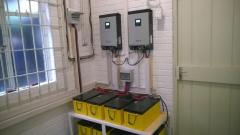 Inverter one and two online
-
 Heavy a$$ batteries
-
 Power room taking shape 3
-
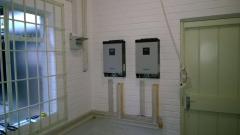 Power room taking shape 2
-
 Power room taking shape 1
-
 36 panels installed
-
 Some more panels
-
 More panels
-
 First Panels installed
-
It all starts with a frame...
-
 It all starts with a frame...
-
 Right bank
-
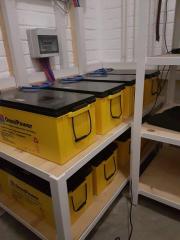 Left Bank
-
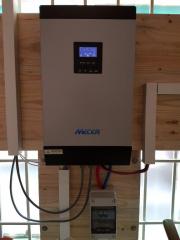 5th inverter installed
-
 5th inverter installed
-
 Added more panels - total 45
From the album: Christiaan Home install
From the album: Christiaan Home install
From the album: Christiaan Home install
From the album: Christiaan Home install
From the album: Christiaan Home install
From the album: Christiaan Home install
From the album: Christiaan Home install
From the album: Christiaan Home install
From the album: Christiaan Home install
From the album: Christiaan Home install
