Pierre-Andre
Members
-
Joined
-
Last visited
-
I did try activating the battery. Nothing happens. Also, no error logs. It looks like the lcd unit get valid battery info from the BMS, but cannot access the rest of the inverter.
-
I have a Sunsynk 8kw inverter, with batteries and PV. This morning there was some cloud cover and I saw the batteries were close to the shutdown level and we were halfway through a 4 hour load shedding. I switched on the generator connected to the AUX/GET port. It is a 7KVA generator, but the invertor is set up to draw a max of 4kw from it and use a max of 20A for battery charge. This setup has been working well for almost a year. I could hear the system drawing power from the generator for a short while and it was indicated on the inverter LCD, but then stopped. It looks like the batteries reached their shutdown level and the inverter shut down. Now I cannot get the inverter to start again. Grid, PV, batteries and generator on or any combination of them. I've restarted the entire system several times. The only thing that comes on is the LCD on the inverter. All 4 indicator LEDs above it is dead. Top left status alternates between a green "OFF" and a red "COMM". The panel is operational and even shows the battery status in the settings, but it loses all config when you shut down the inverter, so I think comms with the actual inverter is broken. Screenshot attached. I think something blew inside, but perhaps someone has an idea of how to troubleshoot?

-
Turned out the electrician connected the CT to pins 3&4 (CT1) instead of pins 5&6 (CT2). I fixed that and everything works correctly now.
-
-
I checked the CT and it looks correct. It did measure input from the grid correctly, before the solar panels were added. I'll see if I can force the system to draw current from the grid to test the CT. How do I get the system to export to the grid if there is excess solar? I thought that was what the "Solar Export" check box was for. I don't have a prepaid meter.
-
Spoke too soon. Seems like it only shows load while PV is on. As soon as the sun sets, it's back to 0W load.


-
-
I think I may have fixed it. The Gen/Aux output was configured as Aux, but we haven't connected the load yet. Was planning to connect the pool pump there later this week. I switched it back to Generator and now everything seems to display correctly again. Battery would also not charge above 96% but is now back to 100%. I had the Aux settings configured to 2000W and "On grid always on" enabled for what it's worth. Will monitor and see if stays correct for the next day.
-
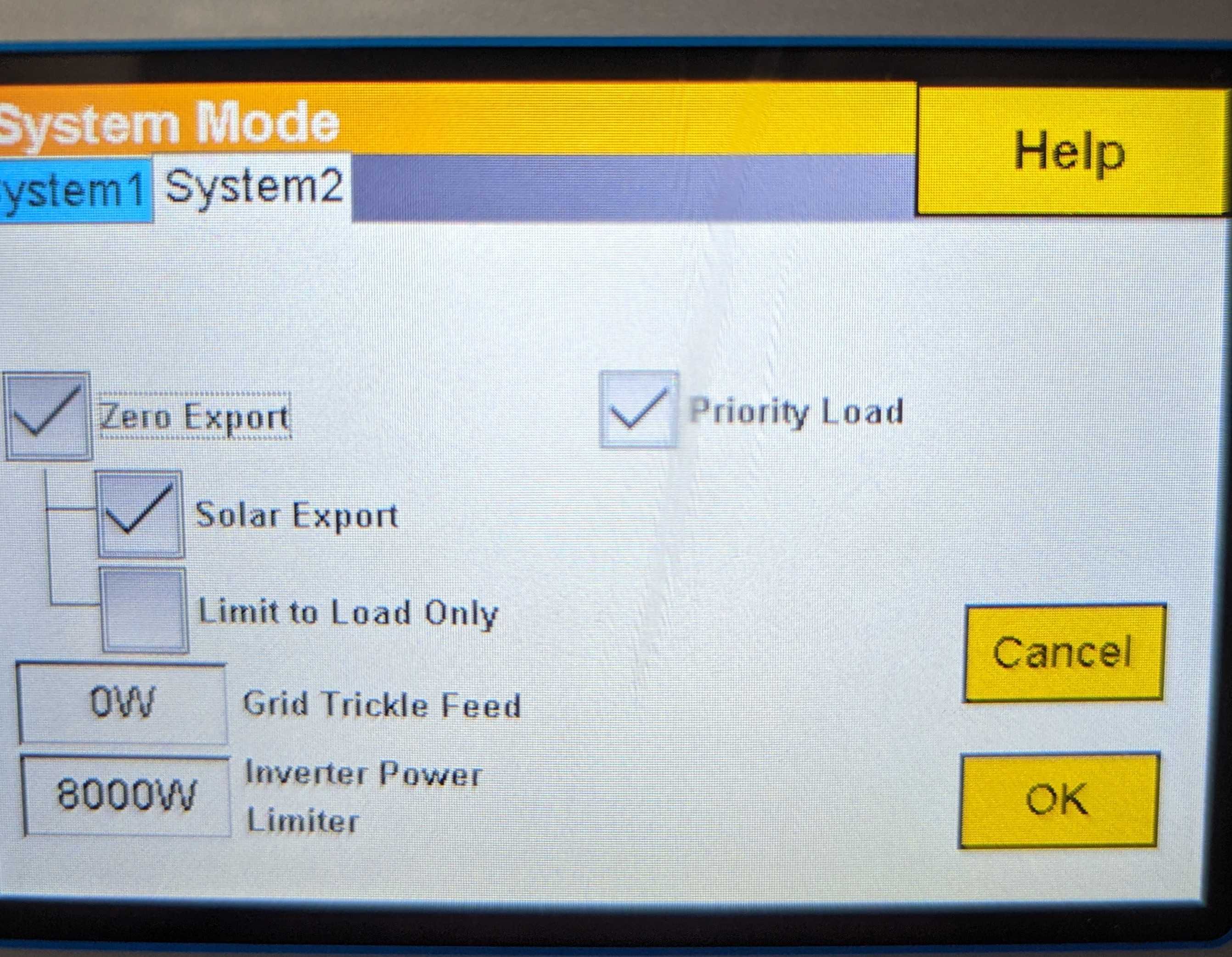
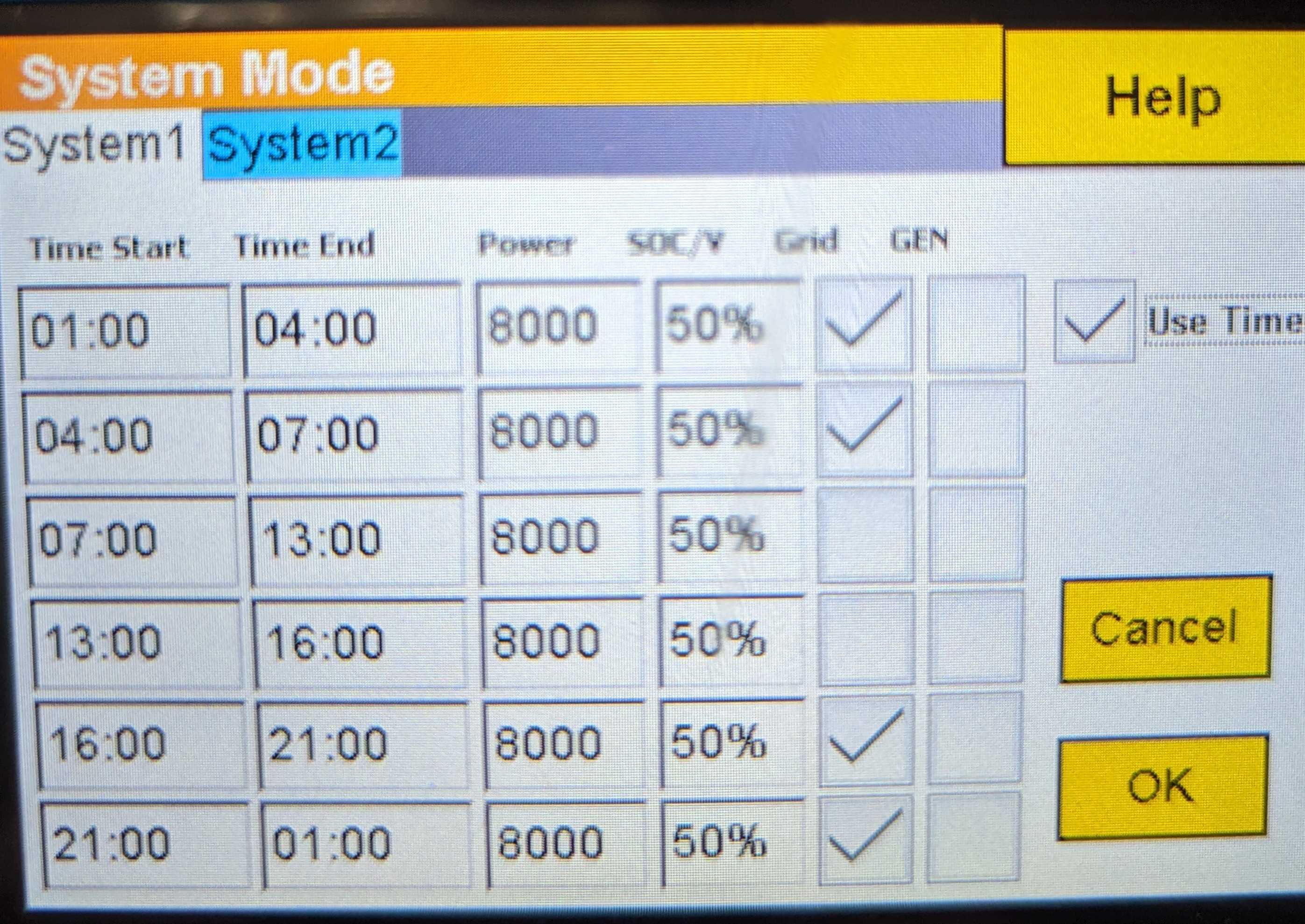
Hi I have a relatively new installation with the following: Sunsynk 8KW 3 x Hubble AM2 in parallel 12 x 545W panels in 2 strings All load connected to the UPS/critical output No load on Aux No load between inverter and CT No generator Battery settings confirmed by Hubble and BMS working correctly System mode set up to use timer, no export, export solar and priority load. Before adding the panels, the inverter would show the load very accurately, down to 50/60W. After adding the panels and setting up the system mode, it now often shows 0W load, which is impossible. It looks like it shows 0 when the load goes below around 500W, but that's just a guess. Switching on the geyser shows up as a 2kw load as expected and this is supplied by the panels. Today I also saw the inverter showing that it supplied a 2kW UPS load and 1.2kW non-essential, even though nothing is connected there. Any ideas?