


Morney
Members
-
Joined
-
Last visited
Everything posted by Morney
-
Dankie Chris, dankie vir die raad, waardeer opreg, lekker naweek.
-
Thanks Chris, I'm "technically" challenged, what is the main difference between a 50 and 100AH... (In afrikaanse taal , sodat ek kan verstaan) My inglish is not so delicious 🤣
-
thanks PsyClown, The inverter got a GEL battery inside, we are not living in the "big city" to just take it in, we are on a plattelandse dorpie and TakeaLot is our shop. this is all I can see.

-
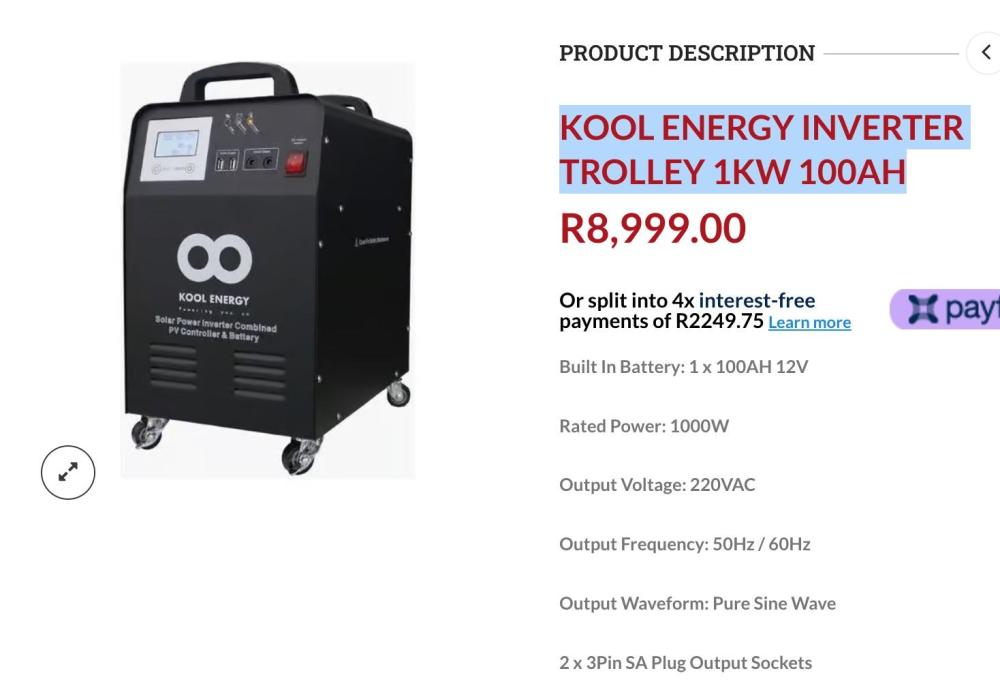
This plug and play inverter is easily transported to where ever you need it and its compact size makes it easy to store away when not in use. Its plug-and-play ability makes it the perfect companion during load shedding and it will run your essential loads. This unit does not need to be installed so you won’t have to spend on solar installations which makes it even more cost-effective. Pure Sinewave for Sensitive Electronics & Motorised Loads Microprocessor Control Optimizes Reliability Input Power Factor Correction Output Power Factor 1.0 Comprehensive Display Allows Easy Monitoring & Access of UPS Status Built-in MPPT solar charger 2 x USB 5 V DC output and 2 x 12 V DC output Battery cut off switch for safety Pre-installed batteries Specifications RATED POWER: 1000 W OUTPUT VOLTAGE: 220 VAC OUTPUT FREQUENCY: 50 / 60 Hz OUTPUT WAVEFORM: Pure Sine Wave SOLAR INPUT MAXIMUM PHOTOVOLTAIC VOLTAGE (VDC): ~ 25 V CHARGE VOLTAGE (VDC): 10 V - 25 V RATED CHARGE CURRENT (A): 30 A MAXIMUM POWER (Wp): 360 Wp VOLTAGE OVERCHARGE PROTECTION (VDC): 14.2 V VOLTAGE OVERCHARGE RECOVERY (VDC): 14.0 V VOLTAGE OF FLOATING CHARGE (VDC): 13.7 V OUTPUT AC OUTPUT: 2 x SA 3 Pin Socket - 230 V 50 Hz, 1000 VA / 1000 W Max. (Combined) USB OUTPUT: 2 x USB Type A Port - 5 VDC 2 A Max. DC OUTPUT: 2 x 12 V DC Port 2 A Max. BATTERY TYPE: 1 x 12 DC 100 AH Deep Cycle VRLA Gel Battery Ports and Interfaces 1. AC Output 2. Smart Cooling Fan 3. AC Input 4. Solar PV Input 5. Battery Extension 6. Battery Switch 7. Led Indicator 8. LCD Display 9. Function Buttons 10. On / Off Buttons 11. 5VDC Output 12. 12VDC Output 13. DC Output Switch
-
Good morning My inverter just don't last during this load shedding and I'm thinking of putting in a Lithium battery. my question: Can you replace it ? and will a Lithium be better? or should I just stick with a Gel ? not even sure if these trolley units will allow a battery change. This is what we have, we only have our internet modum and tv running through this trolley unit. thanks for your advice https://www.takealot.com/kool-energy-1kw-plug-and-play-inverter-system-all-in-one/PLID91066940
-
Hi Jacques Yes, thats why I want to run it from a socket. My question is about the hardware I want to use. Thinking about it, I may go for the over kill and just do the 2,5mm cable.
-
Hi, I want to install 2 LED lights (5watt each) at the front gate against the pillars. I have a normal home plug about 15m away from the gate entrance. Can I run a 1,5mm 3-cord PVC cable (through conduits) from the wall socket to the 2 LED Lights? I will link it up with a 25A day/night switch. OR..must it run from the DB Bord? Thanks in advance morney

