slaw
Members
-
Joined
-
Last visited
Everything posted by slaw
-
I’m using an experimental dynamic tariff where low prices appear in different 15-minute periods throughout the day. I would like to use a single slot (e.g., Prog1) to activate grid charging. However, I can’t figure out how to set Prog1 Time so that it covers a full 24 hours (which would allow me to control Prog1 Capacity from Home Assistant whenever the price is low). My question is: a) How can I configure Prog1 Time to span 24 hours? or b) Is there a better approach to achieve this?
-
I’m using an experimental dynamic tariff where low prices appear in different 15-minute periods throughout the day. I would like to use a single slot (e.g., Prog1) to activate grid charging. However, I can’t figure out how to set Prog1 Time so that it covers a full 24 hours (which would allow me to control Prog1 Capacity from Home Assistant whenever the price is low). My question is: a) How can I configure Prog1 Time to span 24 hours? or b) Is there a better approach to achieve this?
-
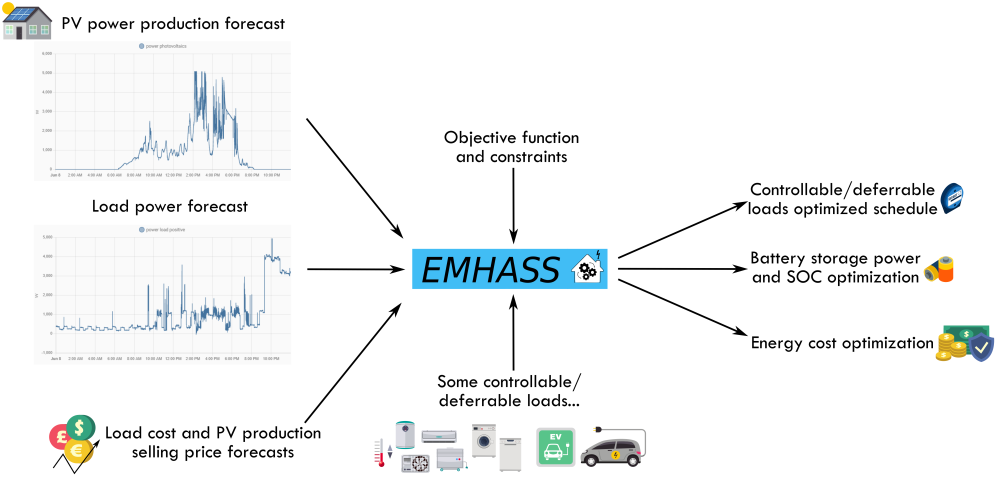
Hello Friends I found a very interesting addition to HA. Can be installed as an add-on for Home Assistant OS and supervised, Docker in standalone mode or Legacy method using a Python virtual environment Links: https://emhass.readthedocs.io/en/latest/intro.html https://github.com/davidusb-geek/emhass https://community.home-assistant.io/t/emhass-an-energy-management-for-home-assistant/338126 Quote: EMHASS (Energy Management for Home Assistant) is an optimization tool designed for residential households. The package uses a Linear Programming approach to optimize energy usage while considering factors such as electricity prices, power generation from solar panels, and energy storage from batteries. EMHASS provides a high degree of configurability, making it easy to integrate with Home Assistant and other smart home systems. Whether you have solar panels, energy storage, or just a controllable load, EMHASS can provide an optimized daily schedule for your devices, allowing you to save money and minimize your environmental impact. EMHASS is not easy to run, but it can be very useful in energy management. I invite you to discuss
-
@kellerza My log with Deye 10k, three phase: s6-rc: info: service s6rc-oneshot-runner: starting s6-rc: info: service s6rc-oneshot-runner successfully started s6-rc: info: service fix-attrs: starting s6-rc: info: service fix-attrs successfully started s6-rc: info: service legacy-cont-init: starting s6-rc: info: service legacy-cont-init successfully started s6-rc: info: service legacy-services: starting services-up: info: copying legacy longrun sunsynk (no readiness notification) s6-rc: info: service legacy-services successfully started 18:01:55 INFO Loading configuration: /data/options.json 18:01:55 INFO sunsynk library version: 0.6.4 18:01:55 INFO Schedules: +-----------+-----+------+--------+-----------+----------+------------+ | Key | src | Read | Report | Change by | Change % | Change any | +-----------+-----+------+--------+-----------+----------+------------+ | date_time | | 60 | 60 | | | True | | rw | | 5 | 300 | | | True | | w | * | 5 | 60 | 80 | | | | kwh | | 300 | 300 | | | | | any_unit | | 15 | 300 | | | | | no_unit | | 15 | 300 | | | True | +-----------+-----+------+--------+-----------+----------+------------+ 18:01:55 INFO Using three phase sensor definitions. 18:01:55 ERROR Unknown sensor specified: aux_power 18:01:55 ERROR Unknown sensor specified: essential_power 18:01:55 ERROR Unknown sensor specified: grid_connected 18:01:55 ERROR Unknown sensor specified: inverter_current 18:01:55 ERROR Unknown sensor specified: load_frequency 18:01:55 ERROR Unknown sensor specified: non_essential_power 18:01:55 INFO Added hidden sensors as other sensors depend on it: Rated power, Serial 18:01:55 INFO Connecting to tcp://192.168.1.167:8899 18:01:56 INFO Reading startup sensors Prog1 Time, Prog6 Time, Battery Low Capacity, Prog2 Time, Prog3 Time, Prog5 Time, Serial, Prog4 Time, Rated power 18:01:57 INFO ############################################################ 18:01:57 INFO Inverter serial number '****6152' 18:01:57 INFO ############################################################ 18:01:57 INFO MQTT: Connecting to homeassistant@core-mosquitto:1883 18:01:57 INFO MQTT: Connection successful 18:01:58 INFO Read every (inverter 1) +-----+----------------------------------------------------------------------------------+ | s | Sensors | +-----+----------------------------------------------------------------------------------+ | 5 | prog1_capacity, prog1_charge, prog5_charge, prog6_time, use_timer, grid_power, | | | prog3_capacity, grid_ct_power, prog2_charge, prog4_time, pv1_power, | | | prog4_charge, prog1_time, battery_low_capacity, prog2_time, prog6_capacity, | | | battery_power, prog3_power, prog6_charge, pv2_power, prog2_capacity, | | | prog1_power, prog5_power, prog2_power, priority_load, prog3_time, prog3_charge, | | | prog5_capacity, prog5_time, prog4_capacity, prog6_power, prog4_power, | | | load_limit, inverter_power | | 15 | battery_current, grid_frequency, overall_state, pv1_current, grid_voltage, | | | battery_voltage, pv1_voltage, battery_soc | | 300 | day_load_energy, day_grid_export, day_grid_import, day_battery_charge, | | | day_pv_energy, total_grid_export, total_battery_discharge, total_battery_charge, | | | total_pv_energy, total_grid_import, day_battery_discharge | +-----+----------------------------------------------------------------------------------+ 18:01:58 INFO Report every (inverter 1) +-----+---------------------------------------------------------------------------------+ | s | Sensors | +-----+---------------------------------------------------------------------------------+ | 60 | battery_power, grid_power, pv2_power, grid_ct_power, pv1_power, inverter_power | | 300 | day_grid_export, pv1_current, prog1_capacity, prog1_charge, prog5_charge, | | | prog6_time, battery_current, day_grid_import, use_timer, total_grid_export, | | | prog3_capacity, total_battery_charge, grid_voltage, prog2_charge, prog4_time, | | | pv1_voltage, battery_soc, day_battery_discharge, prog4_charge, day_load_energy, | | | prog1_time, grid_frequency, overall_state, prog2_time, prog6_capacity, | | | day_pv_energy, battery_low_capacity, prog3_power, prog6_charge, prog2_capacity, | | | total_pv_energy, prog1_power, prog5_power, battery_voltage, prog2_power, | | | priority_load, prog3_time, prog3_charge, prog5_capacity, day_battery_charge, | | | prog5_time, prog4_capacity, total_battery_discharge, prog4_power, prog6_power, | | | total_grid_import, load_limit | +-----+---------------------------------------------------------------------------------+ 18:02:10 INFO Frame error retry attempt(0): V5 frame contains invalid sequence number 18:02:12 INFO Frame error retry attempt(1): V5 frame contains invalid sequence number 18:02:40 INFO Frame error retry attempt(0): V5 frame contains invalid sequence number 18:03:10 INFO Frame error retry attempt(0): V5 frame contains invalid sequence number 18:03:12 INFO Frame error retry attempt(1): V5 frame contains invalid sequence number 18:03:40 INFO Frame error retry attempt(0): V5 frame contains invalid sequence number 18:04:10 INFO Frame error retry attempt(0): V5 frame contains invalid sequence number 18:04:12 INFO Frame error retry attempt(1): V5 frame contains invalid sequence number
-
@Sc00bs I'll check soon. Thx
-
Hi @slipx I have a three phase hybrid inverter Deye SUN-10K-SG04LP3 with battery pack. Will your yaml work with my inverter?