mjmx8k
Members
-
Joined
-
Last visited
Everything posted by mjmx8k
-
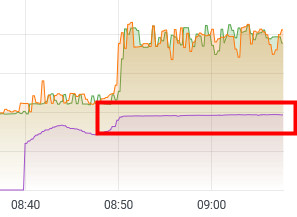
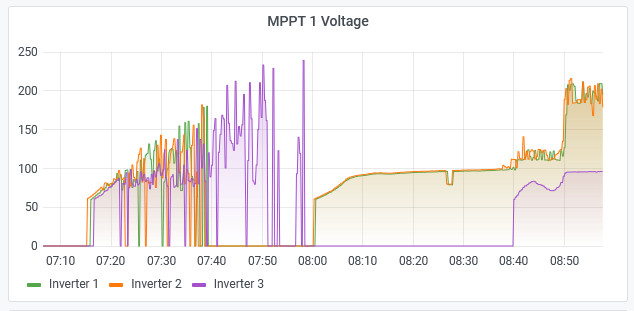
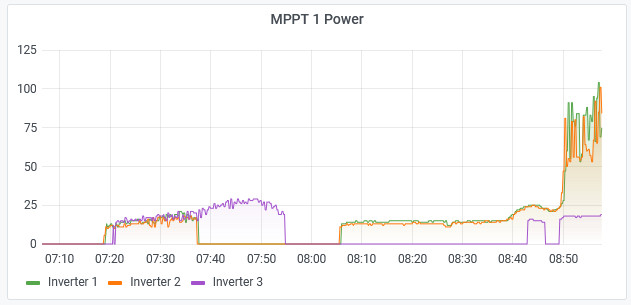
1 inverter is still sticky at 96v
-
Hi, is it correct that it starts up with 80v when in new firmware is set 175v?

-
Hallo Georg, hmm, even if the bar is dead, in theory it should stop glimming when set parameter 51 to off / Lds and interestingly 3P3 was glimming with U12.20 and started working today immediately with MCU Update U12.21. 3p1 and 3P2 did not stop glimming even on 51 Lds maybe i have different Versions of Display chips...
-
Hi Coulomb, i have updated all 4 Max1 8k inverters now to the modified version you made for me. Strange that on 2 of them the Led bar is working correct and on 2 of them the Led bar is glimming light red only - as it was before with the U2 12.20 All for of them show correct version numbers for U1 and U2 The 2 where the led bars is working lost all parameters and i had to enter them again. the 2 where the led bar is glimming only remembered the parameters. 2 of them was spinning up the vents during update, 2 of them not. Can bus connection is established and they are online in 3Phase mode. To see PV it was too late here today. Should i try to reflash the 2 with fancy red glimming led bars again or reset them to factory defaults and reconfigure them? Any way, i dont need the led bars, but somehow this tells me there is maybe more difference inside the box. thank you
-
btw, the Axpert MKS4 5,6kw Models FW 74.02 with 120v MPPT Startup have basically the same sticky 120v issues as the Max models.
-
Hi Coulomb, thank you very much. I´ve flashed the test Inverter well. I will update the other 3 later today.
-
Hi, i have 4 identical orange Axpert MAX1 8k (removable Display) from the same dealer as George594 but with the newer DSP board and the older Display Chip, all manufactured in 05/22 3 Inverters in 3Phase Configuration P1 P2 P3 1 Inverter Standalone (for testing, as a genset to battery charger and spare inverter) Initially they came with U1: 72.03 U2: 112.14 U2: flashed to bricked, then to 12.20 and now 12.21 (btw. i managed to fix the bricked display by putting it into another inverter and reflashed it well) Earlier Update attempts to Gerges594´s patched version 90.08 failed as at this point of time i did not know about the newer DSP Chip issue. As far as i can see the DSP Board has only 1 voltage regulator. I want to update due to the sticky 90v issue mainly, but there are some other issues like daily short power output losses (3 sec. off/on) in single phases and every some days CAN bus Data losses which result in a Phase 1 Inverter Fault 80 with complete power loss on all 3 phases until full restart. Inverter P1 is connected to Pylontech US3000C Battery bank So i guess for the U1 Update this Model needs the 92.xx version with the Arena flasher. Is there a Version with 175V MPPT Startup Voltage for both MPPT Ports available or could it be done? i have 2x6 300w Panels on 4 Tracker which gives around 195-220 Volt on load so a 200v version is too high for me. on P3 i have 1x7 300w Panels on 1 Tracker which gives around 250 volt, so this one also could live with 175v Thank you for any help in advance, as you all do a much better job here than the vendor and its support.