Skip to content
View in the app

A better way to browse. Learn more.

Power Forum - Renewable Energy Discussion

A full-screen app on your home screen with push notifications, badges and more.

To install this app on iOS and iPadOS
  1. Tap the Share icon in Safari
  2. Scroll the menu and tap Add to Home Screen.
  3. Tap Add in the top-right corner.
To install this app on Android
  1. Tap the 3-dot menu (⋮) in the top-right corner of the browser.
  2. Tap Add to Home screen or Install app.
  3. Confirm by tapping Install.

Riccardo

Members
  • Joined

  • Last visited

Everything posted by Riccardo

  1. Thanks GVC for the information
  2. Hi GVC, can I ask you which version of Ubuntu you use with Solpiplog? Does it work with all?
  3. Hi Stef1985, your device does not work with the buffy APP? Or even with the power-datacenter.com?
  4. Riccardo replied to GVC's topic in Design Software
    Look forward to trying it! If you need an Axpert 5048DUO for your tests I will soon turn them into a TRIO I am available
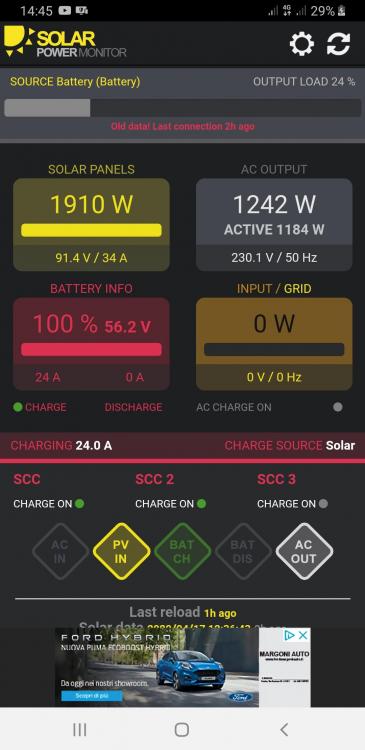
  5. Regards buffy, Beautiful APP! I installed in that on SOLARPOWERMONITOR the power indicated on the SOLAR PANELS is not the sum of the two SCC but only the value generated by the first SCC is indicated. Is your APP also available without ads? Thanks Riccardo
Account

Navigation

Search

Search

Configure browser push notifications

Chrome (Android)
  1. Tap the lock icon next to the address bar.
  2. Tap Permissions → Notifications.
  3. Adjust your preference.
Chrome (Desktop)
  1. Click the padlock icon in the address bar.
  2. Select Site settings.
  3. Find Notifications and adjust your preference.