


ColinvS
Members
-
Joined
-
Last visited
-
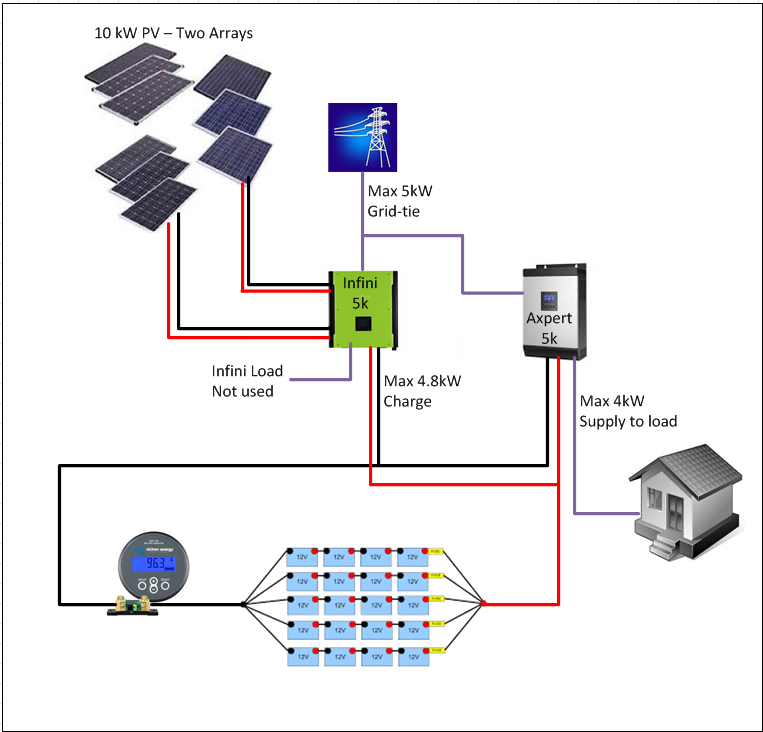
The Infini 5k can do a max of 5kW load and grid-tie combined and an additional 4.8kW of battery charge. So, by adding a cheap sine wave inverter (Axpert), the full PV capability can be used without a huge battery bank. This arrangement allows one to use as much battery as one is comfortable to use on a daily basis, while being seamless in load shedding. Some simple switching gives one full access to the full 10kW off-grid if required.
-
-
The AICC development team has been absolutely awesome! The workings of the Infini 5kw with 10kw PV input splits the 10kw between 5kw grid / load and 4.8kw battery charge, with it requiring at least 5kw of PV before it allocates PV to the other choice. So on a cloudy day, with grid and load as priority, without enough PV then the batteries don't charge. If you change the priority then it charges the batteries first and by the time it gets to grid/load on a sunny day, the batteries are charged so never maximises the capability of the system. However with the new test version you can set the time to automatically swop over at a user set time e.g. priority of grid/load over battery until 10am and then battery over grid/load from 10am to if there is less than 5kw PV the batteries charge and the balance (if any) goes to PV. On the first day I tested this, I bettered my best solar yield by more than 10%. Absolutely awesome software and paying for itself over and over.
