


boljul
Members
-
Joined
-
Last visited
Everything posted by boljul
-
Hi, For those looking for a french translation for MultiSIBControl, il shared my version here: Bonjour, Pour ceux qui seraient à la recherche d'une traduction en français de MultiSIBControl, j'ai partagé ma version ici.
-
Hello, This is the translation file for MultiSIBControl for French. It should be copied to the Lang folder of MultiSIBControl. If you want it to be started by default, you can rename it to English.txt because the software does not remember the language choice. Bonjour, Ceci est le fichier de traduction en français pour MultiSIBControl. Si vous souhaitez qu'il soit chargé automatiquement par défaut au démarrage de l'application, you pouvez le renommer vers English.txt, car il ne conserve pas le choix langue.
-
Thank you for your response @Coulomb, Yes sorry, I meant the version "dsp 274.03 3 patched 2809.zip" you provided some time ago.
-
Hello @Coulomb @mjmx8k, I have the 374.03 patched version installed and having this kind of graph pattern almost every day. Should I consider this as a sticky at 120v situation and patch to 374.04 ? Start of a day: End of a day: Thanks


-
It is based on regular .NET Framework that is not cross platform. I did install it with Wine (Windows Software Emulator) after having .NET Framework installed and it could run. I haven't tried yet if COM ports are working. Meaby you can try it and inform us if you managed to get it working. Hopefully, this sofware might be ported to .Net Core one day in the future, to be available cross platform. But this fully depends on @yani because the code is not open sourced (yet ?).
-
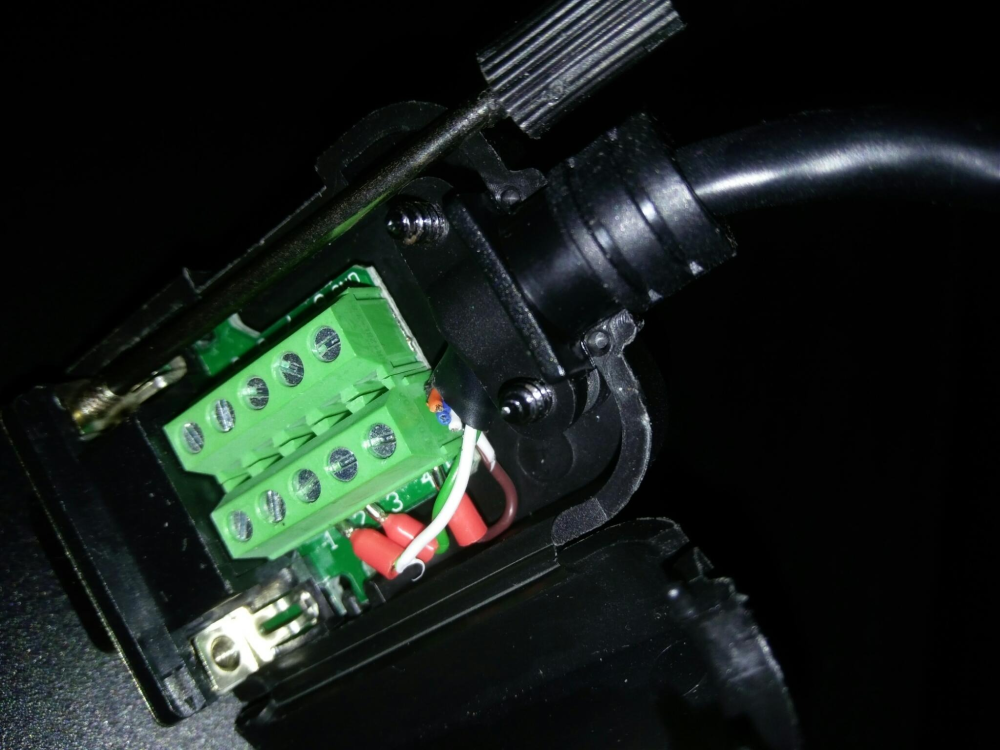
If RS232 (DB-9 Male) : RJ45 pin 8 to RS232 pin 5 (SG) RJ45 pin 6 to RS232 pin 3 (TXD) RJ45 pin 3 to RS232 pin 2 (RXD) I did mine with a RJ45 ethernet cable + and this kind of rs232 adapter with no soldering: I use it like that because plugged on a rs232 to lan box (allowing to do virtual com port). But if you need USB, you can use an adapter, so that you get both options. I used this one for my tests: Edit: Here is the result of wiring so you can even see cable colors :
-
Hello all, Is there any command we can send on these inverters in order to bypass the power switch ? I have found MNCHGC0497 (go standby) and MNCHGC0498 (go normal operations) commands available for some models when patched with DCLC Dynamic Current and Load Control but of course not working with this model. Would it be feasable to add this feature to this model's firmware?
-
Hello @yani, I often have have to start MultiSibControl twice (open, close, re-open) in order to have the inverter connected to it, the first time I start the software after session logon (I use Serial RS232 configuration on COM1). The Pylons are always connecting fine though (with also RS232 on COM2). Would be great to have some kind of automatic recovery if detection failed for whatever reason. All the best
-
@Coulomb Upgraded with Version 274.03 and working well too. Thank you !


