


yani
Members
-
Joined
-
Last visited
-
-
-
-
-
-
-
-
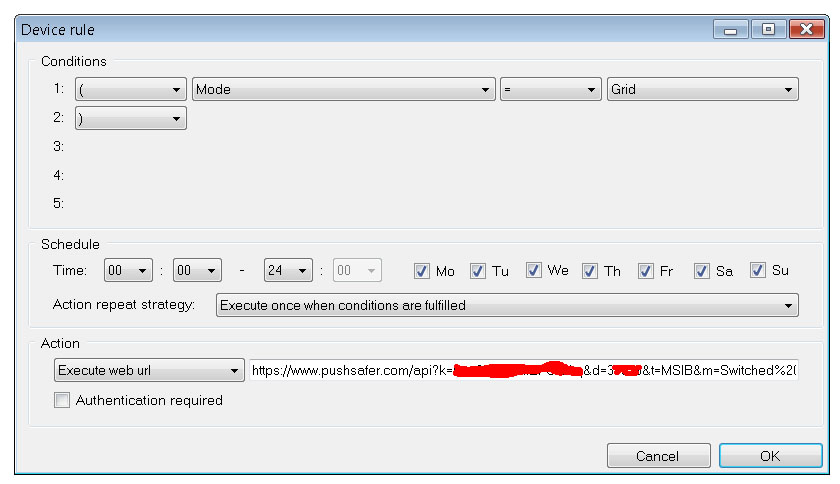
Hi guys, It's been a long time since I wrote here. Sorry, I'm too busy with the regular job and don't have much time to read/post on forums. To reply on some of the questions asked: 1. Many people ask about version for Pi - It is possible, but the software is constantly writing huge amount of data in the database and I'm pretty sure that the SD card of the Pi will not last longer than a few months and will fail. As a result most (or all) data will be lost and monitoring will stop. 2. Some get message that software has expired. Simply download and install the latest version and it will fix this problem. 3. If you want to switch between SBU/SUB/USB modes at specific times every day then go to Settings>Mode control, check "Control inverter mode based on time schedule". Then click "Add" to add a time/mode for a schedule. With the latest version it is also possible to add Pylon SOC% condition for the mode switching. At the specified time the software will switch to selected mode only if Pylon SOC% condition is fulfilled. 4. If you want to control the inverter mode based on Pylon SOC% then go to Settings>Mode control and check "Control inverter mode based on Pylon SOC%". Then select the SOC% thresholds to switch to grid/battery. The system will switch every time the Pylontech SOC% goes below/above the selected thresholds. You can also check the "Continuous SOC control" - this way the system will continuously check inverter mode and will always switch to grid if SOC% is below the grid threshold and mode is not grid, it will also always switch to battery if SOC% is above battery threshold % and mode is not battery. This option is not recommended as it will be in conflict with manual mode switching (from main screen buttons) and also with time schedule switching. 5. If you want to switch the inverter charging mode/max current at specific times every day then go to Settings>Charge control, check "Control grid charging based on time schedule", then click "Add" to add time/mode for a scheduled switching. 6. Device control - this is used to control devices that can be controlled by web requests. I'm using this to send notifications to my phone (using an online notification service) and also to control my Shelly devices and the charging current of the EVSE car charger. It may also be possible to also control Sonoff devices with web requests, but I haven't played with these. I attach some images with examples. The first two screens show the configuration for the phone notifications - The first sends me push notification on the phone when mode changes to "battery", the second one send me notification when mode changes to "grid". Both rules run every day, from 00:00-24:00... The third screen shows the EVSE control - it sets the max charging current on my EVSE charger to 25A if SOC%>60 and total PV for the day is >30kWh (but only between 12:00 and 18:00 hours). I have more rules to set lower currents as well. The web control of Shelly 1/1PM/2/2.5/4Pro relays is also simple - just send http://192.168.0.85/relay/0?turn=on or http://192.168.0.85/relay/0?turn=off to switch on/off. The control is on local LAN IP addresses. I also have information from a user that he is controlling his Fibaro devices with this function.


-
-
-
-
Please note that the software needs Microsoft .NET Framework Version 3.5 (or a newer version) in order to run. .NET Framework is usually already installed in newer versions of Windows. In Windows XP, however, it is usually not installed by default. The .NET Framework can be downloaded for free from http://www.microsoft.com
-
Hi guys, Just wanted to present to you a new Windows' software tool that we prepared for monitoring of PIP/Axpert inverters and Pylontech batteries. It supports many compatible inverter models. It can work with parallel configurations as well. This was actually the main reason to write the software because a few months ago I upgraded my system from single to 3x inverters and the "pi" solution did not work correct anymore. The software can control switching between battery/grid mode based on Pylontech SOC, and also can control Pylontech max charge current based on the request coming from its BMS. The software can also upload data to emoncms server. Currently the software has only basic reporting, but all inverter/pylon data is stored in local database and we intend to add more reporting options in future. We also added a "console" screen where users can manually send commands to Inverters and Pylontech. The communication with inverters is by USB or RS232 connection. In parallel setups each inverter should be connected with separate cable. I chose this method because reading parallel data from a single inverter is highly inaccurate and slow (at least in the setups where we tested). The Pylontech batteries can be connected by RS232 (console port) or RS485 (to the dedicated RS485 port). You can download the software at http://www.multisibcontrol.net . It is absolutely free now.


