


PieterO
Members
-
Joined
-
Last visited
-
@Danie Schoeman i have re posted it Also if you search on YT for CFE 5100 batteries you will find it
-
Yes. After a significant amount of research I believe now that its better to cycle lithium ion batteries between 95% and 100% than keeping them at 100%. I believe it will prolong battery life.
-
Its sad that this happens. I really hope that they will sort out these issues. @MeepMoop did they replace your batteries without questions? Who did you deal with?
-
@GrantCPT Unfortuntaly no I havent experienced this before, maybe someone else on this forum did?
-
I get between 8.5 kWh and 9 kWh discharge daily on 2 batteries and I take my batteries down to 20% so in essence I still have 10% left as the batteries have a DoD of 90%. So no issues for me on capacity. @Patrick i am sure that it is a inverter mis read
-
@Ferdi. thanks for letting me know. I will speak to him. Let me know after 2 weeks?
-
Hi @Ferdi. No change - still cycling between 100% and 95%. When did they do the updates? Is your system now sorted now?
-
@Ferdi. How are we going to get our money back? These batteries have been approved by Sunsynk. Other than the cycling between 95% and 100% with PV (which according to some experts is a good thing) and the poor technical support I don’t have any issues with mine. So i believe some of us will be stuck with them as we cannot proof to the installers that anything is wrong with them.
-
 MeepMoop reacted to a post in a topic:
CFE-5100 S 5.12kWh Lithium battery wifi connection with CF energy app
MeepMoop reacted to a post in a topic:
CFE-5100 S 5.12kWh Lithium battery wifi connection with CF energy app
-
Nope no Version on the App. Best is to speak to Technical Support and ask them to update the BMS to cycle between 100% - 95% SoC. Or maybe the new Batteries coming in will be updated already.
-
@Flappie No, I did not connect anything. I believe this is automatic when the Batteries is connected to Inverter. Probably the BMS sending it to the Inverter. Do you see SOC?
-
MeepMoop reacted to a post in a topic:
CFE-5100 S 5.12kWh Lithium battery wifi connection with CF energy app
-
Hi All, yes same with mine, they did update the BMS on my 2 CFE5100 s and now it cycles between 100% and 95%. This is not ideal as the other Makes of Batteries stays at 100% and almost always when the sun set, I start my battery with 95% SoC. The CFE Technical team says it's an Inverter issue... Thus, I am working with Sunsynk/Dye Technical to see if they can resolve this for us.
-
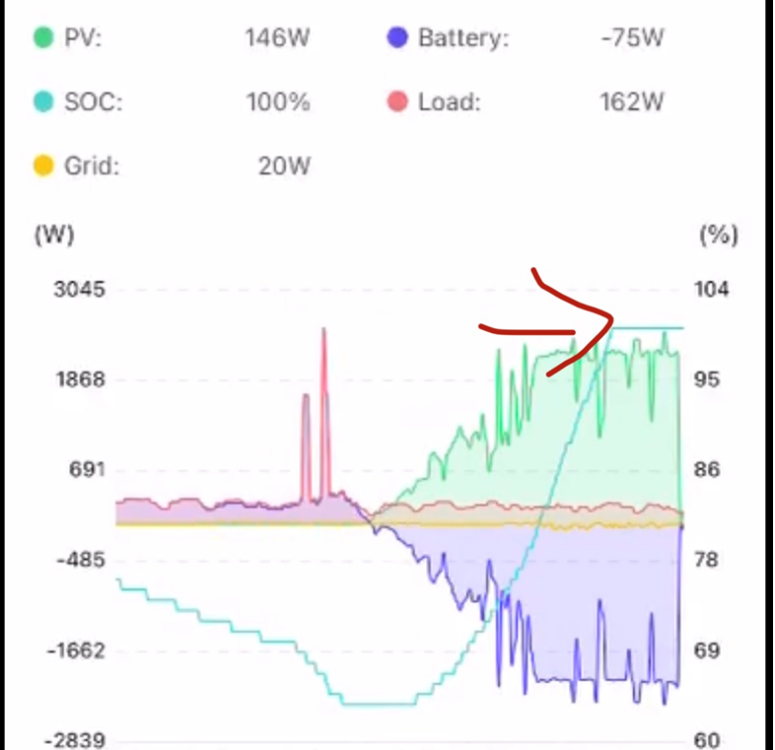
@MeepMoop No not nomal. All other 5.1kw Lithium Ion Batteries stay at 100%. Its just these CFE's that discharge immediately when it gets to 100%. Very irritating as it means that you will go into the night with 5 - 10% less battery. See below: I am fighting with the CFE Technical Team to fix this... maybe you can Raystech Support to do the same?
-
@Huzafa I have never experience the grid charge. Maybe check the Timer Settings on the inverter. Also I would suggest you do a BMS Upgrade the Battery/ies will then cycle between 100% and 95% and see if that resolves the issue. Please check pervious posts on this topic to get connected to a Technical Team via WhatsApp. Also, you have to connect the Batteries to the Smart BESS App for them to update the BMS.
-
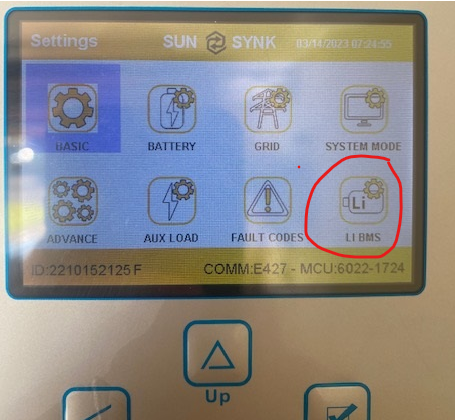
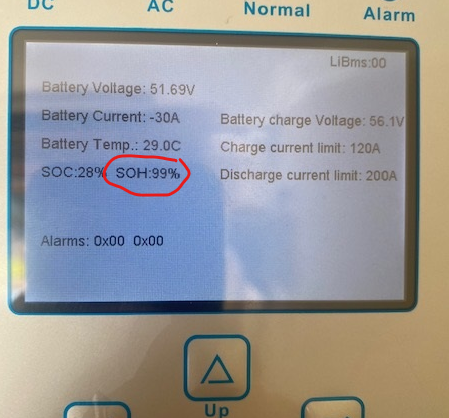
Hi, if its a Sunsynk Inverter you can go to the Settings, then go to the Li BMS on the inverter itself. See below: How do you know they did not do it? It should happen in the background.
-
MeepMoop reacted to a post in a topic:
CFE-5100 S 5.12kWh Lithium battery wifi connection with CF energy app
-
Finally got the BMS app to work again iOS. Had to re-register my account and could then re bind my batteries. So all working again. However, technical support for these batteries is disappointing.
