antarya
Members
-
Joined
-
Last visited
-
The meter reads what solar inverter gives but if we disconnect the solar inverter then immediately meter reading comes down to 223-230V. If we connect solar inverter to the meter then only voltage increases. The 3 earthing done is for solar plant and it is not connected to house earth. House earth has separate earthing. The voltage rise was never an issue before solar plant.
-
OK, Thanks. We got 3 New earthing done and still N-E is not reducing below 7. It fluctuates between 7-19V on good days. But in the inverter setting the Max voltage is set to 280V! by the inverter team which is insane. I can't change it as it requires password. Can this issue be due to the grid?
-
Hi, We have Growatt MIN5000TL-X inverter and it is giving very high voltage output over 255-260V. When we raised the issue, the inverter team said it is due to high grid voltage but we isolated and checked that grid voltage is well within 225-230V. Then inverter team said Neutral-Earth to earth might be causing the issue and it reads around 15-19V. Can high N-E voltage cause inverter output to be over 255V?
-
@zsde@L_D Thank you for sharing the data. Anyway to know at what power these voltages are given?
-
If "storage" / "Hybrid" tab is empty then I am not sure where else to find the data. Just try checking all the tabs in that page and also checkout "More" section further. If it is on-grid usually inverter has to have a slightly higher voltage than the utility to send the power to the grid. So, if it is off grid that issue won't be there regardless the inverter AC output should be monitored (learnt the hard way). Does the app show those data?
-
Hi All, @zsde @Mike_C@L_D@Graham_S and other growatt users, I have a request. We are using Growatt MIN5000TL-X on-grid inverter without battery system. Lately, our inverter is going to standby mode/ offline as inverter voltage rises above 255-260V which is not safe for many appliances in the house. Growatt engineers claimed it is due to high grid voltage first, then they blamed on Earthing, later the thin cables and now they said maybe due to home UPS. We have checked for all the other issues in the plant and it is all normal. My doubt is their inverter is faulty but they are not just agreeing. It is just 4 months old. I wanted a few datasheets from other Growatt users where I can compare to check the AC output voltage of other inverters. The datasheet particularly for the days where sunlight is bright. Only those days we see the inverter issue rest of the days quite less if not zero. In 4 months, our inverter has gone to standby mode/offline more than 150 times and it is not a healthy sign. I'm attaching a sample excel file which one can download from the Growatt website, like that I need for a few inverters for 2-3 days. This would be very helpful to appeal my case. Thanks, antarya growatt_.3KW.xls
-
@L_D What type of inverter are you using? Depending on the model on-grid, off-grid, hybird etc you can check the following tabs "Inverter", "MAX/MID/MAC", "Storage", "Hybrid Inverter"
-
Their API guide says to write to them for API access. https://growatt.pl/wp-content/uploads/2020/01/Growatt-Server-API-Guide.pdf I suppose one can try that
-
Mike, What was the API key? Did you get it from the Growatt by writing to them or is it available anywhere in public fourm? Thanks
-
Hi, I have not got into the code part yet but generally for the api access you need API key from the vendor. If there's any other way to get the data using the code I'll try to figure it out and post it. In the meantime, you can download the data from here https://server.growatt.com/login.do Check my posts above for more details. In the web, you can't access data beyond 60-90 days depending on the model so get the data downloaded soon. URL has to be https:// not http://
-
Try this URL instead https://server.growatt.com/login.do URL has to be https:// not http://
-
Ah! I see the problem. So the Growatt maintains two types of interfaces both has similar name. I am not sure how it is done but if you go directly to https://server.growatt.com it takes you to the above interface but instead, goto https://server.growatt.com/login.do URL has to be https:// not http:// It takes you to the interface I have posted in my previous posts. I suggest clearing cookies or opening in "Private Window" to avoid your browser from reloading using previously stored cookies. Let me know if you could get the access.
-
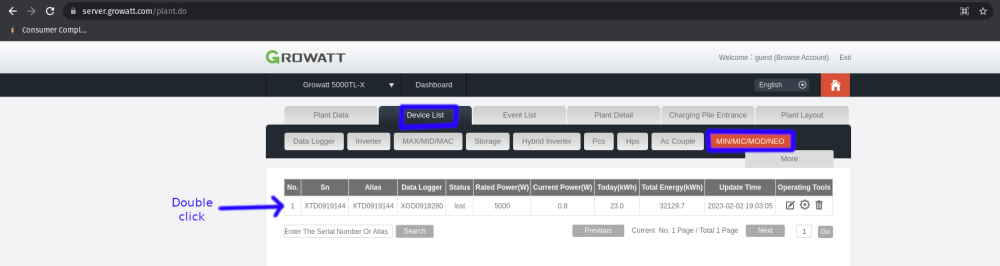
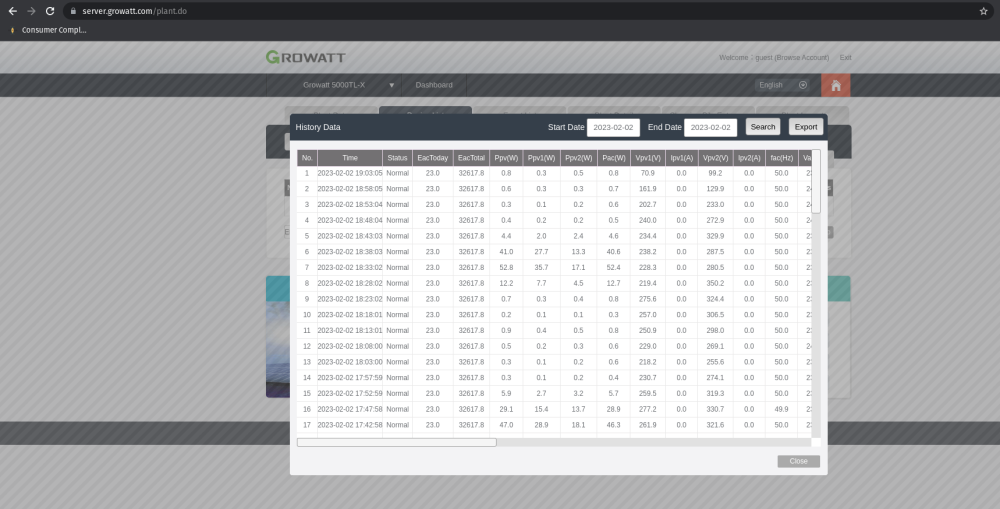
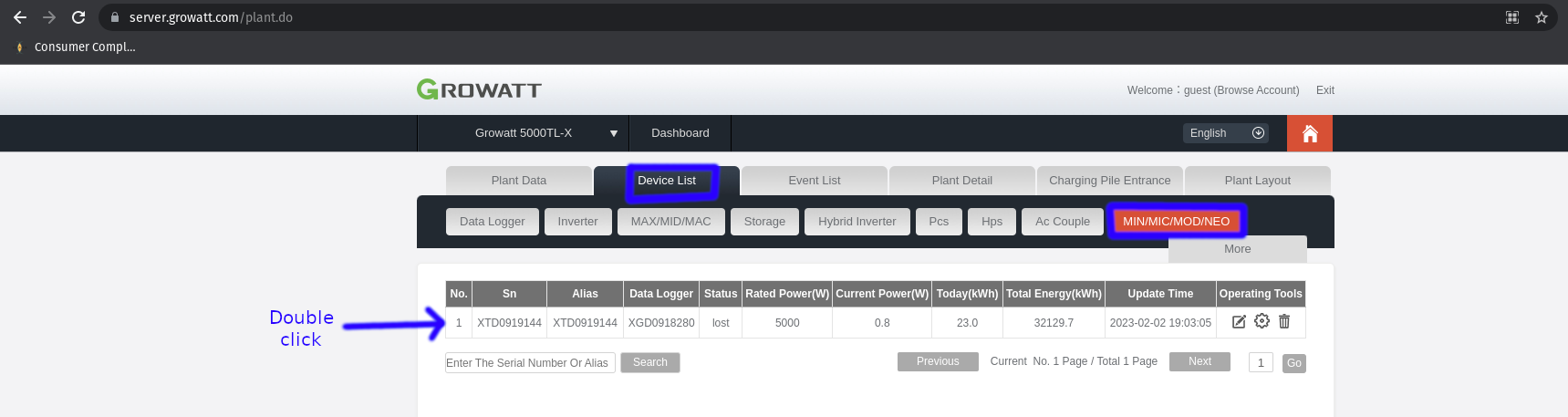
Hi, To those who concerned, for the growatt grid tied inverter you can get the access to the data at "https://server.growatt.com/plant.do" Login with the credentials. In the page, click on "Device List" tab then on "MIN/MIC/MOD/NEO", which shows a table of devices connected. Double click on the device you wish to query the data, a pop window appears with history. There is search button and export button. Export will give the excel tabulated data for the current day. In the search tab you can download the data for any day, I could go upto 4 months of data at max. At a time you can download data for 4 days in a single excel, though the website says maximum 7 days it prints "Too large file" if you select more than 4 or 5 days at a time. Attaching the screenshots for the reference. Regards, antarya