Bucks_Fizz
Members
-
Joined
-
Last visited
-
Thanks to all for the advice. Will put on 50 for a couple of days and monitor to see if any benefit or not. Still within the battery specs.
-
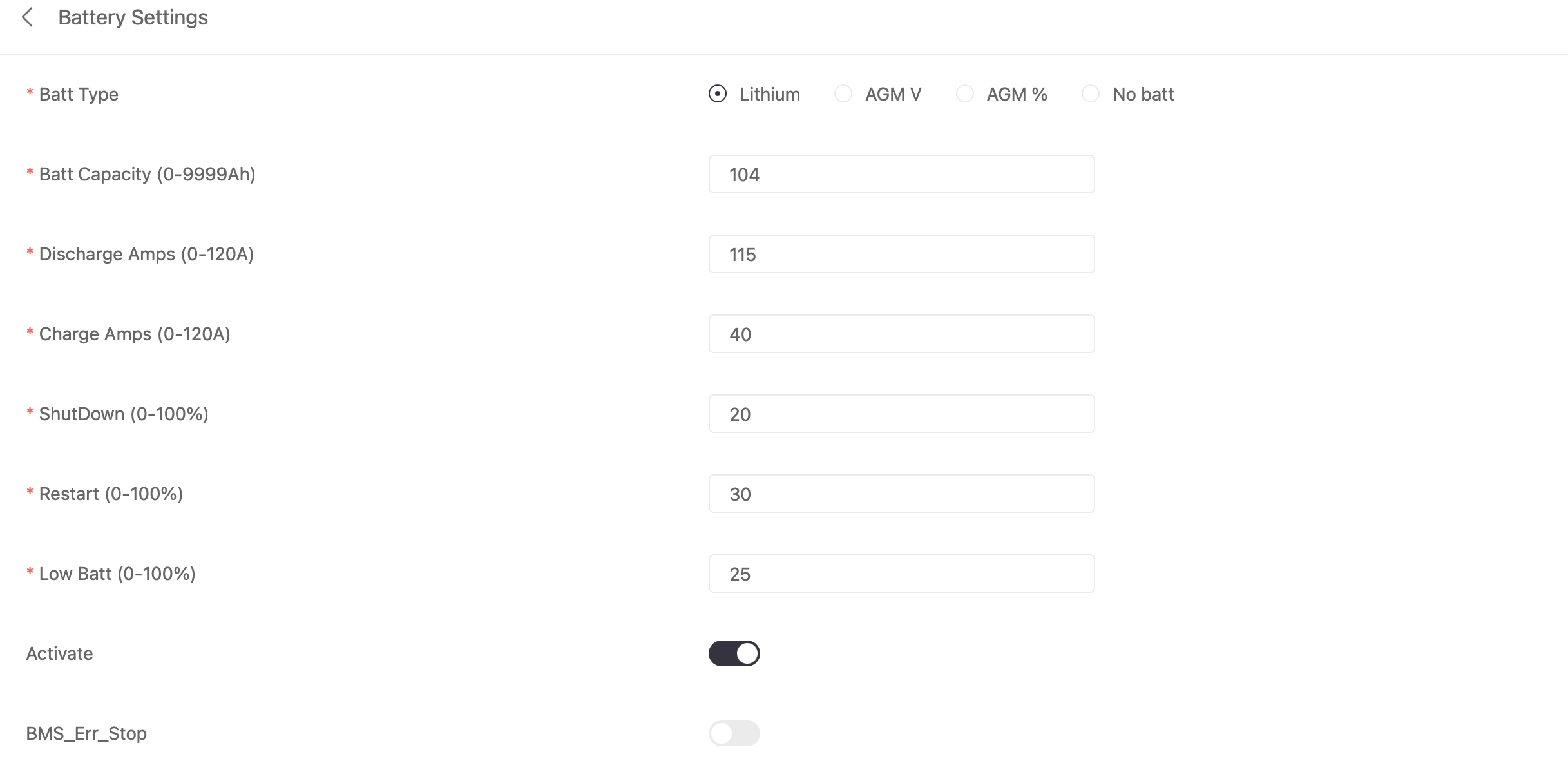
Hi, 8 x 460 panels Datasheet of Sunsynk 5.32 says nominal charge 50a. The installer had it set at 40a since commissioning the system. So was just wondering if it was done optimally
-
Hi all, Came across this post when googling and am hoping someone can help. I have a Sunsynk 5kw inverter and 1 5.32kw Sunsynk battery I am trying to determine if my charge / discharge settings are correct. Some say it should be 50A charge for a single battery? At the moment it is 40A. What is right? Am I getting the most of solar charging with these settings?

-
Hi, That is what I am suspecting. I will get used to it I suppose. As long as the missus has hot water on demand, all good hehe
-
Morning, As I said, I am new to this so may not be the best to give info hehe. However, what I did was a solar conversion. They used my existing Geyser & element (4kw Heath), added solar panels, control unit and LCD controller (MWS). So during the day, the sun powers the geyser. Then I set timers on the unit itself, to use Eskom (if needed) in the afternoon and evening. You can set temps on the unit so at say 18:00, I want it to heat the water to 60 degrees. If it gets to 60 before 20:00, the element switches off and will only come on again if the temp drops by 6 degrees. If it is outside the scheduled timers, doesn't come on at all. You can set up to 4 timers. I know they can also replace the element to a 2KW element if you desire. Also part of the kit. I am not sure if the control unit has a battery backup, some say yes, some say no. I am having issues with the temp readings though. It drops by 20 degrees after two 5 minute showers. But the water is still scalding hot. So I have mailed Geyserwise to ask for advice Good luck...
-
Hi. Had Geyserwise installed. MWS with wifi controller. Unit shows temp of 60 degrees when the element turns off. But after a 5 minute shower, it drops to 40 degrees on the display. Then the wife showers, drops to 28 degrees after another 5 minutes . The geyser is off at this time (no AC per timers). Checking the graph, the temperature rises to about 40 degrees overnight without any power to the element. Water in the shower is still piping hot though after our showers. I suspect a faulty probe or Gremlins lol Any thoughts?
-
-
So update: I phoned Geyserwise and discovered that there is a factory default timer set which is why the geyser came on at 03:00. Secondly they don't recommend using scenes in the Smart Life App. Rather just use schedule to power on and off. Actually suggested only use the app for monitoring and Ac-Boost if needed. The controller timers take precedence over the app. So I am now sorted. This is the first time I am using Geyserwise so definitely a learning curve
-
Hi all, I know they say no question is a stupid question, but here goes... I have just had a Geyserwise MWS installed. As it is wifi, it can be controlled through the Smart Life / Tuya App. I am struggling to set up the automations (set the timers) and the documentation doesn't help much. I want the Geyser to switch to Eskom between 13:30 and 15:30 only if the temp is below 55 degrees. Then at 15:30 it must switch off AC and stay off regardless of geyser temp. I then want to do the same between 18:00 and 20:00. The geyser should then not use AC power at any other time regardless of the geyser temp. So the documentation says set up a schedule to turn on AC Boost at 13:30 if the temp is less than 55. Then the next automation is if the geyser hits 55, switch off AC Boost. I did that and it works. But the problem is at 03:00 this morning, the geyser switched on and started heating which I don't want (trying to save money here hehe). So I suspect, somewhere I have made an error with the automations. Any guru have experience with the Geyserwise MWS and Smart Life App? Thanks all
-
-
Hi. Yip. No data on mine either
-
Thanks. Will check for an extension (On a Mac using Safari)
-
So I got the mail back from Sunsynk. Now an advanced user. I was able to change the data interval to 60s. Only issue i now have is the webpage still doesn't refresh any quicker (still 300s and it does it automatically). The app on the phone doesn't refresh automatically as far as I know (have to manually refresh) Anything I am missing?
-
Thanks, I have filled in the form as suggested. Will have a look at solar-assistant but other than the refresh rate, I am pretty happy with the sunsynk app. At least I can change the timers on the app and don't have to be in front of the inverter Appreciate the feedback
-
Thanks for the response. Didn't know I would need a different dongle. So Sunsynk it is hehe.
-
Hi all, I have a sunsynk 5kw with the datalogger. I currently use the sunsynk app but keep hearing about solarman. Is one better than the other and is it possible to run the two apps together? (or can the datalogger only be bound to one app) At the moment my biggest gripe with the sunsynk app is the data refresh interval and I can't change it (only have unbind as an option). I spoke to the installer and he said he would have to recreate the plant on Region 2 (or something) and to be honest, i never followed up. So thought I would investigate other options but only after speaking to the gurus here Thanks
-
 Antonio de Sa reacted to a post in a topic:
Error F34 - Sunsynk 5kw. Anything I should do or is it automatic restart?
Antonio de Sa reacted to a post in a topic:
Error F34 - Sunsynk 5kw. Anything I should do or is it automatic restart?
-
mzezman reacted to a post in a topic:
Error F34 - Sunsynk 5kw. Anything I should do or is it automatic restart?
-
zsde reacted to a post in a topic:
Error F34 - Sunsynk 5kw. Anything I should do or is it automatic restart?
-
Many thanks for the reply. As to #3...Don't put on the kettle when the dishwasher, Microwave and pool pump are already on. Needless to say, family was "schooled"