


B1G_WH1T3
Members
-
Joined
-
Last visited
Everything posted by B1G_WH1T3
-
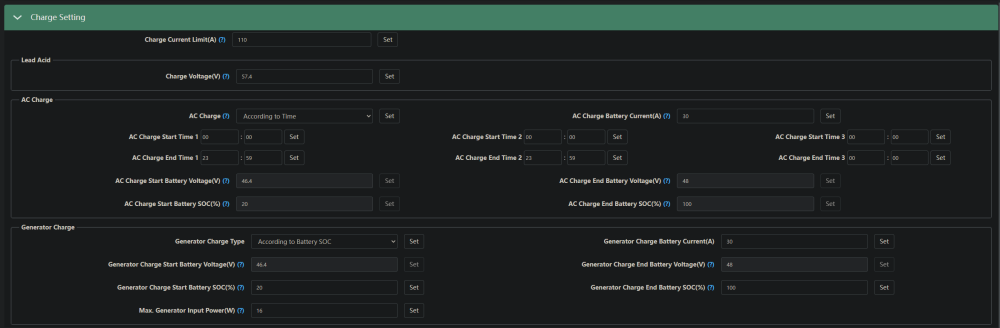
Just to provide more info on my settings etc, I see few people got different advise to which settings should be used.



-
If you connecting your battery via BMS comms then changing any of the charging voltages etc is redundant, the BMS will handle the voltages how it wants to charge the battery. as for point 3 - it should not matter what method you use to enable AC charge, time/ soc / manual etc anyone of them should yield the same results. Mine is set to time aka 00:00 - 23:59
-
Morning all So update, I'm rather stubborn so took the fighting force to luxpower. Finally got it sorted after back and forth arguing etc. They rolled out Firmware cBaa-12777F on 27 Feb 07:00 AM, and since then I have not had any issue with the EPS error. Also not sure what the rules are around reviewing companies? aka where I bought the inverter and support etc around it. if this community feels like name and shame is appropriate I'm game to give out my experience dealing with them.
-
So let me provide an update, the firmware I got upgraded to cBaa-12777E seems to somewhat remove the issue. Since they upgraded me I've only had the warning 29 2 times, all at random intervals 1 during the day at 4pm other one again at midnight. I've emailed the company I bought it from and luxpowertek official international support and well they recommended the firmware upgrade which they executed, but nothing really after that. International support did how ever say that if it triggers the event again they will look into creating a custom firmware, which I really hope resolves the issue. South Africa support has not even responded once, rather disappointed since I would expect them to know what is going on in our country and would look at users complaining about this issue. But that's about the feedback I got, will update again when something happens
-
Wanted to post last night to say my issue was fixed but that took a turn for the worst today. Had the same issue as someone else reported that it only happens late night/early morning when the grid goes down (loadshedding). I then get a warning 29. Contacted luxpowertek directly via email as my original sales company ignored me when I asked them to check if my unit was checking in on their account. Luxpower then upgraded me from Initial firmware cbaa-121714 to current firmware is cBaa-12777E. This actually fixed my issue for 1 time only, today at 16:08 when I got loadshedding the exact same thing happened again. I got the Luxpower 5kv LUX-SNA5000WPV with a Volta Stage 1 battery, CAN connected battery version 2 selected as advised by seller of Volta battery pack. Also you can upgrade your own firmware, on the app logout, right at the bottom is download firmware, using the drop down there should be a file with cBaa-xx77xx which is the one I got loaded. - ***WARNING*** I take no responsibility if you brick your inverter do this at your own accord. #rant - I'm in the IT field for 15 years, and absolutely hate the fact that I bought a product but I get locked out of admin functions with a end user account.... drives me nuts...





