randomfool
Members
-
Joined
-
Last visited
Everything posted by randomfool
-
hi what's better to use this node-red integration or the "Sunsynk v3 addon" implementation with a dual inverter setup? thanks
-
Gary can you add the ability to set "sysWorkMode" please. (0 is export, 2 is Zero-Export + Limit to Load Only). I think with this I can get away with just performing some basic weather checks and other pieces then either simplify my JavaScript or potentially remove it entirely and just create a yaml automation.

-
Superb advice thank you will look into this tomorrow.
-
Updated version of the Octopus Agile tariff automation working with @Gary Waterworth new version 2. Made an adjustment to set sstimer1 to nearest 30 minute segment in the past to avoid throwing node warnings and align with the new version 2; sstimer2 is set to 23:30 at all times unless sstimer1 is also 23:30 in which case it changes sstimer2 to 00:00 to avoid issues, the trade off is it will not control the inverter for the last 30 minutes of the day. For my own personal version I have modified Gary's script slightly so that it accepts 23:55 as an input. If you care enough about controlling the inverter automatically for the last 25 of the 30 minute window between 23:30 and 00:00 you could copy this logic also to avoid any node warnings. Sunsynk Automation V4.json
-
Purged recorder Removed flows Rebooted HA Followed full install procedure again Fixed
-
Started working, I deleted the the entire node-red configuration and re-imported and everything is up now. I purged all old entries and shut down HA prior to doing this, not sure if this made any difference but either way it's all looking good now!
-
@Gary Waterworth I am trying to switch over to version 2. Followed all the steps in the quick guide. Obtained my serial number and plantid, got a long life token. I can see raw data being obtained as shown below:- however it failing here: Also Calc Last Update Time & General Status Check has error "11/01/2024, 20:10:46node: Calc Last Update Time & General Status Checkfunction : (error) "Logger Not Online - Error With Data ""

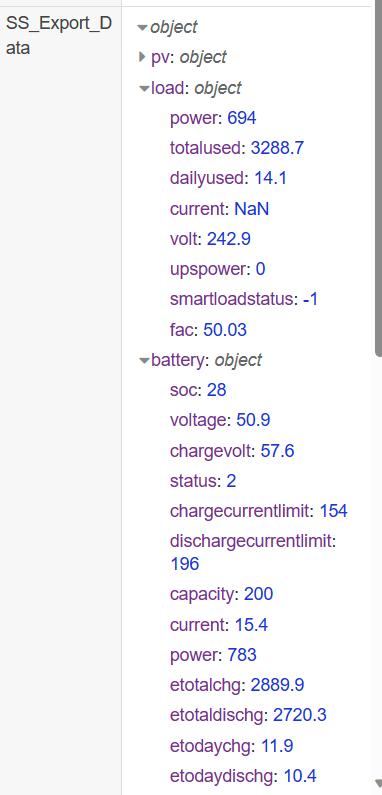
 Hi, Hi Gary, in the 3 months I have been running with this timer configuration it has worked flawlessly for me. It sets the timer1 value to the nearest 5 minutes before the current time e.g. 16:23 becomes 16:20 timer2 is always set to 23:55, so the inverter only ever needs to look at timeslot 1; therefore all other time slots can be set to 00:00. I will download your new script and re-factor mine to take advantage, thank you for all of your hard work.I have had a few requests from UK users for an updated version of the Octopus Agile script I created a few months ago which automates various parts of charge/discharge and wanted to share this with the community for anyone to use as they see fit. I hope it is of some use to others Here is a summary of what the script does and the attached JSON file. // This script attempts to charge the battery by controlling the inverter throughout a 24 hour period // Firstly it performs an overnight check based on weather conditions from openweathermap // For example if it is rainy we charge the battery higher than if it were partlycloudy // Further, it should only charge the battery at the cheapest price points overnight so use // (https://github.com/BottlecapDave/HomeAssistant-OctopusEnergy) and create custom target sensors that turn on during the cheapest price periods // In this script they are referenced as timer1 (overnight) and timer2 (daytime) // As the battery can run low (particularly in winter) during the day time timer2 charges the battery to the value of the variable "timer2_target" before the peak period (peak period is usually 4-7pm) // Finally, a third target sensor import_highprice is used to identify edge cases where the battery SOC is below 30% but it is a peak price period. In this case allow the battery to deplete as low as 10% // ** As an override to all of the above, if the import_current_price is less than import_current_price_target the inverter will sell back to the grid to take advantage of preferential export prices // This can run at any point and will ensure the battery charges/discharges on a loop between the 70 to 80% range ** // This script automatically accounts for daylight savings // It will automatically ensure timer1 is always up to date, ensure all other timers on the inverter are removed Sunsynk Octopus Agile Automation Version 3.jsonToday I started getting a lot of errors in node red, example below from debug messages:- 11/10/2023, 17:36:00node: Update SunSynk Load msg : string[88] "hass-post: API call http://localhost:8123/api/states/sensor.sunsynk_load, statusCode 400" 11/10/2023, 17:36:06node: Update SunSynk Battery msg : string[91] "hass-post: API call http://localhost:8123/api/states/sensor.sunsynk_battery, statusCode 400" 11/10/2023, 17:36:06node: Sunsynk Input Data function : (error) "TypeError: Cannot read properties of undefined (reading 'ppv')" 11/10/2023, 17:36:06node: Sunsynk Grid function : (error) "TypeError: Cannot convert undefined or null to object" 11/10/2023, 17:36:06node: Calc Last Update Time & General Status Check function : (error) "Logger Not Online - Error With Data " 11/10/2023, 17:36:06node: Calc Last Update Time & General Status Check function : (error) "Input(Input) - Error With Data " 11/10/2023, 17:36:06node: Calc Last Update Time & General Status Check function : (error) "Input(Grid) - Error With Data " 11/10/2023, 17:36:06node: Calc Last Update Time & General Status Check function : (error) "Input(Load) - Error With Data " 11/10/2023, 17:36:06node: Calc Last Update Time & General Status Check function : (error) "Logger Not Online - Error With Data " 11/10/2023, 17:36:06node: Calc Last Update Time & General Status Check function : (error) "Input(Input) - Error With Data " 11/10/2023, 17:36:06node: Calc Last Update Time & General Status Check function : (error) "Input(Grid) - Error With Data " 11/10/2023, 17:36:06node: Calc Last Update Time & General Status Check function : (error) "Input(Load) - Error With Data " 11/10/2023, 17:36:06node: Update SunSynk Battery msg : string[91] "hass-post: API call http://localhost:8123/api/states/sensor.sunsynk_battery, statusCode 400" 11/10/2023, 17:36:06node: Sunsynk Grid function : (error) "TypeError: Cannot convert undefined or null to object" 11/10/2023, 17:36:06node: Sunsynk Input Data function : (error) "TypeError: Cannot read properties of undefined (reading 'ppv')" 11/10/2023, 17:36:06node: Update SunSynk Load msg : string[88] "hass-post: API call http://localhost:8123/api/states/sensor.sunsynk_load, statusCode 400" 11/10/2023, 17:36:06node: Calc Last Update Time & General Status Check function : (error) "Input(Input) - Error With Data " 11/10/2023, 17:36:06node: Calc Last Update Time & General Status Check function : (error) "Input(Grid) - Error With Data " 11/10/2023, 17:36:06node: Calc Last Update Time & General Status Check function : (error) "Input(Load) - Error With Data " 11/10/2023, 17:36:06node: Calc Last Update Time & General Status Check function : (error) "Logger Not Online - Error With Data " 11/10/2023, 17:36:06node: Calc Last Update Time & General Status Check function : (error) "Input(Input) - Error With Data " 11/10/2023, 17:36:06node: Calc Last Update Time & General Status Check function : (error) "Input(Grid) - Error With Data " 11/10/2023, 17:36:06node: Calc Last Update Time & General Status Check function : (error) "Input(Load) - Error With Data " 11/10/2023, 17:36:06node: Update SunSynk Battery msg : string[91] "hass-post: API call http://localhost:8123/api/states/sensor.sunsynk_battery, statusCode 400" 11/10/2023, 17:36:07node: Update SunSynk Load msg : string[88] "hass-post: API call http://localhost:8123/api/states/sensor.sunsynk_load, statusCode 400" 11/10/2023, 17:36:07node: Sunsynk Grid function : (error) "TypeError: Cannot convert undefined or null to object" 11/10/2023, 17:36:07node: Sunsynk Input Data function : (error) "TypeError: Cannot read properties of undefined (reading 'ppv')" 11/10/2023, 17:36:07node: Calc Last Update Time & General Status Check function : (error) "Logger Not Online - Error With Data " 11/10/2023, 17:36:07node: Calc Last Update Time & General Status Check function : (error) "Input(Input) - Error With Data " 11/10/2023, 17:36:07node: Calc Last Update Time & General Status Check function : (error) "Input(Grid) - Error With Data " 11/10/2023, 17:36:07node: Calc Last Update Time & General Status Check function : (error) "Input(Load) - Error With Data " 11/10/2023, 17:36:07node: Calc Last Update Time & General Status Check function : (error) "Logger Not Online - Error With Data " 11/10/2023, 17:36:07node: Calc Last Update Time & General Status Check function : (error) "Input(Input) - Error With Data " 11/10/2023, 17:36:07node: Calc Last Update Time & General Status Check function : (error) "Input(Grid) - Error With Data " 11/10/2023, 17:36:07node: Calc Last Update Time & General Status Check function : (error) "Input(Load) - Error With Data " 11/10/2023, 17:36:07node: Update SunSynk Battery msg : string[91] "hass-post: API call http://localhost:8123/api/states/sensor.sunsynk_battery, statusCode 400" 11/10/2023, 17:36:07node: Sunsynk Input Data function : (error) "TypeError: Cannot read properties of undefined (reading 'ppv')" 11/10/2023, 17:36:07node: Update SunSynk Load msg : string[88] "hass-post: API call http://localhost:8123/api/states/sensor.sunsynk_load, statusCode 400" 11/10/2023, 17:36:07node: Sunsynk Grid function : (error) "TypeError: Cannot convert undefined or null to object" 11/10/2023, 17:36:07node: Calc Last Update Time & General Status Check function : (error) "Logger Not Online - Error With Data " 11/10/2023, 17:36:07node: Calc Last Update Time & General Status Check function : (error) "Input(Input) - Error With Data " 11/10/2023, 17:36:07node: Calc Last Update Time & General Status Check function : (error) "Input(Grid) - Error With Data " 11/10/2023, 17:36:07node: Calc Last Update Time & General Status Check function : (error) "Input(Load) - Error With Data " 11/10/2023, 17:36:07node: Calc Last Update Time & General Status Check function : (error) "Data last updated more than 3 minutes ago. Should be minimum less than a minute - Error With Data " 11/10/2023, 17:36:07node: Calc Last Update Time & General Status Check function : (error) "Logger Not Online - Error With Data " 11/10/2023, 17:36:07node: Calc Last Update Time & General Status Check function : (error) "Input(Input) - Error With Data " 11/10/2023, 17:36:07node: Calc Last Update Time & General Status Check function : (error) "Input(Grid) - Error With Data " 11/10/2023, 17:36:07node: Calc Last Update Time & General Status Check function : (error) "Input(Load) - Error With Data " 11/10/2023, 17:36:07node: Update SunSynk Battery msg : string[91] "hass-post: API call http://localhost:8123/api/states/sensor.sunsynk_battery, statusCode 400" 11/10/2023, 17:36:07node: Update SunSynk Load msg : string[88] "hass-post: API call http://localhost:8123/api/states/sensor.sunsynk_load, statusCode 400" 11/10/2023, 17:36:07node: Sunsynk Input Data function : (error) "TypeError: Cannot read properties of undefined (reading 'ppv')" 11/10/2023, 17:36:07node: Sunsynk Grid function : (error) "TypeError: Cannot convert undefined or null to object" 11/10/2023, 17:36:07node: Calc Last Update Time & General Status Check function : (error) "Data last updated more than 3 minutes ago. Should be minimum less than a minute - Error With Data " 11/10/2023, 17:36:07node: Calc Last Update Time & General Status Check function : (error) "Logger Not Online - Error With Data " 11/10/2023, 17:36:07node: Calc Last Update Time & General Status Check function : (error) "Input(Input) - Error With Data " 11/10/2023, 17:36:07node: Calc Last Update Time & General Status Check function : (error) "Input(Grid) - Error With Data " 11/10/2023, 17:36:07node: Calc Last Update Time & General Status Check function : (error) "Input(Load) - Error With Data " 11/10/2023, 17:36:07node: Calc Last Update Time & General Status Check function : (error) "Logger Not Online - Error With Data " 11/10/2023, 17:36:07node: Calc Last Update Time & General Status Check function : (error) "Input(Input) - Error With Data " 11/10/2023, 17:36:07node: Calc Last Update Time & General Status Check function : (error) "Input(Grid) - Error With Data " 11/10/2023, 17:36:07node: Calc Last Update Time & General Status Check function : (error) "Input(Load) - Error With Data " 11/10/2023, 17:36:07node: Update SunSynk Battery msg : string[91] "hass-post: API call http://localhost:8123/api/states/sensor.sunsynk_battery, statusCode 400" 11/10/2023, 17:36:07node: Sunsynk Grid function : (error) "TypeError: Cannot convert undefined or null to object" 11/10/2023, 17:36:07node: Update SunSynk Load msg : string[88] "hass-post: API call http://localhost:8123/api/states/sensor.sunsynk_load, statusCode 400" 11/10/2023, 17:36:07node: Sunsynk Input Data function : (error) "TypeError: Cannot read properties of undefined (reading 'ppv')" 11/10/2023, 17:36:10node: Calc Last Update Time & General Status Check function : (error) "Input(Input) - Error With Data " 11/10/2023, 17:36:10node: Calc Last Update Time & General Status Check function : (error) "Input(Grid) - Error With Data " 11/10/2023, 17:36:10node: Calc Last Update Time & General Status Check function : (error) "Input(Load) - Error With Data " 11/10/2023, 17:36:55node: Calc Last Update Time & General Status Check function : (error) "Input(Input) - Error With Data " 11/10/2023, 17:36:55node: Calc Last Update Time & General Status Check function : (error) "Input(Grid) - Error With Data " 11/10/2023, 17:36:55node: Calc Last Update Time & General Status Check function : (error) "Input(Load) - Error With Data " Most of my automations now don't work including slip06x card. Some data is still pulling through for example Sunsynk Settings. I am still region 1 awaiting region 2 migration. Has anyone else experienced issues? The app works fine as does the web site.For anyone interested here is my latest update to the dynamic pricing automation which has been running perfectly now for 2+ months (I use Octopus Agile in the UK where we receive 30 minute import/export price changes so it can be very beneficial to pick the right times to import/export). I have added an export functionality which sets the sysWorkMode to 0; in my case this looks at a helper which turns on/off based on the target rate sensors used in this integration (HomeAssistant-OctopusEnergy/_docs/setup_target_rate.md at develop · BottlecapDave/HomeAssistant-OctopusEnergy · GitHub). I use the Power Flow Card by slip06x to be able to toggle it on/off manually or you can setup a simple automation and it will use this to export to the grid when the battery soc > 80% and price is preferential to do so. As before it is calibrated to continually update timer1 to the current hour (depending on your locale from HA) and has various checks for weather, pricing, time etc. I don't suggest you just copy and paste mine (unless you are a UK user and want to reverse engineer a few sensors) but can be used as a guide for anyone wishing to automate their SS inverter based on dynamic pricing from your provider. Most of the config is defined as variables so it's relatively easy to adjust to your needs. Hope this helps someone. Sunsynk Dyanmic Pricing Automation.jsonit's been a while since I did this and no longer use it but from memory I followed this guide:- InfluxDB - Home Assistant (home-assistant.io) there is a section for how the configuration.yaml should be setup; the rest can be done in the InfluxDB AddonAfter having multiple issues with the temperamental Octopus Agile API used by Sunsynk messing up the timer values and subsequently not functioning as required I have created an entirely new script, this is much improved and having run it now a few days so far working well for me. Maybe this will be of use to someone else? Do not enable Live Price in the Sunsynk UI; You will need to provide a sensor where the script can pull the current price from, a key difference is this can be any energy supplier who provides dynamic pricing, and not restricted to Octopus providing you can get sensor data. I would recommend cleaning any existing timer values you have setup before running this. The script will automatically update timer1 to be the current hour every hour based on the system locale defined in HA. It will check your price sensor and in my case; when the sensor is ON it will set the SOC/V based on the weather and enables Grid Charge. When the sensor is OFF it changes SOC/V to 25% and disables Grid Charge effectively forcing it to use the battery. As noted above I have also included the weather check in this script so that the SOC charge % is variable. All of this can adjust to your needs. With this script you should be able to set and forget if you are lucky enough to receive dynamic pricing. Sunsynk automation Dynamic Pricing.jsonThis looks like it might still be an issue, just spoke with one of their support team as had a few issues with it not charging despite being set correctly. This is odd though as when you turn on "Live Price" it automatically starts adjusting timer1 to the current hour so you would have thought this would have been tested. In other news, the final stage of the Region 2 DC move looks to be going ahead this weekend.
 Timer1 is automatically updated when Live Pricing is enabled.Refactored the code and outputs to a sensor to compare if we need to make changes. Pre-Requisites:- 1. Only makes sense if you are using dynamic pricing 2. Ideal for use with Octopus Agile (UK tariff) 3. Right now I only care about the import price; but I will make further additions to account for export pricing 4. I would recommend using this integration and configuring target rate sensor data for half hourly pricing (https://github.com/BottlecapDave/HomeAssistant-OctopusEnergy/blob/develop/_docs/setup_target_rate.md) Just some background info on how I have configured 4. as it's probably the most important part for this to work effectively...For my setup with 10kw batteries I need circa 2.5 hours to charge overnight (3.6kw inverter) and weather dependant 1.5 hours during the mid afternoon before the peak cost starts at around 16:00. I have therefore setup an overnight and daytime sensor which work on intermittent half hourly basis to obtain the best prices. Further to this for the daytime sensor I take the latest period where possible to maximise battery into the evening, and solar is usually better for me mid morning through mid afternoon. Finally; I take the 'overall_max_cost' attribute which is the cheapest highest half hour time segment identified within the period and rounding up to the nearest whole number, you can change this to suit your needs; for me this is to ensure I always get the desired charge time if needed. On a 1.5 hour charge that would be the 1st, 2nd and 3rd lowest identified prices within the desired monitor window e.g. 10am - 4pm. On some days if solar is good, then the daytime run may not be required but with this automation we can set and forget about it, forever. Still a few bits to add in:- 1. Add export dynamic pricing 2. Tie in weather for automatic SOC (Gary has done this excellent work already so should be straight forward) I'll post the final version of it when ready with the above additions for reference purposes in case anyone else wants to use this, but for most the attached should be sufficient. Auto ratesThreshold.jsonI added the following into the Setup Global Vars function node on the Sunsynk Gather flow:- global.set("SS.url.income", global.get("SS.url.hostname") + "/api/v1/plant/" + global.get("SS.Plantid") + "/income"); This could exist in a separate automation script and not the Gather flow as it used for POST requests but to keep everything together I put it in the same place. ----- I'm still working through the code I bastardised, so far it just updates the import ratesThreshold but it should be easy enough from here to configure other plant information, including the ratesThreshold for export as needed. I have attached a sample automation node which checks the price of an external sensor then updates the ratesThreshold. For users with variable pricing this could be useful. For example I have two function nodes; one which finds the cheapest periods during the night and sets the import price accordingly; I also have another one for the day time for when I want to top up the battery from the grid on low solar days. Used in combination with the weather check for grid charge % it's a good way to maximise the cost efficiency. For information purposes (see screenshot). If you chose to enable dynamic pricing from Octopus timer1 is updated every hour to show the current hour, it also automatically enables grid/gen and use timer on both timer1 and timer2. As this changes every hour automatically, timer2 and beyond are never invoked. In the screenshot attached the price obtained from the Octopus API is currently greater than ratesThreshold therefore SOC/V is set at 20% automatically. If the price is lower than ratesThreshold then SOC/V is set to 100% automatically (we can later adjust this with your weather check to be even more optimum). By configuring ratesThreshold using the JSON I have attached based on the prevailing daily rates we can dynamically adjust when SOC/V is set to 100% when it is cheapest to grid charge; otherwise this is a static value and not optimum. ratesThreshold automation.json
 I have got this working (on region 1). I will tidy it up and post the JSON shortly; perhaps @Gary Waterworth you could add it to the templates on github for UK users who want to dynamically set the pricing.@Gary Waterworth following on from this post I have made "some" progress, but JSON is anything but my speciality... I have the console Payload output from https://sunsynk.net/plants/edit/[PlantID] showing the POST message, I am trying to update the "ratesThreshold" under direction 1 which is Import, direction 0 looks to be Export. {id: "12345", currency: 366, invest: 0,…} charges : [{price: 0, type: "3", startRange: "", endRange: ""}] currency : 366 id : "12345" invest : 0 products : [{direction: 1, ratesThreshold: "15", provider: 1, regionId: 12},…] 0 : {direction: 1, ratesThreshold: "15", provider: 1, regionId: 12} direction : 1 provider : 1 ratesThreshold : "15" regionId : 12 1 : {direction: 0, ratesThreshold: 60, provider: 1, regionId: 12} direction : 0 provider : 1 ratesThreshold : 60 regionId : 12 I have attached a sunsynk automation JSON file I am using. The Check Price Node works, and I have entered static information under the Create request; I see Set Status as a success but there is no visible change when I check the web site. Thank you. Auto Price Update Sunsynk.json
 Hi @Gary Waterworth I have recently switched over to Octopus Agile; a wholesale variable rates which update every 30 minutes in the UK. Using the mobile app or web site you can configure the inverter to automatically charge the battery when the target price is below a specific value. See graphic below:- In this example I have set it to import up to a price of 12p. Unfortunately this is not a dynamic process so it does not update daily; what I would like to be able to do is update the "Charge Battery" value by looking at the prices within a specified time period. Thankfully, there is an Octupus Agile addon (HomeAssistant-OctopusEnergy/_docs/setup_target_rate.md at develop · BottlecapDave/HomeAssistant-OctopusEnergy · GitHub) which allows me to create a flow to capture the cheapest price points. What I would ask for your assistance with is identifying the attribute "Charge Battery" and what the process would look like to update this value on the inverter. In my limited testing, as soon as I set the price manually; if the current price period is below that value the grid immediately starts to charge the battery. Thank you for any assistance; and I hope this makes sense. EDIT Checked the API documentation and it looks like it could be something in the "Price Domain" array under Plant Info:- I think "price" maybe the required attribute, however I also noticed the e-linter api manual only shows 2 income types whereas if you login to sunsynk.net there are 3:- 1-Fixed price 2-Interval price 3-Live price (this is what you select when you want to use Octopus Energy) Also noted on Node-Red you are pointing at global.set("SS.url.hostname","https://pv.inteless.com"); so it may not be possible without repointing the API at the current commented out URL global.set("SS.url.hostname","https://api.sunsynk.net") ; I am still on region 1.
Here you go. Also posted a few pages back the full dashboard with this in.I think you'll just need to wait as slip06x said. I've made quite a few improvements to mine since I posted the modified slip06x dashboard above. I'll upload it when I'm done. I've added grid export for those who use that and Included some costs. I've also changed the layout about a bit to suit my needs more with octupus energy dashboards. I've also got a basic automation working now with octupus energy for anyone who uses it. Octupus also offer a feed in tariff based on half hourly prices for the subsequent day. So if there is an arbitrage opportunity where you earn more on the export than the cost of import I plan to automatically charge for 15 mins then turn on grid export based on battery soc levels e.g bring it in at 15p export it at 35p, profit 20p....I have done some very noddy stats but plan to create an arbitrage P&L apex chart using the import/export data and costs from the agile card. Might end up not being worth it, but time will tell. My noddy calculations tell me it will cover the standing charge costs.Glad to see it's working for you. Re the daily and total that should populate tomorrow then onwards will work as expected (that's what happened for me anyway). Monthly still has not populated anything for me, waiting until May to determine if there is an issue or not. The cards for automations is grid-layout "ssauto".Ok here goes; caveats to begin with - I am no HA expert, in fact I only discovered HA a few weeks ago through Gary's post and his subsequent links to slip06x dashboard, so my ability to provide "support" will be limited. I am more than happy for any of this work to be updated and improved upon and added to any github to help others as needed. I will be making many other changes to suit my specific needs (e.g. integrating Octupus Agile automations and cards); have left this largely vanilla so you can customise to your own specific requirements. All of that said; attached is the modified slip06x Sunsynk dashboard; I have made a few changes:- Removed load shedding as it's not applicable to the UK Moved some of the cards around; dropped the energy cards from the bottom as I felt they were a duplication although I may add them back in at a later date. Today's graph focuses on last 6 hours; not 24 hour period (scroll still enabled). I'm still playing around with this and may change to 12 hours but for the UK a 24 hour period didn't look right to me. Integrated Gary's Time Left to Discharge - this requires the Sunsynk automation flows Gary provided on his github. Added the event card and integrated the timer card; note the "Override Mode" currently does nothing; and I will probably change this around in the coming months to better suit my needs. Only 2 grid layouts; desktop (I am using 2560x1440 and it aligns perfectly) and mobile/tablet 800px - you will need to modify to suit your needs. You will need to add the additions below to your configuration.yaml or equivalent. - sensor: - name: "Sunsynk PV Today" state_class: total_increasing unique_id: "sensor.sunsynk_pv_today" device_class: energy unit_of_measurement: kWh state: > {{state_attr('sensor.sunsynk_input', 'etoday')|float}} - sensor: - name: "Sunsynk Battery etodaychg" state_class: total_increasing unique_id: "sensor.sunsynk_battery_etodaychg" device_class: energy unit_of_measurement: kWh state: > {{state_attr('sensor.sunsynk_battery', 'etodayChg')|float}} - sensor: - name: "Sunsynk Battery etodaydischg" state_class: total_increasing unique_id: "sensor.sunsynk_battery_etodaydischg" device_class: energy unit_of_measurement: kWh state: > {{state_attr('sensor.sunsynk_battery', 'etodayDischg')|float}} - sensor: - name: "Sunsynk Grid Export Today" state_class: total_increasing unique_id: "sensor.sunsynk_grid_export_today" device_class: energy unit_of_measurement: kWh state: > {{state_attr('sensor.sunsynk_grid', 'etodayTo')|float}} - sensor: - name: "Sunsynk Grid Today" state_class: total_increasing unique_id: "sensor.sunsynk_grid_today" device_class: energy unit_of_measurement: kWh state: > {{state_attr('sensor.sunsynk_grid', 'etodayFrom')|float}} - sensor: - name: "Sunsynk Grid Export Total" state_class: total_increasing unique_id: "sensor.sunsynk_grid_export_total" device_class: energy unit_of_measurement: kWh state: > {{state_attr('sensor.sunsynk_grid', 'etotalTo')|float}} - sensor: - name: "Sunsynk Load Today" state_class: total_increasing unique_id: "sensor.sunsynk_load_today" device_class: energy unit_of_measurement: kWh state: > {{state_attr('sensor.sunsynk_load', 'dailyUsed')|float}} Screenshots (Monthly Production missing from screenshots below but it is included on the dashboard, there is just no data as yet so I have not posted it):- Sunsynk.yaml
Hi @Gary Waterworth I have recently switched over to Octopus Agile; a wholesale variable rates which update every 30 minutes in the UK. Using the mobile app or web site you can configure the inverter to automatically charge the battery when the target price is below a specific value. See graphic below:- In this example I have set it to import up to a price of 12p. Unfortunately this is not a dynamic process so it does not update daily; what I would like to be able to do is update the "Charge Battery" value by looking at the prices within a specified time period. Thankfully, there is an Octupus Agile addon (HomeAssistant-OctopusEnergy/_docs/setup_target_rate.md at develop · BottlecapDave/HomeAssistant-OctopusEnergy · GitHub) which allows me to create a flow to capture the cheapest price points. What I would ask for your assistance with is identifying the attribute "Charge Battery" and what the process would look like to update this value on the inverter. In my limited testing, as soon as I set the price manually; if the current price period is below that value the grid immediately starts to charge the battery. Thank you for any assistance; and I hope this makes sense. EDIT Checked the API documentation and it looks like it could be something in the "Price Domain" array under Plant Info:- I think "price" maybe the required attribute, however I also noticed the e-linter api manual only shows 2 income types whereas if you login to sunsynk.net there are 3:- 1-Fixed price 2-Interval price 3-Live price (this is what you select when you want to use Octopus Energy) Also noted on Node-Red you are pointing at global.set("SS.url.hostname","https://pv.inteless.com"); so it may not be possible without repointing the API at the current commented out URL global.set("SS.url.hostname","https://api.sunsynk.net") ; I am still on region 1.
Here you go. Also posted a few pages back the full dashboard with this in.I think you'll just need to wait as slip06x said. I've made quite a few improvements to mine since I posted the modified slip06x dashboard above. I'll upload it when I'm done. I've added grid export for those who use that and Included some costs. I've also changed the layout about a bit to suit my needs more with octupus energy dashboards. I've also got a basic automation working now with octupus energy for anyone who uses it. Octupus also offer a feed in tariff based on half hourly prices for the subsequent day. So if there is an arbitrage opportunity where you earn more on the export than the cost of import I plan to automatically charge for 15 mins then turn on grid export based on battery soc levels e.g bring it in at 15p export it at 35p, profit 20p....I have done some very noddy stats but plan to create an arbitrage P&L apex chart using the import/export data and costs from the agile card. Might end up not being worth it, but time will tell. My noddy calculations tell me it will cover the standing charge costs.Glad to see it's working for you. Re the daily and total that should populate tomorrow then onwards will work as expected (that's what happened for me anyway). Monthly still has not populated anything for me, waiting until May to determine if there is an issue or not. The cards for automations is grid-layout "ssauto".Ok here goes; caveats to begin with - I am no HA expert, in fact I only discovered HA a few weeks ago through Gary's post and his subsequent links to slip06x dashboard, so my ability to provide "support" will be limited. I am more than happy for any of this work to be updated and improved upon and added to any github to help others as needed. I will be making many other changes to suit my specific needs (e.g. integrating Octupus Agile automations and cards); have left this largely vanilla so you can customise to your own specific requirements. All of that said; attached is the modified slip06x Sunsynk dashboard; I have made a few changes:- Removed load shedding as it's not applicable to the UK Moved some of the cards around; dropped the energy cards from the bottom as I felt they were a duplication although I may add them back in at a later date. Today's graph focuses on last 6 hours; not 24 hour period (scroll still enabled). I'm still playing around with this and may change to 12 hours but for the UK a 24 hour period didn't look right to me. Integrated Gary's Time Left to Discharge - this requires the Sunsynk automation flows Gary provided on his github. Added the event card and integrated the timer card; note the "Override Mode" currently does nothing; and I will probably change this around in the coming months to better suit my needs. Only 2 grid layouts; desktop (I am using 2560x1440 and it aligns perfectly) and mobile/tablet 800px - you will need to modify to suit your needs. You will need to add the additions below to your configuration.yaml or equivalent. - sensor: - name: "Sunsynk PV Today" state_class: total_increasing unique_id: "sensor.sunsynk_pv_today" device_class: energy unit_of_measurement: kWh state: > {{state_attr('sensor.sunsynk_input', 'etoday')|float}} - sensor: - name: "Sunsynk Battery etodaychg" state_class: total_increasing unique_id: "sensor.sunsynk_battery_etodaychg" device_class: energy unit_of_measurement: kWh state: > {{state_attr('sensor.sunsynk_battery', 'etodayChg')|float}} - sensor: - name: "Sunsynk Battery etodaydischg" state_class: total_increasing unique_id: "sensor.sunsynk_battery_etodaydischg" device_class: energy unit_of_measurement: kWh state: > {{state_attr('sensor.sunsynk_battery', 'etodayDischg')|float}} - sensor: - name: "Sunsynk Grid Export Today" state_class: total_increasing unique_id: "sensor.sunsynk_grid_export_today" device_class: energy unit_of_measurement: kWh state: > {{state_attr('sensor.sunsynk_grid', 'etodayTo')|float}} - sensor: - name: "Sunsynk Grid Today" state_class: total_increasing unique_id: "sensor.sunsynk_grid_today" device_class: energy unit_of_measurement: kWh state: > {{state_attr('sensor.sunsynk_grid', 'etodayFrom')|float}} - sensor: - name: "Sunsynk Grid Export Total" state_class: total_increasing unique_id: "sensor.sunsynk_grid_export_total" device_class: energy unit_of_measurement: kWh state: > {{state_attr('sensor.sunsynk_grid', 'etotalTo')|float}} - sensor: - name: "Sunsynk Load Today" state_class: total_increasing unique_id: "sensor.sunsynk_load_today" device_class: energy unit_of_measurement: kWh state: > {{state_attr('sensor.sunsynk_load', 'dailyUsed')|float}} Screenshots (Monthly Production missing from screenshots below but it is included on the dashboard, there is just no data as yet so I have not posted it):- Sunsynk.yaml