


Gary Waterworth
Members
-
Joined
-
Last visited
-
 abd7 reacted to a post in a topic:
Upgrade Your Old Pylontech Batteries – Exclusive Trade-In Offer with Solar Deity & Powerforum!
abd7 reacted to a post in a topic:
Upgrade Your Old Pylontech Batteries – Exclusive Trade-In Offer with Solar Deity & Powerforum!
-
 GreenFields reacted to a post in a topic:
Upgrade Your Old Pylontech Batteries – Exclusive Trade-In Offer with Solar Deity & Powerforum!
GreenFields reacted to a post in a topic:
Upgrade Your Old Pylontech Batteries – Exclusive Trade-In Offer with Solar Deity & Powerforum!
-
Installer sourced from Segen Donated them to someone else who was looking for BMS controllers Batteries were 4 years old running on a Sunynk 8K. Settings were to 40% floor normal usage with a hard floor of 20%. So no they were not abused. Batteries had been bought with 10 year warranty registered Still interested to see if Solar Deity PTY LTD is going to be honoring all the batteries bought over the last 10 years that were registered with 10 year warranties as an official distributer and repair center.
-
 hoohloc reacted to a post in a topic:
Upgrade Your Old Pylontech Batteries – Exclusive Trade-In Offer with Solar Deity & Powerforum!
hoohloc reacted to a post in a topic:
Upgrade Your Old Pylontech Batteries – Exclusive Trade-In Offer with Solar Deity & Powerforum!
-
Remember when these were bought a few years ago they were bought with 10year warranties. The bms was supposed to manage the events you are talking about. Blaming the customer for a junk bms by saying you have a few high voltage charges is bs I had 3 us3000. After 4 years they swelled. I had warranty rejected because of high voltage events 3 years prior. I will never touch the brand again and will point the middle finger at them every chance I get. Crap brand
-
Are you going to support the 10y warranty of all pylontechs sold in the last 10 years ? If no, why not as an approved agent
-
 chickenbeef reacted to a post in a topic:
Upgrade Your Old Pylontech Batteries – Exclusive Trade-In Offer with Solar Deity & Powerforum!
chickenbeef reacted to a post in a topic:
Upgrade Your Old Pylontech Batteries – Exclusive Trade-In Offer with Solar Deity & Powerforum!
-
Yellow Measure reacted to a post in a topic:
Upgrade Your Old Pylontech Batteries – Exclusive Trade-In Offer with Solar Deity & Powerforum!
-
Sorry after the run around when I had swollen US3000's and being told I overcharged , when there is supposed to be a bms to prevent this Will never touch the brand again
-
-
-
Can u pm it to me again ? or send to my email : [email protected]
-
-
I have been working on the next iteration of Solar Monitoring High level it will Consist of the following addons: Scraper that gets the solar information and populates it in MQQT I have allready completed a bare bones of this one running under : https://github.com/gdwaterworth/sunsynkmqqt I forked SunsynkV3 and changed it 90% to do what I want Only prerequisite is the MQQT addon Processor which then take the MQQT data and creates topics in MQQT that will then be processed as MQQT discovery and create entities in Home Assistant TBD A MQQT listener that will look at changes coming from topics in HA and then set those topics back on the inverter TBD I have chosen this route to be modular so in the future I can add in modules that talk to various inverters and you just implement the modules needed.


-
Yes
-
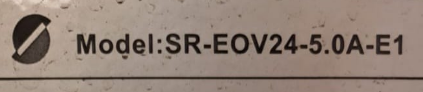
Morning all Just want to get some opinions from those in the industry I have signed an OTP for a property that has solar installed. From everything I can see the inverter is not certified for NRS097-2-1 and does not have a type certification available. It is a Below is an extract from a Ekhurhuleni doc which is attached. Luckily I did include the type certification as a requirement in the OTP and as far as I know a Solar COC cannot be approved for a system not meeting legal requirements. ATM just trying to see how much of an "arsehole" I must be with the sellers. SSEG-General-Information-for-Public-General-1.pdf

-
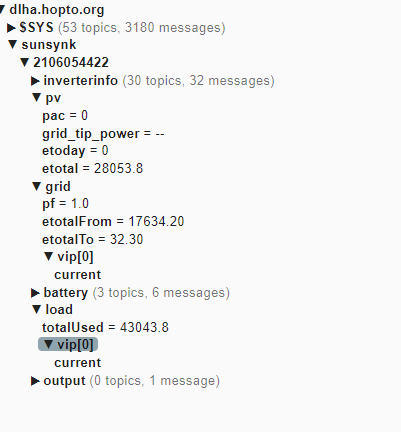
Been looking at how to do this whole thing better Forked off the Sunsynkv3 Looking at pulling all the data into MQTT under HA then setting up a config file to create some auto entities via MQTT with the required info. Problem is my Sunsynk is no more so I cant get data Can someone share their plant to mine under [email protected] So Far :
-
I have to agree on this or if you have to use : GitHub - martinville/solarsynkv3: Integrate your Sunsynk account with Home Assistant for real-time solar energy monitoring. Track power generation, battery storage, and grid usage while enabling smart automations and custom alerts. Optimize energy efficiency, reduce costs, and stay in control with seamless remote access and intuitive dashboards. They took it to where I wanted to, but didnt have the time to invest If I ever got sunsynk again I would go direct. I created something that was needed at the time, but there are far better solutions now Even Solar as a one in all solution I now realise I can live without In a rental. Have access to a small solar install that basically powers lights. Geyser/Stove etc are all on Gas. Keep a 5kw battery pack for work stuff. I can run 3 days on it. Cost was minimal. If I have longish power downs I just charge up the battery pack with the genny. What we realised is if we can cook / shower / work and have lights the rest is ~meh~
-
Saw the problems earlier. I suspected this was going to be coming for a while. I think addons like mine caused problems for them and this is their way to remove them Sunsynk as a brand with their Crap support is running their brand into the ground
-
-
I really dont mind if you fork it :) I just dont have time atm with my other activies to really work on it
-
-
I have access to my sunsynk account. Will be enough to check logins etc. Just a matter of finding time to find a way to do the same in node red. Main problem is trying to fnd equiv functions in node-red
-
Will mull over this. I dont actually have a sunsynk system anymore so will need to setup a vm again WIll need to see if some of teh key functions you use are available or not in node red
-
If they are prehashing the password instead of sending it in the clear then this addon is going to be dead in the water unless the method and salt they are using can be figured out. I wondered a while back when this was going to happen The orrigional spec actually had a version of this in their design document that was never implemented