
valienté
Members
-
Joined
-
Last visited
-
Very interesting - I looked at most of the forks as the SunsynkV3 did not work for me due to my Inverter Serial Number containing dashes (Not allowed in HA names) Then I fixed that issue and also added MQTT functionality with a PR back to the original repo: Add MQTT discovery support and inverter setting fixes by louispires · Pull Request #76 · martinville/solarsynkv3 Fully optional, auto configured if you have normal HA MQTT!
-
Here is a config for slipx06/sunsynk-power-flow-card Just find your Serial number, find and replace {REPLACE_WITH_SERIAL} with your Serial and it should work: This is a unit I have at a Guard House: cardstyle: compact wide: false large_font: true show_solar: true show_battery: true show_grid: true center_no_grid: false card_height: 800px card_width: 100% decimal_places: 2 decimal_places_energy: 1 dynamic_line_width: true max_line_width: 8 min_line_width: 1 inverter: modern: true colour: '#959595' autarky: power auto_scale: true max_power: 5000 model: sunsynk battery: energy: 7000 shutdown_soc: 15 show_daily: true colour: '#ffc0cb' animation_speed: 5 max_power: 5000 show_absolute: false invert_power: false auto_scale: false dynamic_colour: false linear_gradient: false hide_soc: false show_remaining_energy: true animate: true battery2: energy: 0 shutdown_soc: 20 soc_end_of_charge: 100 invert_power: false hide_soc: false colour: '#ffc0cb' show_remaining_energy: true remaining_energy_to_shutdown: false show_absolute: false auto_scale: true dynamic_colour: true linear_gradient: true animate: true path_threshold: 100 navigate: '' invert_flow: false solar: mppts: 1 show_daily: true colour: '#f4c430' animation_speed: 5 max_power: 2000 auto_scale: false dynamic_colour: true load: show_aux: false show_daily: true animation_speed: 5 max_power: 5000 additional_loads: 0 load1_icon: '' load2_icon: '' dynamic_colour: true auto_scale: false invert_load: false dynamic_icon: true grid: show_daily_buy: true no_grid_colour: '#ff0000' animation_speed: 5 max_power: 5000 energy_cost_decimals: 2 show_daily_sell: false invert_grid: false auto_scale: false show_nonessential: false type: custom:sunsynk-power-flow-card panel_mode: false entities: aux_power_166: sensor.solarsynk_{REPLACE_WITH_SERIAL}_smart_load_power pv1_power_186: sensor.solarsynk_{REPLACE_WITH_SERIAL}_pv_mppt_0_power pv1_voltage_109: sensor.solarsynk_{REPLACE_WITH_SERIAL}_pv_mppt_0_voltage pv1_current_110: sensor.solarsynk_{REPLACE_WITH_SERIAL}_pv_mppt_0_current day_pv_energy_108: sensor.solarsynk_{REPLACE_WITH_SERIAL}_pv_etoday day_battery_charge_70: sensor.solarsynk_{REPLACE_WITH_SERIAL}_battery_etoday_charge day_battery_discharge_71: sensor.solarsynk_{REPLACE_WITH_SERIAL}_battery_etoday_discharge battery_soc_184: sensor.solarsynk_{REPLACE_WITH_SERIAL}_battery_soc battery_voltage_183: sensor.solarsynk_{REPLACE_WITH_SERIAL}_battery_voltage battery_power_190: sensor.solarsynk_{REPLACE_WITH_SERIAL}_battery_power battery_current_191: sensor.solarsynk_{REPLACE_WITH_SERIAL}_battery_current battery_temp_182: sensor.solarsynk_{REPLACE_WITH_SERIAL}_battery_temperature battery_status: sensor.solarsynk_{REPLACE_WITH_SERIAL}_battery_status day_grid_import_76: sensor.solarsynk_{REPLACE_WITH_SERIAL}_grid_etoday_from day_grid_export_77: sensor.solarsynk_{REPLACE_WITH_SERIAL}_grid_etoday_to grid_voltage: sensor.solarsynk_{REPLACE_WITH_SERIAL}_grid_phase_0_voltage grid_ct_power_172: sensor.solarsynk_{REPLACE_WITH_SERIAL}_grid_or_meter_power essential_power: sensor.solarsynk_{REPLACE_WITH_SERIAL}_load_total_power day_load_energy_84: sensor.solarsynk_{REPLACE_WITH_SERIAL}_load_daily_used grid_connected_status_194: sensor.solarsynk_{REPLACE_WITH_SERIAL}_grid_status inverter_voltage_154: sensor.solarsynk_{REPLACE_WITH_SERIAL}_inverter_voltage_phase_0 inverter_power_175: sensor.solarsynk_{REPLACE_WITH_SERIAL}_inverter_power inverter_current_164: sensor.solarsynk_{REPLACE_WITH_SERIAL}_inverter_current_phase_0 dc_transformer_temp_90: sensor.solarsynk_{REPLACE_WITH_SERIAL}_battery_temperature view_layout: grid-area: flowJust also a side note, this is from the MQTT sensors where I removed the V3 but if you want to use the normal sensors, you can ALSO find and replace solarsynk with solarsynkv3

-
Awesome integration! I made some optional changes to the Add-on - Add MQTT discovery support and inverter setting fixes by louispires · Pull Request #76 · martinville/solarsynkv3 This gives some flexibility to these Sensors!

-
-
Can confirm, both the new and the old method are working again. They are probably going to remove the old method, thus the new method should be worked on in the meantime.
-
-
Seems like it died this morning... Doing some investigations, manually logging into https://api.sunsynk.net/ there are 2 changes that I am seeing: URL changed from https://api.sunsynk.net/oauth/token to https://api.sunsynk.net/oauth/token/new Payload password seems to be some kind of hash: {"username":"[email protected]","password":"v4o9WZhlL5UI8dyq7Qt46+tubAYsPssTiBgw8wS8UR2K99fRI8srmaGP1INp5uoZj+xSIZbB96apbeEqVuta45yNmvGj8gSdPiN72Dej0cDv37lo4xHS3IV5KBVo8KOYMFXsNG50JL5nBOUlXsnPE+a2F9jMAUZBgKHo0wL4TQ1lmmG/pGPNlBBPK/frfGRmfnzcfUSY2+/UEHOYj2OF9nI2/qgohTN/nHB6FSyNowO2WhCnSmg1UVksWU0OueVxcE0oiRZfm52gCbiAK1TM8iA9MxPhBsk617kaGJF0dNV7pvxrKTn4ybeCrZSxLfW6FFUcwVO8l3InfvmdRXKoPcCuqSI8uYX3QQPRaVwcA+j3a9g28/Fq0kf/d7ZWKlauzKwJCZxhOgoqOckJ5KjuI46364bef2UG+7/DfrPajjttgfHCv4wRBlnas02dgqXWvY1ISydcivh35Dyjp7Y8ioW5W2KECmKJ/pcXvnD7NAF5Hyx8TJK9S8yqyOfx+SwgwukZcUse/YU6es7D0koAAjqymbwbFky/FKBg3owzV0xLgXZs+4Awq9u8pl2szGIiQQV5VYjBBDVMxM/tIW8quRfzskj9IUM/WOMSpCSN8XUFJ9EVkxybprVYDNjEA2RtVJ8dehc=","grant_type":"password","client_id":"csp-web","source":"sunsynk"} This hash password changes every time, so using this static value does not work - I suspect we will have to manually calculate the hashed password the same way they do it on the site.

-
That is a fantastic install! I don't have the answers you are looking for. However, I am looking at installing this exact same setup inside a Guard House to run the Cameras, Gate Motors etc. How are you finding the Inverter? Does the Wifi Dongle work nicely? Any other feedback on Inverter and Battery? I will also be adding 6 x 550w Solar Panels - Hope to be off-grid with this setup.
-
-
I've had my AM-2 installed for exactly a year now. After delays with the Cloudlink only being delivered 6 months after the battery purchase and install, I finally managed to install it today. My battery was always connected directly via CAN and LiBMS reported everything in order. After installing the Cloudlink, LiBMS now shows SOH as 92% and yest this morning it showed 100% Battery has never been discharged to lower than 20% But yeah the Web interface and App is total shit.
-
-
-
-
🎉🎉 FINALLY got an Update 🎉🎉 About 1 hour after posting yesterday, I lost power and Inverter Alarm going off: BMS Communication Fault - Checked Batteries and all was good. Switched everything off, Batteries and Inverter, then all back on again. Device Started and was up for 2 minutes and another fault Tz_Dc_OverCurr Fault. About a minute later everything came back on and I looked and noticed the firmware has been updated Not sure if I was just on a very old version but I lost power completely while they were upgrading it. No warning at all and I didn't know it was happening at all until after it restarted...


-
I've tried requesting an update multiple times but nothing... Still on: 8kw SW Ver.: M 6.0.0.5 / S 0.0.0.0 / C E.4.1.C
-
-
I have requested a Firmware Update twice, but still not seen anything... 8kw SW Ver.: M 6.0.0.5 / S 0.0.0.0 / C E.4.1.C
-
 Yellow Measure reacted to a post in a topic:
New Hubble Lithium Batteries AM-2 PLUS, AM-5 5.12kWh & AM-10 10kWh
Yellow Measure reacted to a post in a topic:
New Hubble Lithium Batteries AM-2 PLUS, AM-5 5.12kWh & AM-10 10kWh
-
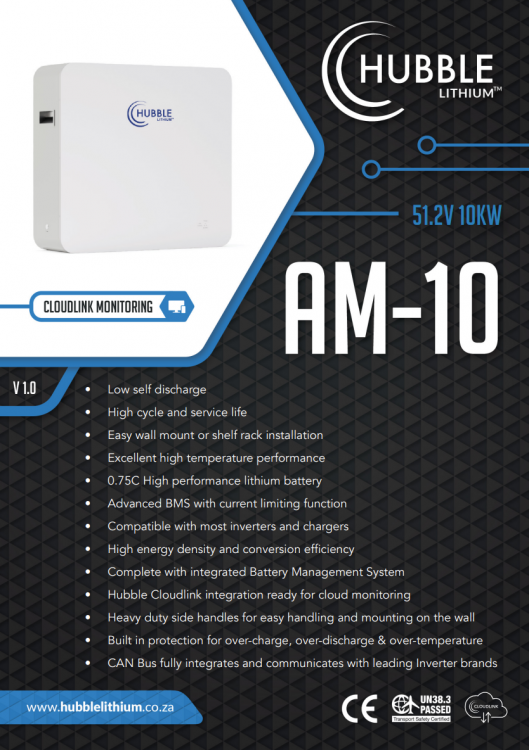
Was just browsing the Hubble Lithium | AM Series website and saw a Coming Soon section AM-2 PLUS - No info on this AM-5 5.12kWh: AM-5 Spec Sheet AM-10 10kWh: AM-10 Spec Sheet

-
The newer Sunsynk inverters come with a Synsunk dongle instead of the older Solarman dongle. This obviously does not work with Solarman.
-
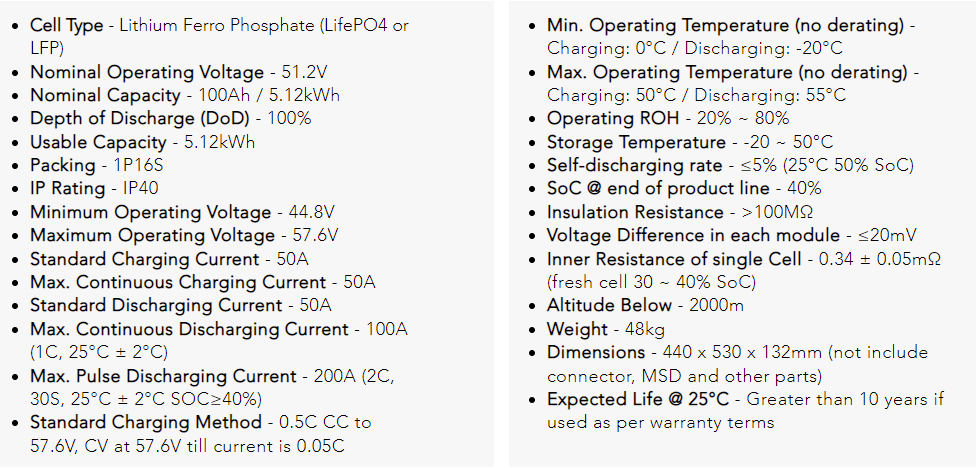
From the website:Lithium Batteries | Sunsynk Max. Continuous Discharging Current - 100A (1C, 25°C ± 2°C) Max. Pulse Discharging Current - 200A (2C, 30S, 25°C ± 2°C SOC≥40%)
-
-
-
Good day, Can anyone assist with mounting my AM-2 Batteries inside a Server Rack? The photo below comes direct from Hubble's website and even the specs say they can be wall-mounted or Rack Mounted. I have contacted Hubble themselves and they referred me to Voltex | Your electrical connection Contacted Voltex and they also have no idea how to mount these batteries. Any guidance and or assistance in the right direction please? Anyone else have these rack-mounted?

-
-
I briefly used Wireshark back in the day, but that only gave info on the Device it was running on... How would one get the info from the Logger running on the network?