


Maffs
Members
-
Joined
-
Last visited
-
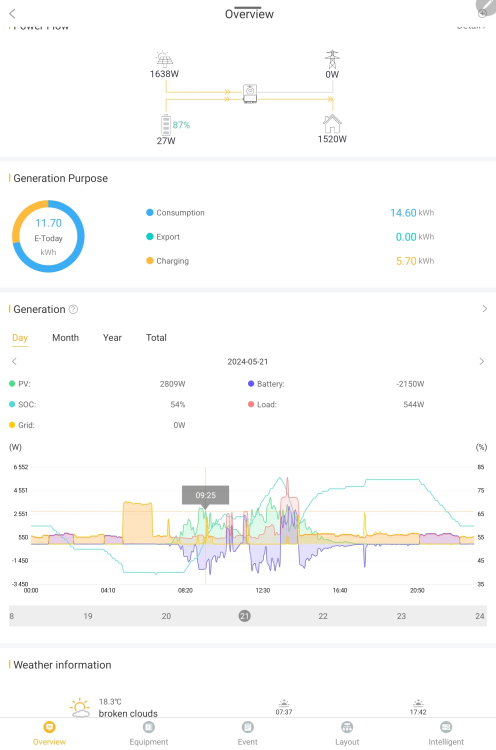
Hi Vaal, Sorry for my belated reply. Herewith stats on a relatively sunny day. In hindsight I am not sure that I should have bought the second battery. My saving was around 50% with one 5kw battery and with two batteries I save about an extra 3000w per day. Hardly worth the investment in my opinion.
-
Thank you GreenFields, much appreciated!
-
Thanks JacoG, much appreciated! I have two Sunsynk 5.32 batteries. Do you also force your SOC back up to 100% using the grid if need be? I have noted that some guys on the internet have their SOC set to a maximum of 30% which makes sense as the solars will fill the batteries to 100% if sunlight allows. Then again once loadshedding returns we may want to ensure that we go back up to 100% around 18:00 and limit drain throughout the night but it does sound as if your average consumption is not as high as mine namely around 700w per hour. I am still trying to find the cause because it seems to high. I will adjust my geyeserwise as it seems an easy win. Thanks again,
-
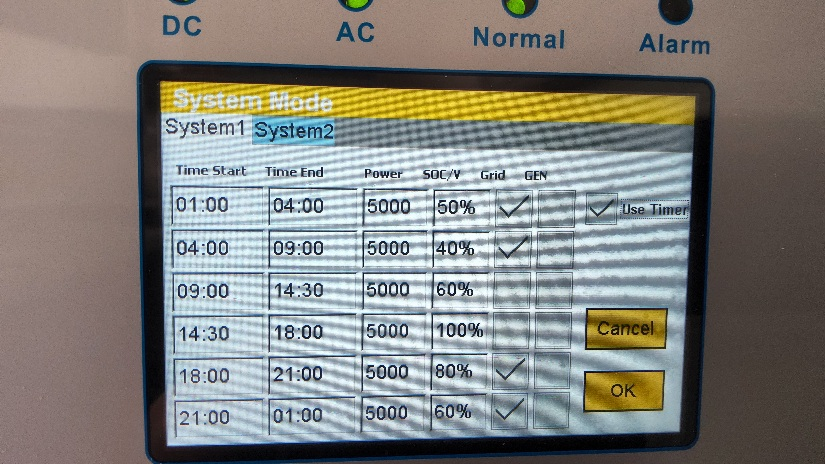
I would like to know what would be the most economical system mode settings for the above setup. I have 12 x 550w panels, north facing, and my average evening use is 650watt. I have a geyserwise sysetem which kicks in between 05:00 - 07:30. My daily grid consumption still average between 8kw and 11kw. Used to be 25kw -30kw before but the installation. Any input would be much appreciated, sorry if the question has been answered. I did do a search before I posted🙂 Here is a picture of my current settings. Any input would be much apprectated. Thank you,
-
Maffs joined the community
-
Has anyone been able to fix the E7 error.
