


Alexyss
Members
-
Joined
-
Last visited
-
-
-
-
-
-
Now, i sayng 64/61 firmware its OK dont have problem with 90V but, for testing new version 64/62 i need bad time like rain, more cloud, this big condition for testing one new firmware, one sunny day all firmware working good, but one cloud day and more like rain its perfect day for testing like aim posting one youtube heer:
-
Rezolved problem with 90V i have now version firmware 64/61 and @Columb posted new version 64/62 heer:
-
Now i need bad time like rain for testing, thank you!
-
Yes, now i need bad time like rain for testing, tks!
-
-
-
You have heer for 8KW firmware
-
Verifici dimineata la rasaritul soarelui cat iti sta in 90V, daca ramane 25 min maxim poate si mai putin cum este la versiunea 64/61 si apoi urca brusc spre 300V atunci este OK, asta ar fi un aspect, al 2lea aspect ce trebuie sa il verifici este daca pe timp inorat respectiv ploaie/lapovita intra in "protectie" si trece iar la 90V, la versiunea 64/61 intra in protectie pe 90V pe timp prost dar iese imediat dupa circa 2 min si ramane sa lucreze normal, abia dupa ce testezi ceea ce am spus mai sus vino si cu un reply in care sa expui pas cu pas cum reactioneaza atat la rasarit cat si pe timp prost, cer inorat, ploi etc, succes!
-
Unfortunately, I cannot try, if the result is not good, I will stay with this version, not having the 64/61 version available to return to safely!
-
-
I dont have this version, for a few days it was available here (5 mai 2023): http://ftps.voltronic.com.tw/E/Easunpower-93CB312922AC474787C6/ But it was deleted, I didn't keep the file, I just installed the version a few months ago and that's it. when I also made this video:
-
Yes i tray and i install 64/62, result 64/08.... No, i dont have acces to 64/08 and i dont want this version beacose have 90V bug For the moment i use version 64/61 its OK no bug 90V
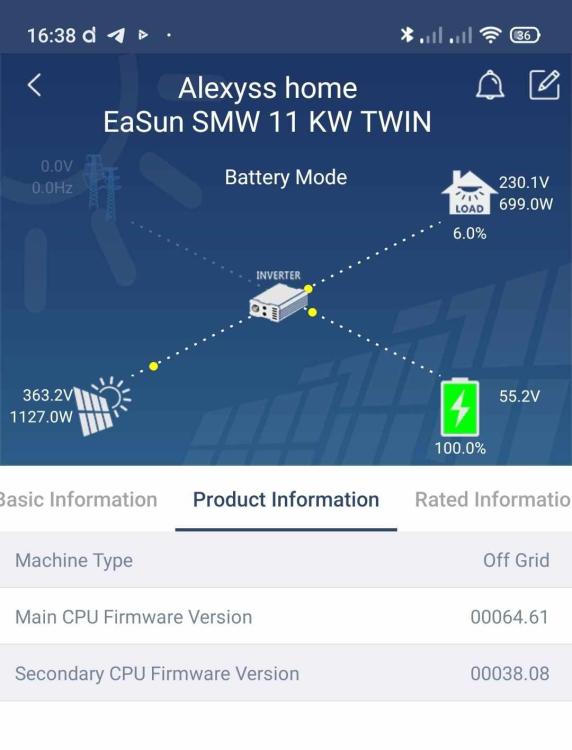
-
Nu este buna, te intoarce la versiunea de baza 64/08...
-
Din pacate versiunea care a fost disponibila pe net a fost eliminata, nu se stie motivatia, iar cei care am apucat sa facem trecerea la noul firmware care elimina bugul de 90V nu am pastrat fisierele, sunt multi care sunt interesati, sa apara o noua versiune dar din pacate nu este nimic disponibil....momentan!
-
Thank you sow mutch @Coulomb
-
-
-
Thank you for your answer @Coulomb
-
Hi, i have this inverter Easun SMW Twin 11KW, and have problem with 90V in morning its stuck in 90V.... Actual version firmware Main CPU its 00064.08 and Secondary CPU firmware version its 00038.08 Thank you for your answer!!!
-
@mihaigsm2003 Firmware-ul pe care l-ai atasat in postarea de pe acest forum rezolva problema la Easun SMW Twin cu cei 90V? si daca da, ce versiune de firmware va aparea la invertor? eu acum am versiunea 00064.08 si ramane blocat pe 90V dimineata Multumesc


