


nikitto
Members
-
Joined
-
Last visited
Everything posted by nikitto
-
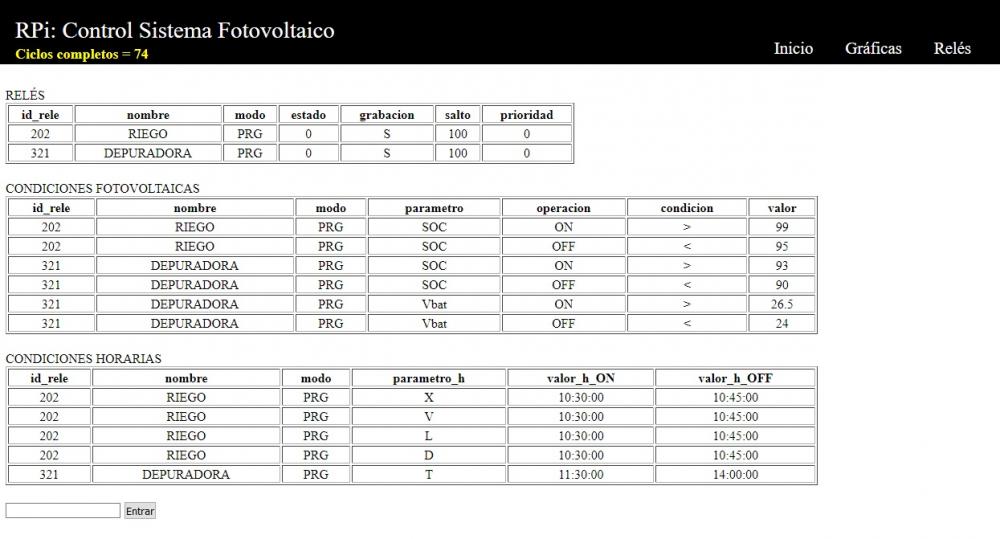
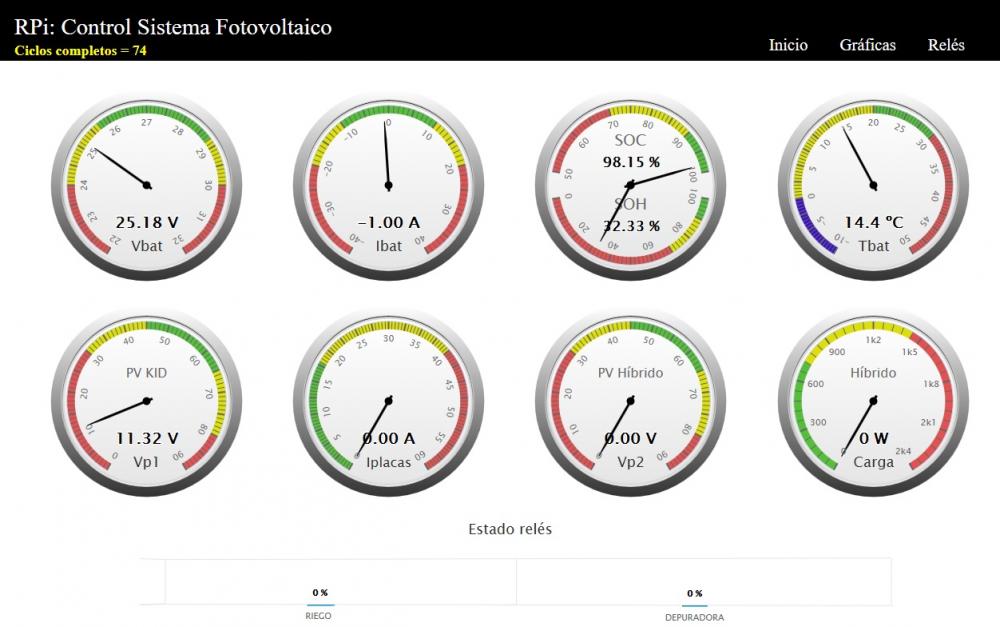
Yes, we're using MariaDB (mySQL). Everything is in local, although it's ready to publish data to pvoutput.org We've got a page in FB if you want to know more things about this project: PVControl+ https://www.facebook.com/pvcontrolplus You can checkout the system, for example, in this web: http://jordi.ddns.net/ Or in my personal web: http://asako.sytes.net/ There is an image of the system here: https://adnsolar.eu/viewtopic.php?f=20&t=445 Allways look for the last update. If you've any doubt or question, please do not hesitate to contact us (in English, of course). We're interesting to have an English version. So, you can help us to get it. Greetings. P.S.: Now, it's ready to work with SONOFF relays with Tasmota, too.

-
Hey everyone. We've worked a lot with this code, so in this moment we're able to send large commands, over 8 bytes. Tested in Axpert and Infini. You can checkout the code here: https://sourceforge.net/p/pvcontrol/code/ci/master/tree/hibrido.py
-
I've got a mix with Python, microPython (nodeMCU), PHP, HighCharts, MQTT, MySQL, Telegram, ...

-
You don't need to change the directory permission, just use 'sudo'
-
Try it again or maybe this command doesn't exist in your inverter. $ sudo python hibrido_test.py QMOD
-
Yes. $ sudo python hibrido_test.py QPIGS QPI QMOD QPIRI QID ....
-
I attached the file in the post before.
-
We're using module timeout_decorator to exit from definition if there's some problem. You've to install these programs: $ sudo pip install crc16 $ sudo pip install timeout_decorator To run program: $ sudo python hibrido_test.py cmd1 cmd2 or $ sudo python hibrido_test.py cmd1 cmd2 -R You can send one or more commands at the same time. Also, with -R (repeat these commands every few seconds) As I said, you don't need to setting port or CRC. hibrido_test.py
-
I haven't got any problem reading my inverter. You can try our script (hibrido_test) or our APP (Voltron APP). You're free to test both. If you've any problem with language, leave a comment. The script auto detect port (/dev/hidrawX) and CRC In this case (alpha version), you need to edit voltron.py and modify the port.
-
It looks very nice. Congrats! Are you thinking to implement any kind of control ? Perhaps using Telegram to get some information about system or connect a relay.



-
An example: And the code: #!/usr/bin/python # -*- coding: utf-8 -*- import sys import crcmod import time comando = 'QPIGS' xmodem_crc_func = crcmod.mkCrcFun(0x11021, rev=False, initCrc=0x0000, xorOut=0x0000) def calc_crc(comando): global crc crc = hex(xmodem_crc_func(comando)) return crc # calcular crc comando = raw_input("Enter command (qflag, qid, qmod, qpi, qpigs): ") comando = comando.upper() if comando == 'QPIGS': nbytes = 110 elif comando == 'QID': nbytes = 18 elif comando == 'QFLAG': nbytes = 15 elif comando == 'QPI': nbytes = 8 elif comando == 'QMOD': nbytes = 5 else: print 'Command not found' sys.exit(0) calc_crc(comando) print('Command='), comando print('CRC='),crc crc1=crc[0:4] crc2=crc[0:2]+crc[4:6] crc1=int(crc1, base=16) crc2=int(crc2, base=16) fd = open('/dev/hidraw0', 'r+') fd.write(comando+chr(crc1)+chr(crc2)+'\r') r = fd.read(nbytes).encode('string-escape') s = r.split("\\") print s i = s[0][1:].split(" ") print i fd.close() Thats all. I don't need any more to use in my photovoltaic control system: http://asako.sytes.net
-
A similar way to get data, can be: $ sudo python >>fd = open('/dev/hidraw0', 'r+') >>fd.write('QPI\xbe\xac\r') >>fd.read(8) # bytes to read, also posible get 110 bytes >>fd.close()
-
Hi all, this is my first post in this forum. Thanks Gnome for your effort. I got your code (Python) and I begun to work with it. I installed crcmod library for python (https://pypi.python.org/pypi/crcmod) and now, I can send every command with its CRC. import os, sys import crcmod import time comando = 'QPI' xmodem_crc_func = crcmod.mkCrcFun(0x11021, rev=False, initCrc=0x0000, xorOut=0x0000) def crc(comando): global crc crc = hex(xmodem_crc_func(comando)) return crc # calcular crc crc(comando) print ('CRC='),crc crc1=crc[0:4] crc2=crc[0:2]+crc[4:6] crc1=int(crc1, base=16) crc2=int(crc2, base=16) fd = os.open('/dev/hidraw0', os.O_RDWR | os.O_NONBLOCK) os.write(fd, comando+chr(crc1)+chr(crc2)+'\r') time.sleep(1) res = os.read(fd, 5) print res os.close(fd) In this momment, I'm working with os.read() (almost finished). I'll publish the code soon.


