Bouncy
Members
-
Joined
-
Last visited
Everything posted by Bouncy
-
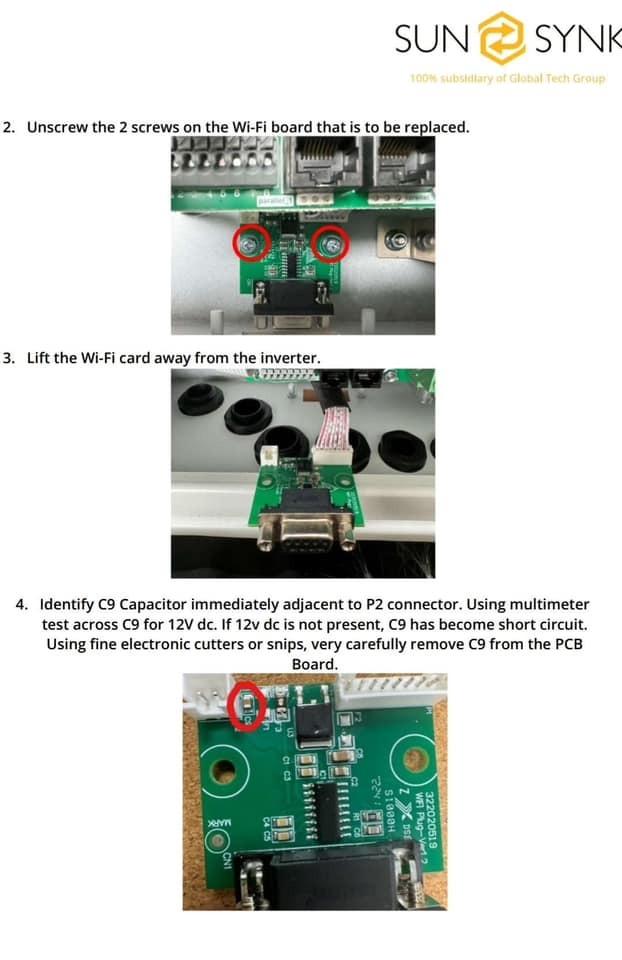
Ooh, there’s a easy fix for it Got it off the sunsynk WhatsApp group ( apologies for the very very late reply) There’s is a small smd cap that goes faulty and shorts to ground, you can literally just snap it off the board, and it works again 😂 Attached is the document

-
Thread necro… So I have 3 am5 batteries , been running since around September 2023 , paired with a sunsynk 5kw inverter, Discharging to 40% ( don’t really need to go more) and not a days hassle with it. The inverter says ( although I wonder if it’s even possible) the SoH is still 100% Batteries are on 332 cycles according to solar-assist
-
So my serial port died last night i primarily use solar-assit, and it stopped updating during the night, i powered down the whole system,. put in the sunsynk dingle, powered back up, but no luck, its dead as this country. I have a 5kw Sunsynk, wonder if its possible just to buy that little serial board? its 4 screws and a cable not brain surgery to change, i really couldnt care if its a warranty item or not, just want the quickest path to fixing this
-
i really like solar-assistant, my only gripe is the lack of notifications, its been "coming next month" for a good few years now