


GPvdB
Members
-
Joined
-
Last visited
Everything posted by GPvdB
-
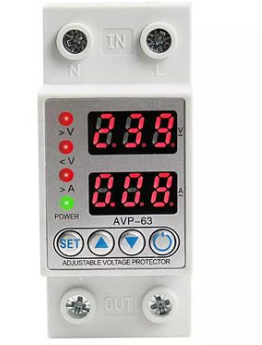
Yes, that was my first change I made - Setting 03 to UPS (input 170 -280V). I just woner why they didn't give me a choise to set it to what I want. I am now investigating devices that switch off bad mains within your own setting range and return grid power only after it is back within your setting limits. So cheap it should be part of the inverter? R 375 (TakeAlot) Description Specification Rated voltage :220V Operation voltage range: AC80V~400V(Single Phase) Rated frequency:50Hz Rate current:1A-63A adjustable Under-voltge action cut-off value: 140V-210V Over-voltage action cut-off value: 230V-300V Uand Range of time delay: 1s-600s Voltage measurement accuracy:1%(Not exceeding 1% of the overall range) Rated insulation voltage: 400V Output contact: 1NO Protection degree: IP20 Or another one:

-
Interesting - thanks. Marketing brocures tends to tell only the nice side of a product, knowing that not everybody has the knowledge or experience to ask the right questions in advance, only to then discover the bad part of the product by accident when it is to late. To me as a retired mechanical engineer I was always under the impression that a pure sine wave inverter was disigned to provide clean on spec power to protect computers and sensitive equipment against bad power. But the loophole is certanly that it must run only from batteries and not have direct Eskom input as an option? Sad but true!
-
I had a symilar problem, but even a 32 min delay would not solve my problem. I was really under the impression that my Inverter - with enough battery backup (10kW), is the best solution to bad power inputs and to protect all appliances (fridges, computers etc. downstream with clean stabelised pure sine wave power within it's specs. It was late night and my system was setup as SUB, and in Batt-mode at that stage because of the "load shedding". The switch back to Line-mode after Loadshedding was a mess, and Inverter settled in Line-mode, but giving me between 90 and 110V on the Output side to my home. Only my 4W LED lights remained on. When the TV switced off, I rushed outside and switched Eskom OFF, and forcing it back to Battery-mode. I understand that the inverter (because of the low power input settings of 90 - 280V) was allowed to switch back to line mode, but the least I expected was that: 1) The inverter should either stay in battery mode where it had enough power to supply to the house. 2) or, simbly blend in some battery power to conform with the output specs of the Kodak OG-7.2 (specified output voltage of 230V +- 5%). Do I maybe miss something? Spending all this money and still have the same risk of damaging electronics, fridges etc doesn't make sense. If this inverter really can't supply clean power reliabilly up to spec (or rather nothing at all if in trouble), then what else will do the job. Any suggestions would be appreciated. Regards, Gerhard
-
Thanks for your reply Coulomb, I was really under the impression that my Inverter - with enough battery backup (10kW), is the best solution to bad power inputs and to protect all appliances (fridges, computers etc. downstream with clean stabelised pure sine wave power within it's specs. It was late night and my system was setup as SUB, and in Batt-mode at that stage because of "load shedding". The switch back to Line-mode was a mess. I understand that the inverter (because of the low power input settings of 90 - 280V) was allowed to switch back to line mode, but the least I expected was that: 1) The inverter stay in battery mode where it had enough power to supply to the house. 2) Or simbly blend in some battery power to conform with the output specs of the Kodak OG-7.2 (specified output voltage of 230V +- 5%). Do I maybe miss something? Spending all this money and still have the same risk of damaging electronics, fridges etc doesn't make sense. If this inverter really can't supply clean power reliabilly up to spec (or rather nothing at all if in trouble), then what else will do the job. Any suggestions would be appreciated. Regards, Gerhard
-
Thanks Jacques. I just wish a could find a way to set the limits from 200V to 260V or something alike.
-
Thanks for all your help and info. I am new in electronics and definately can't do a line of programming. I am a retired mechanical design engineer and just want to keep the lights on. I will definately try MultiSIBControl as I can see that WatchPower is very basic and slow on the phone App. I like to understand what I do, but lack a few skills and a lot of tools. 🤨
-
I have the Kodak OG-7.2 inverter, 4360W PV panels, and recently had a second Freedom Won 5 kW e-Tower battery installed to make a total of 10kW Batt power now. On 13 July 2023 we had a proper '"Brown out" in Montagu when power was trying to restore after a 4 hour loadshedding episode, with power reading from 90 to 110V for about 32 minutes (according to the alarm report from my neighbour). My concern is that my Inverter didn't know what to do, as the lights was dimmed and then finally the TV switched off - only the 4W leds stayed on. The Inverter switced over (on and off) a few times and settled on City Power AC (90-110V) instead of staying in Batt-mode - it was in SUB mode. I realised something was wrong and manually switched off Eskom (mains trip) and set the Inverter to Batt mode (SBU) where all was fine. I saw the street lights was also dimmed and eventually was shut down until Eskom was repaired. I stayed on SBU mode until the next morning because I didn't trust Eskom when I go to sleep. My power consumption was only about 750W during the loadshedding before the switch-over attempt. According to my inverter Setting-03 the AC input default was set on "Appliances" which is 90-280V. Surely the Inverter was supposed to not switch back to Line-Mode unless it can add power from the battery and give me an output of say 230V (there was at least 60% batt power available). It did report a "Warning Indicator 10!" on the display (Output power derating) but I was just focused on getting Eskom killed so didn't count beeps or anything else. My interim solution was to change the Setting-03 to "UPS" which is 170-280V (see picture). That is the only available setting (option) if I am not miataken. It could have damaged a lot of my domestic equipment and I would like some advice on how to stop this from happening again. No problems or errors up till now. Regards, Gerhard

-
Setting 13, in my Kodak 7.2 User Manual states 54V as the default for "Setting voltage point back to battery mode". In the top line in small print it says "Available options for 48V model:" (meaning the 48V battery- as opposed to 24V batteries). In the bottom line they state "Setting range from 48V to 62V". Maybe thats a reason for them not to hold you responsible?
-
Thanks a lot Flouw, I found the menu hidden behind >> meaning it was minimised on my taskbar/tray. I had to set it to show all "Icons" in that tray, so I am one step futher now. There was another 5 icons hiding there wich I didn't miss at all, but all is showing now. 😀
-
Thanks, I got hold of an old phone charger cable and plugged in on the inverters small 'USB' port and managed to see the data on my laptop. I still havent see and don't now where to find the "the system tray"? Hi All, This is my first post so please bare with me. I see I have a lot to learn a lot about PV systems and all the App's and software supporting them. After many late nights I managed to get the "WatchPower Management Software" running as "administrator" on my Windows 7 home Laptop. Opening the program from the WatchPower icon on my desktop, it opens the main "dashboard" and this is where it ends. Trying to follow the help file failed on page three as it doesn't show the menu as per picture below (Diagram 3-2) I can't configure anything, nor does it pick up my wifi router that is already linked to the Inverter wifi module and working on my phone App. Any help or suggestions would be greatly appreciated. Regards, Gerhard

-
Hi All, This is my first post so please bare with me. I see I have a lot to learn a lot about PV systems and all the App's and software supporting them. After many late nights I managed to get the "WatchPower Management Software" running as "administrator" on my Windows 7 home Laptop. Opening the program from the WatchPower icon on my desktop, it opens the main "dashboard" and this is where it ends. Trying to follow the help file failed on page three as it doesn't show the menu as per picture below (Diagram 3-2) I can't configure anything, nor does it pick up my wifi router that is already linked to the Inverter wifi module and working on my phone App. Any help or suggestions would be greatly appreciated. Regards, Gerhard
