TenMilSocket
Members
-
Joined
-
Last visited
Everything posted by TenMilSocket
-
Mosfets or IGBTs but more likely Mosfets. The true definition of "dynamite comes in small packages". Usually a few connected in parallel to share the total current being conducted. Pretty amazing the amount current they can handle for their physical size.
-
Yes, balancing works on a similar principle and 100% SOC is safe way to ensure it does get balanced hence their warranty statement which make it much simpler to understand for the layman. (If only more things where written this way, the world.....) Unfortunately not all BMS modules are equal🙃 and some start balancing based on a trigger voltage per cell which in many cases is a completely arbitrary. Some start at close to 100% SOC per cell (3.55 - 3.6V) where others start much earlier (3.20 - 3.30V) which could be anywhere from 30% to 70% SOC. (Heaven forbid they try to balance all the time😟) If you look at the Voltage vs SOC curve for a LiFePO4 cell it is very much flat through most of the cell charge and discharge phase which makes it impossible to estimate SOC based on cell voltage hence the implementation of counting the AmpHours instead. The problem with Ah counting is if the reference point shifted the SOC is wrong until the pack is recharged to 100% in order to reset it. But I digress. I think that my Volta BMS was sleeping for the time it was in shipping/sitting at a warehouse until I bought it. The parasitic drain of the BMS could have discharged the cells a bit while the BMS was not keeping track in sleep mode. So when I started it up it remembered it was at for example 60% SOC when it went to sleep but now the cells were lower. Hence you should charge to "Full Voltage" to ensure the SOC is reset But it is a far fetched idea... (I need to learn to not write essays) I have managed to set up communication with the BMS to some PC software a little while back. I can try to do some testing when time permits to see when balancing happens, when SOC resets, etc. (See Volta Stage one BMS Software topic on this forum for more info)
-
I just realized my previous post might not be of much help to your situation. Any possibility of the supplier providing assistance? It sounds like it could be dead cell or loose connection in the battery pack that forced the BMS to shut down (51.9V to dead is very dramatic) Opening the battery case and measuring each cell to see if one has died indeed is my backyard solution but is very dangerous if you do not have the experience or equipment to do so safely. Also no more warranty......
-
This is going to be a long winded so apologies in advance. I bought a 5kW Deye and Volta Stage 1 back in July 2023 and set it up as a UPS system. Followed all the manuals I could find on both items when commissioning. Battery comms to inverter all worked. I set mine up using Sytem Work Mode to charge from the grid late at night (21:00 to 01:00) and only to 80% at the time because "I did not want to stress the battery". Few loadshedding cycles(4 or 5) later inverter shuts down with Low Battery Voltage error 5 minutes into loadshedding. Battery still reported more than 70% capacity on the LiBMS screen so I was puzzled to say the least. Voltage measured at the battery terminals was around 44V(can't recall exact value). After loadshedding I got the battery to charge again. It reported 100% pretty quick but the voltage was not in the correct range and it kept on charging for a while (>2hours) with it reporting 100%. I think my mistake was not charging the battery to "full voltage" the first time I started using it. Let me explain...... I started to dig online as to what the issue could have been and this is my theory. Some BMS modules from China sets the State of Charge (SOC) to 100% when 1 of the cells in the battery pack reaches "full voltage" ie 3.6 - 3.65V for most LiFePO4 modules. It then counts the amps (Ah) leaving the battery pack and adjusts the SOC accordingly. Now if for some reason you never recharge your battery to "full voltage" ie 3.65 x 16(number of cells in a pack) the error in the current measurement of the BMS (yes, there is always an error margin/ tolerance) adds up over time. Example: the BMS might think it only let out 10Ah but actually it was 10.5Ah and then reports a 10Ah equivalent drop in SOC. When it charges up the battery again it only puts back the SOC amount of charge ie 10Ah because that it what the BMS tells the inveter. Over time this error gets bigger until that day where it thinks it is at 90% but actual charge is less than for example 20% and shuts down. In my opinion to avoid this issue one needs to charge the battery to "full voltage" at least once a week/month to get it to reset the SOC counter. This is very tedious and erroneous values in the charging algorithm can lead to very expensive and dangerous mistakes so do not attempt unless you know what you don't know..... Long story short I set the charge on my system to 100% in the System Work Mode to top up the battery daily. It has been behaving so far. I have only recently come across the issue of "SOC drift" on the Volta batteries in the forums so better solutions might already be out there.
-
Great to hear. I haven't been able to pay attention to the forum in a while. Did you manged to get the Stage 4 working as well? Suspecting the bigger BMS's to use another software...
-
-
-
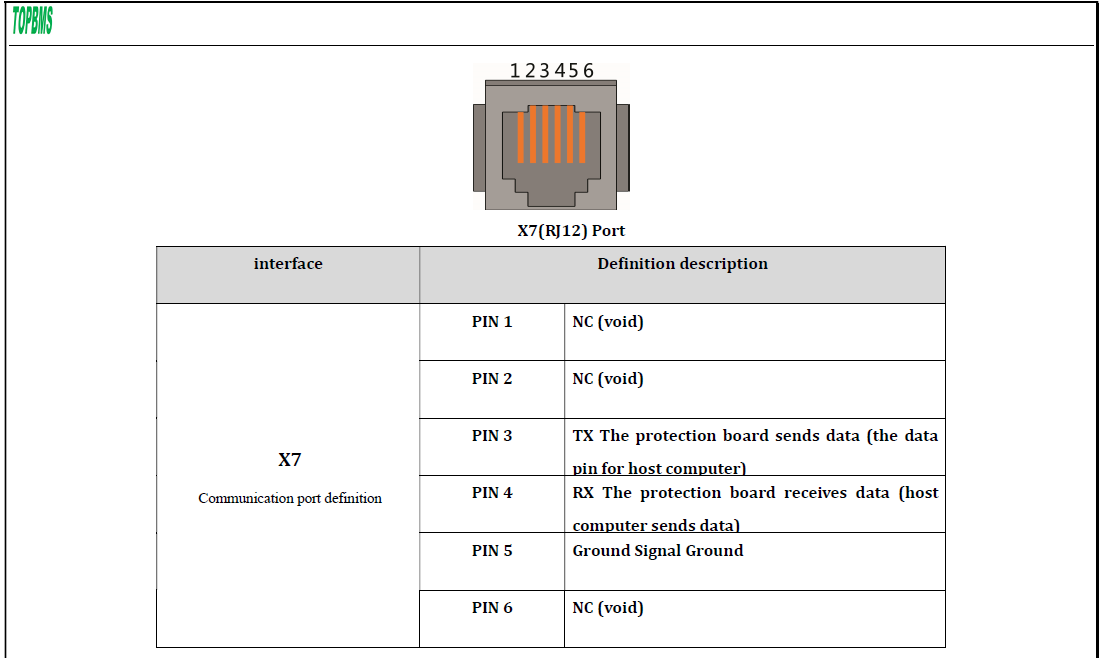
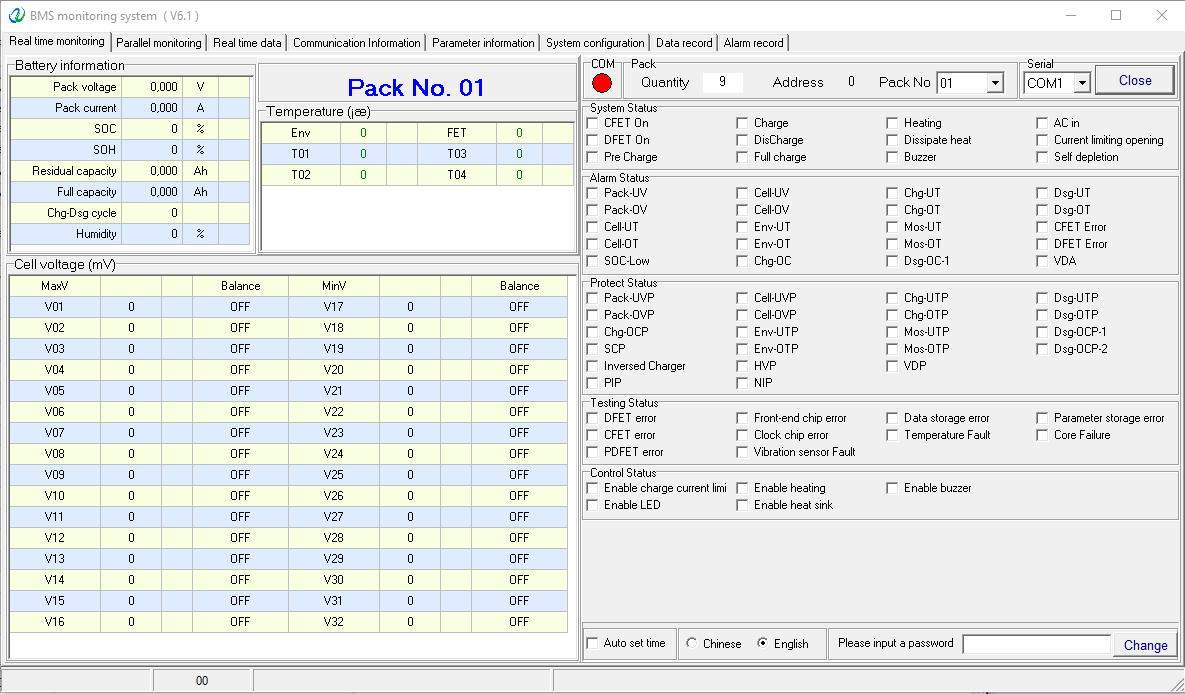
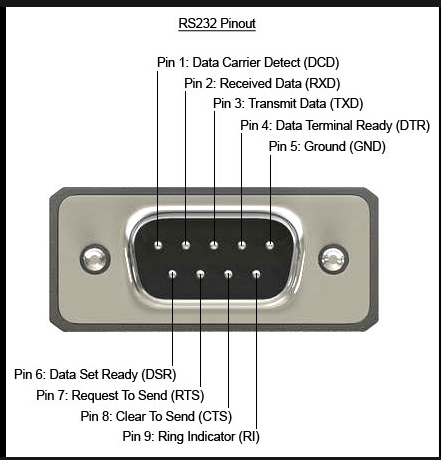
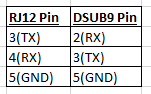
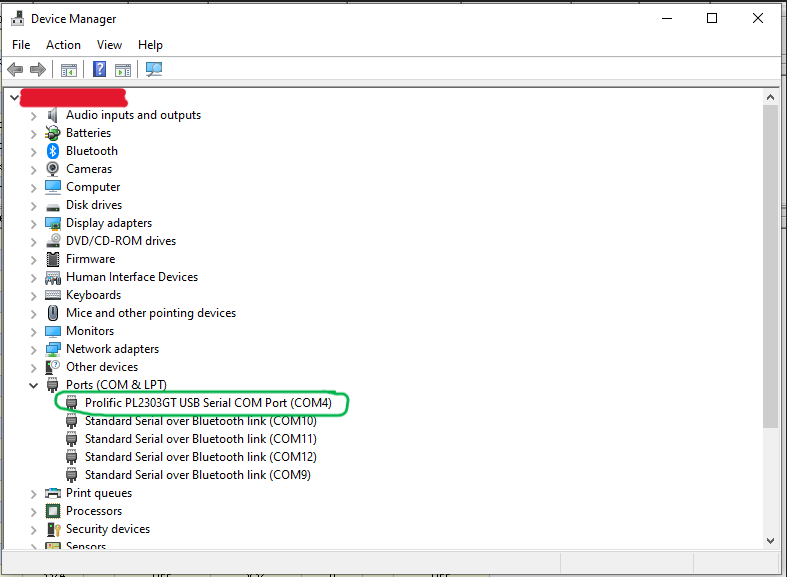
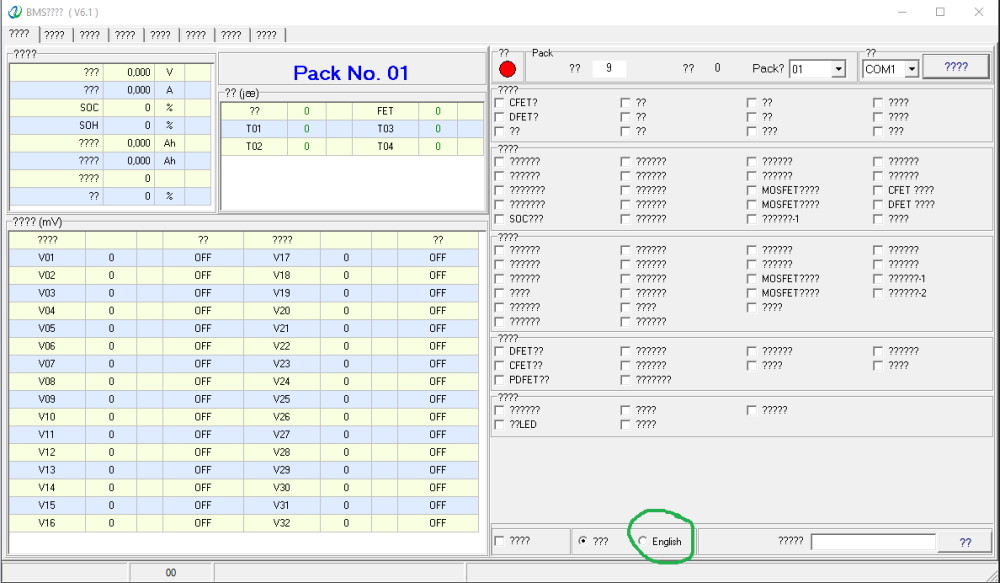
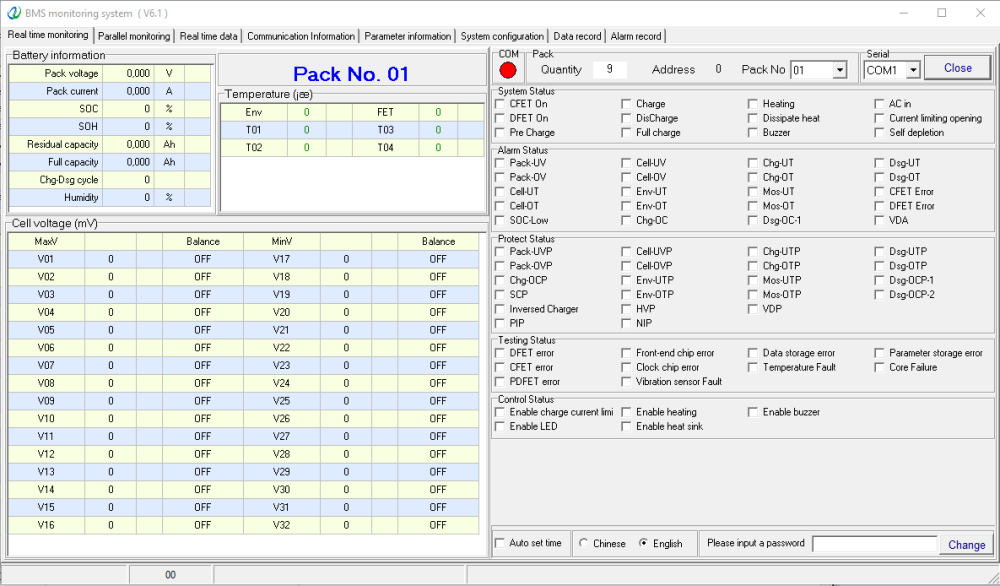
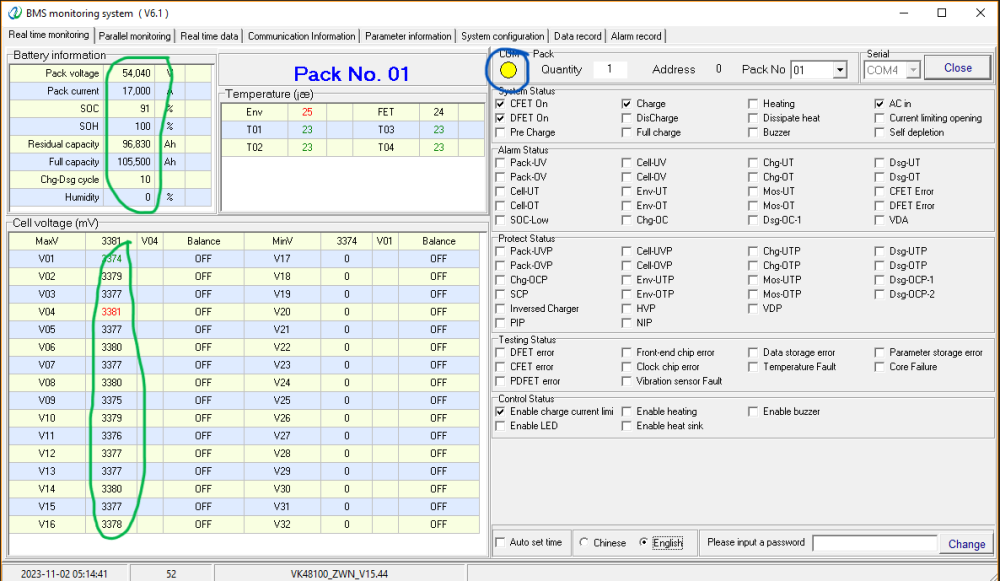
All right, it is late and as usual I poked the bear until it woke up.... Here are my steps: 1. Rig up a USB to RS232 adaptor to connect to the RJ12 port as per the connection information below: Battery RS232 Port My USB to RS232 Adaptor pinout In my case the I had a USB to RS232 adaptor with a D-SUB9 connector as seen above. The connections I made were as follow: Please don't just look at pin numbers as the function is more important than the pin number ie. RX, TX and GND. So if your RS232 Adaptor is different to mine rather use the functions to guide your connections. 2. Make sure the driver is installed for your USB to RS232 Adaptor on the PC you plan to use. Check Device Manager to determine if it is installed and also look at which COM Port number is assigned to the USB to RS232 adaptor (see example circled in green -mine is COM4). 3. Download the TOPBMS 6.1 software from the link mentioned in the thread above. https://www.cleverbms.com/news/76.html Extract the files from the folder downloaded by the TOPBMS 6.1 Link. (Folder name is just a bunch of numbers for me (1688880348148907)... weird. 4. Plug in the USB to the computer and the RJ12 connector to the battery RS232 Port. 5. Open TOPBMS.exe located in the extracted folder.(it takes a moment sometimes to open) If it is your first time opening it, it will most likely look like this with ????????????????? everywhere. Just select English at the bottom of the screen (circled in Green) It now should look like this: 6. Click on the "Close" button located next to the Serial COM window in the top right. Wait for the button to say "Open". now select your COM port Number in the drop down box to the left of the "Open" button (it is the one from Step 2 above - yours will be different). Once selected, click "Open". You will most likely see a message appear at the bottom below the "English" language selection that says "--6 Invalid Data". 7. Input the password in the password box on the bottom right. DON'T press change. Simply hit the ENTER key on your keyboard. The Password as per the VOLTA Manual is "green1234". 8.If all went according to plan, the screen should show the battery information circled in green below. The COM light (Blue circle) should also flash GREEN/YELLOW indicating that the communication with the BMS is active. Lastly for those interested the RS232 Baud Rate is 9600bps by default. Hope this helps PLEASE NOTE THIS IS JUST A GUIDE ON HOW TO CONNECT! I AM NOT RESPONSIBLE FOR ANY CHANGES MADE TO THE BMS SETTINGS AND THE CONSEQUENCES THEY BEAR! PLEASE DO NOT PLAY WITH THE "LITHIUM OVERLORDS" AND SUFFER THEIR "WRATH OF FIRE!" Also your warranty might be void (don't quote me on that).

-
Any luck getting Comms to work with the Volta Stage 1?