


KobusK
Members
-
Joined
-
Last visited
Everything posted by KobusK
-
I will ned to get it from the APP. Just waiting for the latest polling.
-
Now it feeds into the grid

-
If i tick it the pv works
-
Same problem. The only way Incan “get the PV” to work if i use solar sell. My prepaid is billing it😡
 Still not using the PV
 I have changed the max sell power and it still does not pull from the pvChanged value
 Thanks removed
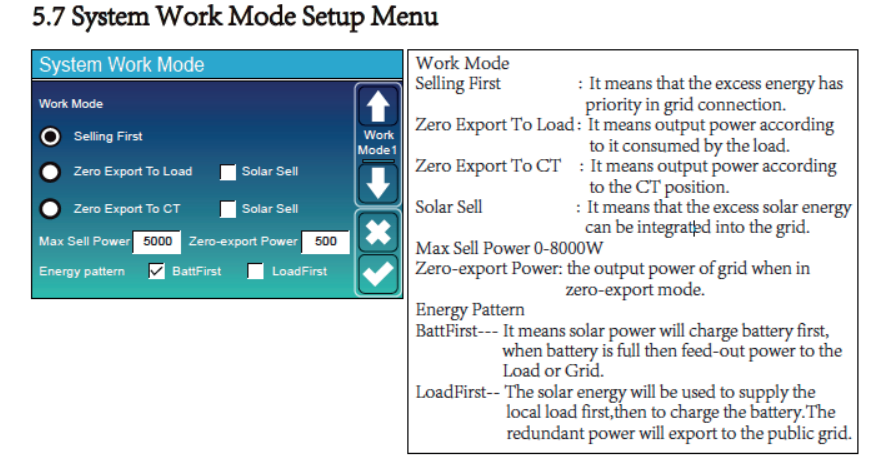
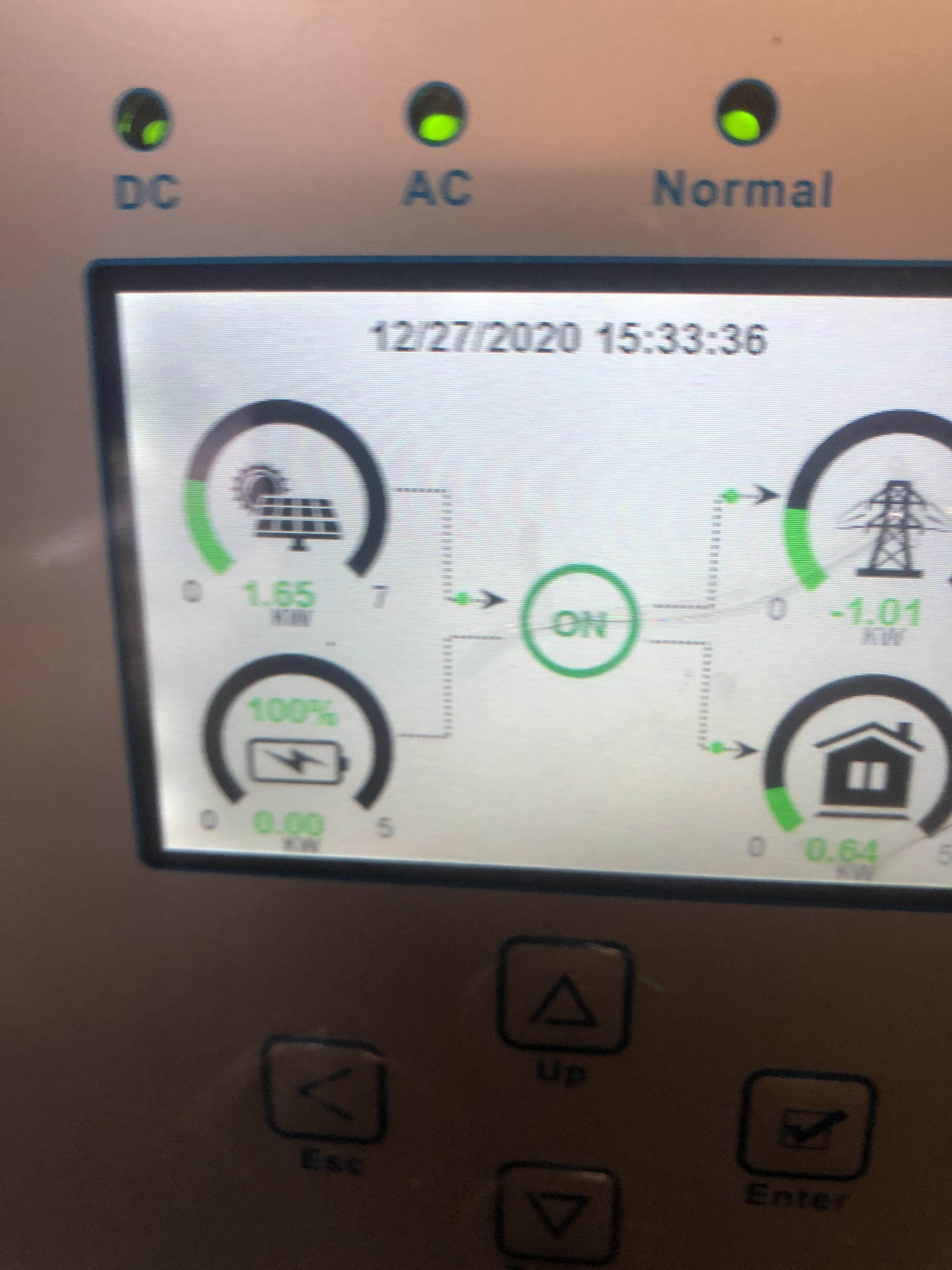
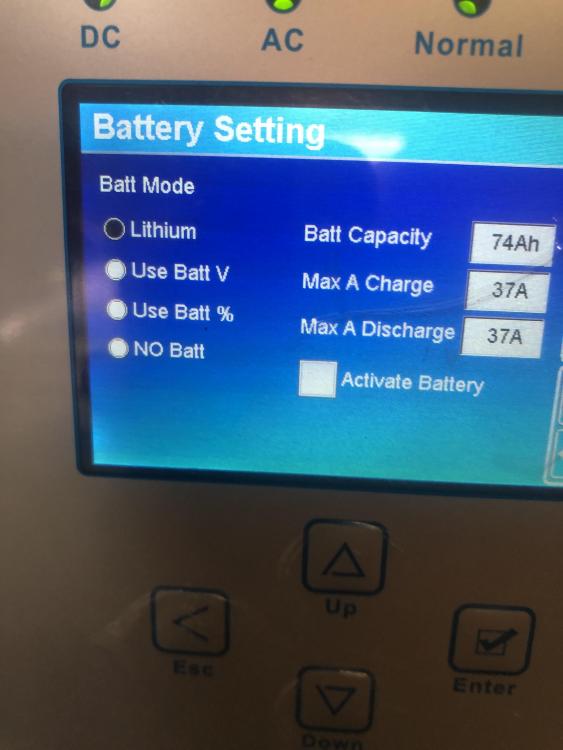 Gents. Who has experience in the Dye 5KW inverter. When I set the inverter as below without Solar sell it dies not use the PV array, see Diagram 1 and 2. The only way to get it to use the the PV is to "sell" to grid, not nice with a prepaid meter 😡 Any ideas??? Diagram 1. Preview attachment IMG-7869.jpg IMG-7869.jpg 2.5 MBNOOOOOOO, still looking for the correct settings , it keeps on feeding back into the grid as soon as I activate the battery.I think I found the solution. I disabled the battery, left the settings and plugged the BMS cable in the inverter and and CAN of the Pylontech, switched everything AC/DC power switched on and left it for about 10 minutes and walla
 I have turned the CT around, put in other position's, the only way for not to feed is to disable. Another thing with the baterrye it works fine from solar PV but the I need to tick solar sell the one next to zero export to CT. I have even played around with the quantity of zero export and max sell power, no luckThe problem I have is that when I connect my batterye it feeds into the grid. I can only use it without the battery.Did you mannage to find a solution. I have the same issueI have tried that. It atill export, it is as if the CT gets ignored. I have turned it around, diconnected from the live. When the inverter has no battery connected/disabled then it works fine no feedback. As sson as I enable the Litium settings and the inverter restarts with the setiingd on Zero export to CT it still exports to the Grid. Will send some photos in a few.
 Morning gents. I have a deye 5kw pure sine wave hybrid. I noticed when there is no battery connected the Grid tie fuction works correct. When I ad my Pylontech battery, all extra capacity feeds into the Grid. Any idea as the CT clamps is installed as per the schetch, I have turned it around as well.
 Great, thanks. I believe the settins are now sorted, will keep an eye on it today😀Thanks for the video. OThe interface is very powerfull and simple to use On the inverter I can find a setting to charge the battery, either from generator or the grid and at at specific time. Below from an online manual. What is can not find is a timer to sat discharge the batterye. On Axpert it will be something linke SBU(Solar bayyert utility)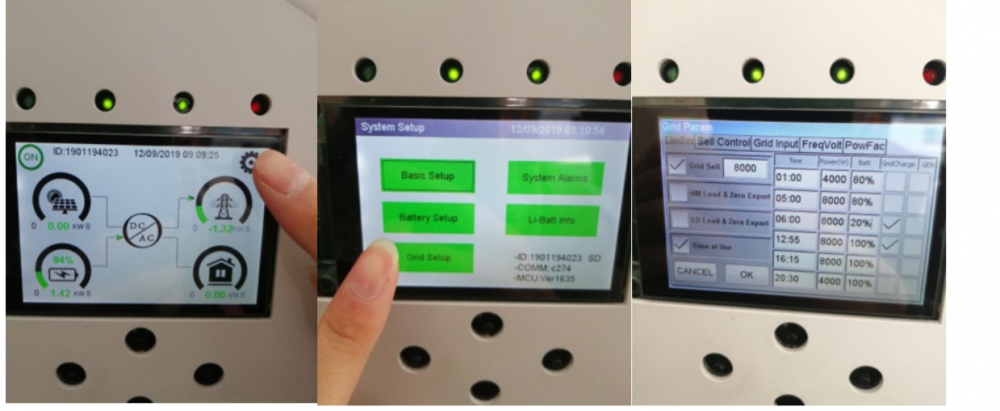


Account
Navigation
Search
Configure browser push notifications
Chrome (Android)
- Tap the lock icon next to the address bar.
- Tap Permissions → Notifications.
- Adjust your preference.
Chrome (Desktop)
- Click the padlock icon in the address bar.
- Select Site settings.
- Find Notifications and adjust your preference.
Safari (iOS 16.4+)
- Ensure the site is installed via Add to Home Screen.
- Open Settings App → Notifications.
- Find your app name and adjust your preference.
Safari (macOS)
- Go to Safari → Preferences.
- Click the Websites tab.
- Select Notifications in the sidebar.
- Find this website and adjust your preference.
Edge (Android)
- Tap the lock icon next to the address bar.
- Tap Permissions.
- Find Notifications and adjust your preference.
Edge (Desktop)
- Click the padlock icon in the address bar.
- Click Permissions for this site.
- Find Notifications and adjust your preference.
Firefox (Android)
- Go to Settings → Site permissions.
- Tap Notifications.
- Find this site in the list and adjust your preference.
Firefox (Desktop)
- Open Firefox Settings.
- Search for Notifications.
- Find this site in the list and adjust your preference.