


Tomeek
Members
-
Joined
-
Last visited
-
No firmware can solve the problem of charging the network. Unfortunately, this is a feature of the inverter when a large consumer suddenly stops. SBU mode is the only solution. :(
-
@smsteves I tried the firmware: 72.75. I have a problem with the serial number... That's not good for me either
-
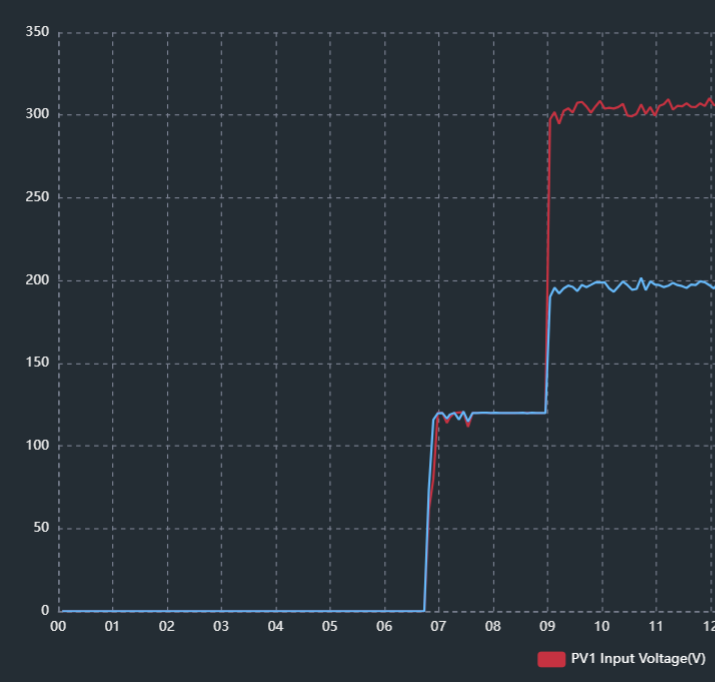
@smsteves Is this the one with the removable display non twin model? Doesn't 90/120V stick in cloudy weather? 90V or 120V starting PV voltage? Thanks!
-
This very version would be fine for me by both MPPT current thresholds would you modify 0.3A Supports battery soc settings. There was only a little 120V in the morning and evening Can you do it if you have time? @Coulomb MAX_HV_8k 72.68.7z
-
Don't do it! usb-RS232 cable is required! Attached is the description for the update Firmware Upgrade SOP via RS232.docx

-
I don't think it's entirely good to play with amps either. The voltage will be the right solution. For me, for example, the 120V factory versions (72.62, 72.68 (old version)) do not stick or only rarely. A 150V start would be about ideal for everyone..
-
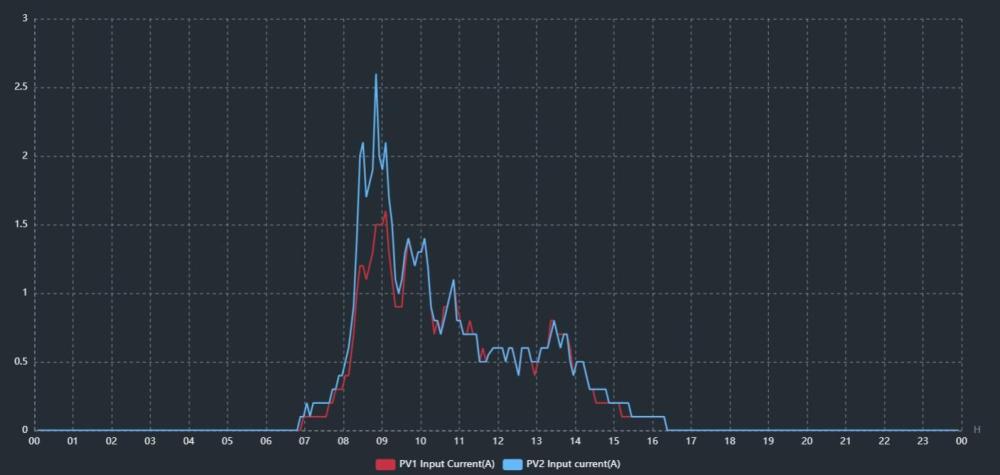
Works fine. I tried it, the display values work (SOC). It does not transfer the SOC value to the monitoring software, the previous one remains there: Volt. No problem. Display Firmware: 12.21 Helper PSU board PV connector removed Do you think it makes sense to modify both MPPT PV current thresholds to 0.25A? or should I stay with the factory version? The loss is small..
-
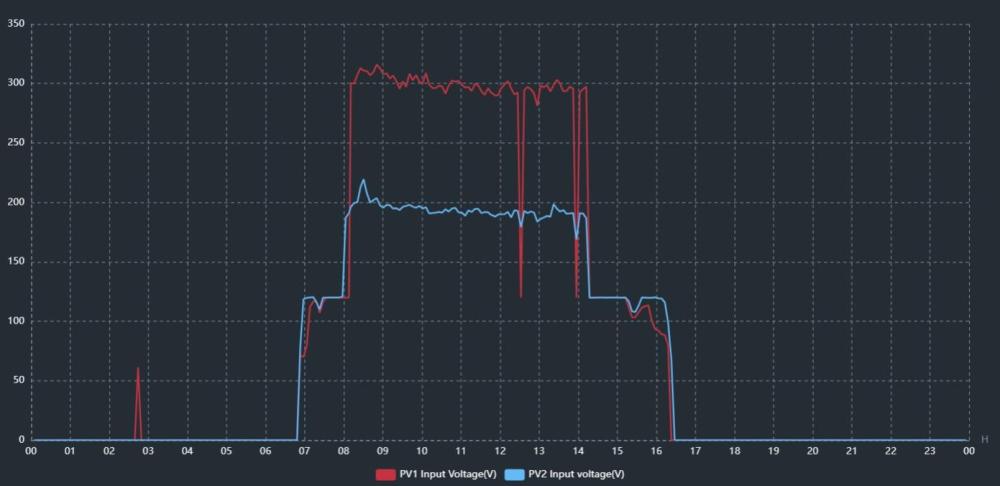
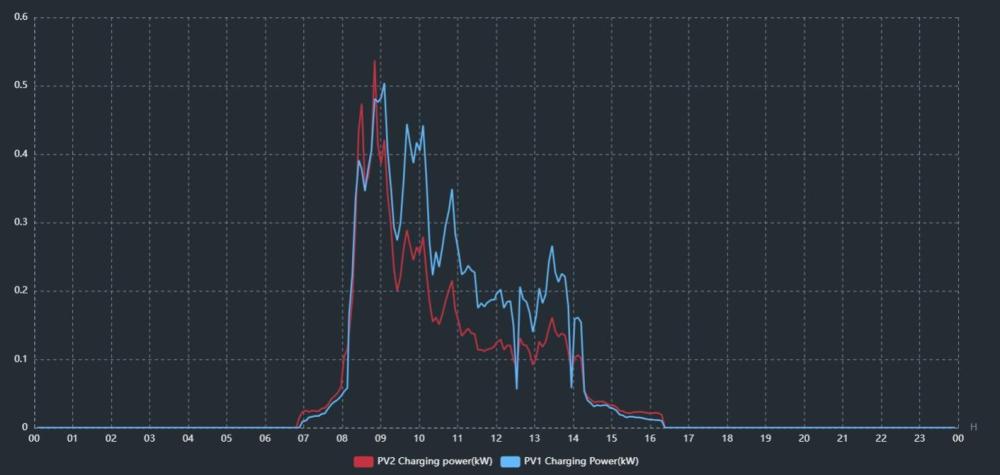
72.68 older version supports battery SOC value. (HAX_HV_8k 72.68.7z ) The starting PV voltage is 120V. It's a very cloudy day. Successful breakout. It doesn't stick. The loss is small. The inverter display shows the SOC, but the dessmonitor and Viewpower show the voltage 12 (back to utility), 13 (back to battery), and 29 (low battery cut-off voltage) The serial number is displayed correctly. No error Help board supply solar connector remove Which one is true? (Display VS PC Monitoring) Is it worth changing both MPPTs to 0.25A? MAX_HV_8k 72.68.7z


-
Thanks! I will try it soon. Today I updated about 10 times (test). MPPT 2, (200V) 30' east, the other MPPT 1, 10' south (340V) I will replace it in 1-2 days and we will see which one is better. (0.25A-0.12A) Now the best 172.62 (Unfortunately there is no % soc ) I will apply soon.. I am very grateful for your work.
-
 Tomeek reacted to a post in a topic:
BETA FIRMWARE AXPERT MAX 8 KW >>>MPPT improvement<<< (Based on stable 90.06)
Tomeek reacted to a post in a topic:
BETA FIRMWARE AXPERT MAX 8 KW >>>MPPT improvement<<< (Based on stable 90.06)
-
It is displayed correctly again on other firmware Sorry, I was tired No clouds, no shade. PV voltage fluctuates between 200-300V every 5-10 seconds (VOC 340V) 272.66 Yes, that's I understand. But with the properties of 172.62. (It has no fixed voltage and the PV current is 0.25A) I'll forget about that then
-
Note: If the display is 12.28, after updating the main cpu to 72.72 SN: 55355535553555 Other FW (72.66, 72.74, 172.62, 272.66...... ) factory SN: 92932xxxxx I want a FW that shows the battery SOC (BMS) Still 172.62 is the best. 272.66 is often PV voltage fluctuation. 272.66 Can't find a job or are you looking for it very often A FW like 172.62 (0.25A) would be perfect for me, only the battery SOC indicates it This is original Axpert max 8kW (display removed)
-
Coulomb reacted to a post in a topic:
BETA FIRMWARE AXPERT MAX 8 KW >>>MPPT improvement<<< (Based on stable 90.06)
-
My experience: Axpert Max 8k 28066 Both solutions worked for me for the stuck 90V problem! If you are brave enough, disconnect the solar connector from the additional power supply and the factory: 72.66 FW (Consumes approx. 40 W from grid or battery, even in sunlight) If you don't want to install it electrically... 272.66 CFW could be the solution PS: (If the RGB LED is turned off by the user before the firmware update, then the RGB LED will glow dim red after the update. Turn on the led strip before updating, and turn it off after updating... if you don't want to see it!!)
-
172.62 is the best. I tried them all.
-
Yes, the update is interrupted. The inverter fan works but nothing else. Tried all com ports with no success. This not work for max 8k The problem might be slow opto-couplers in the removable display. Try another if you have access to one, or if you're fairly technically minded, you could attempt to bypass the removable display using a home-made adapter as described in this post.
-
Hello Another inverter is a different problem: The USB RS232 cable is good. E32 error message on the display Before that I flashed to 72.66 and everything was fine The inverter has not worked since then


