Skip to content
View in the app

A better way to browse. Learn more.

Power Forum - Renewable Energy Discussion

A full-screen app on your home screen with push notifications, badges and more.

To install this app on iOS and iPadOS
  1. Tap the Share icon in Safari
  2. Scroll the menu and tap Add to Home Screen.
  3. Tap Add in the top-right corner.
To install this app on Android
  1. Tap the 3-dot menu (⋮) in the top-right corner of the browser.
  2. Tap Add to Home screen or Install app.
  3. Confirm by tapping Install.

Islam Djamalov

Members
  • Joined

  • Last visited

  1. USE, I don't have Li setting in my inverter 100% worth it
  2.    Raiden2912 reacted to a post in a topic: SHOTO and Solar assistant
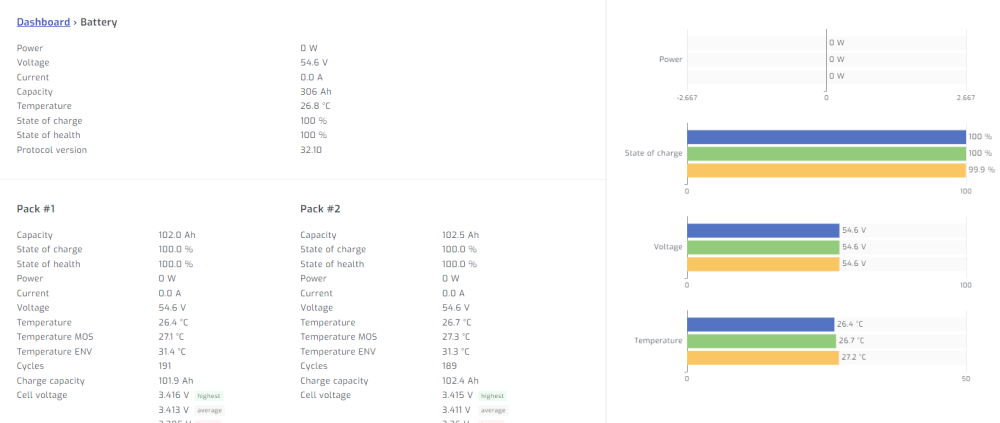
  3. in my setup, I have 3 Shoto SDC-Box5 batteries, and the DIP switches are as following: 1) 1 is up, other are down 2) 2 is up, other are down 3) 1,2 are up, other are down with such setup everything works fine.
  4. as someone in our telegram group with nickname "JE" found, in order to automation functionality to appear, we need to deactivate all old functionality from "Power" tab. after a while page will change and you will see automation functionality.

Account

Navigation

Search

Search

Configure browser push notifications

Chrome (Android)
  1. Tap the lock icon next to the address bar.
  2. Tap Permissions → Notifications.
  3. Adjust your preference.
Chrome (Desktop)
  1. Click the padlock icon in the address bar.
  2. Select Site settings.
  3. Find Notifications and adjust your preference.