


Perfo
Members
-
Joined
-
Last visited
Everything posted by Perfo
-
Arrg crap... A day and £22 wasted there then. I thought rs485 was a pretty standard thing and any rs485 module should work for that bit of the project... Thanks for highlighting this you have probably saved me another few days of inane fiddling..
-
I'm new on this Forum but thought I pop in to this thread to say thanks to you Martin for this excellent project. I'm using it for three SunSynk inverts and it works great. The only problems I have are mainly internet related. Thanks for sharing this ....
-
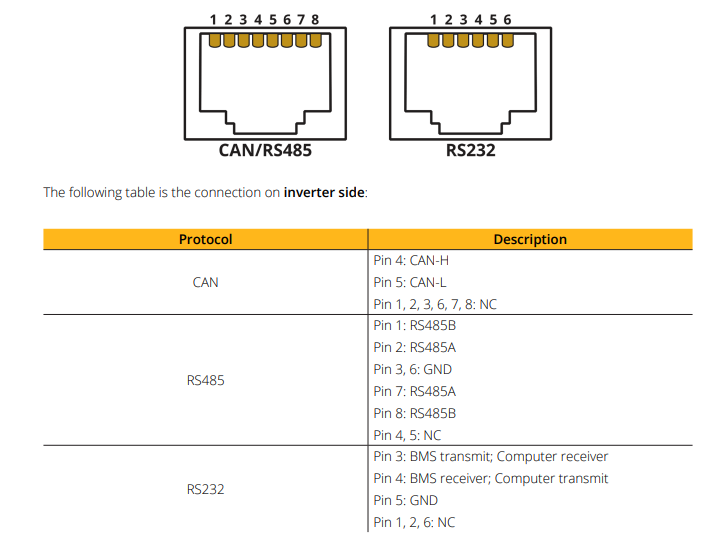
I ordered one of those wave share modules as shown in the video. Did all the setting up on the network side of it and it communicates over my network no probs, The power light and link light are on as expected. It also has an ACT led which I assume is the active led flashing every time the inverter gets interrogated. This LED doesn't light and I'm guessing it is because the commands being sent to it are wrong due to the integration in home assistant being for a Solax. Does anyone know if I'm on the right track here ? The other two big unknowns (to me) is what socket on the invertor to put the RJ45 plug in (I've tried the ones labelled Can , RS485 and Meter the bottom two are labelled parallel 1 and parallel 2 so I didn't try them) I thought the RS485 port would be the correct one. Also on the Wave share you have RS485A , RS485B and GND but which cables do I connect to these. From the SunSynk manual I found Appendix A that showed on the inverter there is two rs485A pins and two Rs485B pins I've tried pin 1, 2 and 3 on the inverter to the waveshare module and 3 7 and 8 but nothing changes or flashes etc. So I'm a bit stuck now as I'm not sure where to focus my attention. Maybe even if the wiring was spot on I wouldn't see any ACT led flash due to the commands being gobbledygook or maybe the commands are ok enough to get a connection but the wiring is wrong.. or they are both ok but wrong port... hmmmm or something else completely. Any suggestions ? Thanks


-
At my house. it is a small holding with a few out buildings and luckily three are south facing so I've utilised all available space. I didn't realise at the time I'd have difficulty getting the inverters to talk to each other. I was intending to share the batteries out but have been told by sunsynk I can't. I have to put all the batterys on one inverter which is a bit pants. So just including this snippet incase you are thinking of going for something similar and thus the question you asked...
-
Hello all, I'm pretty convinced the answers to my questions are on this forum somewhere but I can't find them so if anyone could point me in the right direction it would be appreciated. I've been watching this youtube video (below). This seems such a simple straight forwards way of achieving what I want. I currently access the sunsynk API to get my inverter data in to home assistant but it is very slow and even though you can change the refresh rate to min 60 seconds it can still take a few minutes to update and sometimes doesn't update at all. So direct to to RS485 modbus port is my goal. This video explains everything nicely and looks the part but is for a Solax inverter. Does any one know if the same thing has been done for sunsynk ? (ie no node red or MQTT etc) ? Even though the integration is for Solax inverters I'm thinking the only difference would be the addresses of the parameters ? The other end of the sytem at the inverter I'm thinking the module should just be plug and paly bar providing external power as the Solax inverter seems to include power rails on its RJ45 port but SunSynk doesn't. Has this been done already (as mentioned 100% sure it has somewhere) ? Thanks for reading
-
Hello all, I've been trawling around this site for a few days now and thanks to all those that take the time to post some pretty interesting content. A bit about me. Worked in power industry , electronic design (low level stuff) and write a bit of software every now and then. So definitely an eternal fiddler with nothing but a shortage of time thwarting my efforts to learn everything.. My new set up :- 1 x 3.6 kwp Sunsynk solar PV array and inverter 1 x 5.5 kwp solar PV array and inverter 1 x 8.8 Kwp solar PV array , inverter and 40 kwh Sunsynk battery. 1 x Old sunny boy 4 kwp solar PV array and inverter. I have a couple of EV cars (and a couple of chargers Zappi, Ohme) and an Airsoruce heat pump. New (to me as just set it up) Home Assistant running on an RPI4 with SSD. So many learning curves here but hoping to end up running the integrations and control through HA for the whole house. I have so many questions that I'll probably bore/annoy you 🙂 but I hope to reach a point where my project maybe able to help others if I get it working. See you on the forum dudes....


