


Perfo
Members
-
Joined
-
Last visited
Everything posted by Perfo
-
@Sc00bs Yes good point. I'm only using ModBus anyway. Why do you need both ?
-
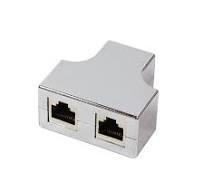
@Sc00bs I've studied your videos Sc00bs and they are very good. It was my back up plan to use an esp32 and follow your instructions if I couldn't get my ModBus adapter to work. I'm not really totally sure why I wanted to use the WaveShare adapter and not go straight for the Esp32 anyway. I liked the look of the solution plus I can connect multiple inverters to the same module just using dumb RJ45 T's they are a couple of £ (like one below). I like the idea that there is no remote intelligence. The WaveShare has a bit of inbuilt firmware but those and T's don't have any bespoke firmware they are off the shelf plug and play (nearly as you have to set some parameters on the WaveShare) . I know this moves the processing load on to the Home Assistant server but I rather it this end if possible. But never say never, I may be back to rethink in the future.
-
@shaun99 Hello Shaun99. I'm at a road block at the moment on this project. If you read some of my other posts you'll see I'm having problems with my installation and SunSynk wont answer their support emails. My PV system hasn't been working properly since Early December last year. My installer has finally managed to get a Sunsynk engineer to attend site and though the dates change I hope it will be this month. Until it is all up and running as it should I'm reluctant to go for a full install. I've tested it and it works so it is only a proper install waiting to happen. As soon as I'm operational that's what I'll get on with. I'll do some pics and an update at that point. I may even do a YouTube video to help anyone else doing the same thing though I'd probably make a complete hash out of any kind of video. I have the face for radio and the voice for newspaper
-
That's a shame. especially as the WaveShare ModBus gadget I had to two inverters worked luverly and this could read and write. Can you set the checksum in these inverters ? maybe one is set to odd and the other even or something. Thanks for trying anyway.
-
@Yuri did you manage to test the one power meter feeding two inverters ? Thanks
-
Ivette to get a few it’s and pieces to install this properly now I’ve proven it works ok. I’ll probably have 5 data points each so 10 in total if they update every 5 seconds that will be ok for my needs
-
Well I'm pretty chuffed to report that putting an rj45 splitter T (1 in 2 out) and setting one inverter to modbus 1 and the other the modbus 2 I can read both inverters with the same waveshare adapter.. Unfortunately I got home just slightly too late and not much happening on the solar front but I get something albeit mainly zeros so I think its working.
-
That is my back up. Using off the shelf converters like this doesn’t involve any bespoke remote elements. However this seems to be working great now. Now only the link to two inverters at once to test / fettle. DIn mounted modules and cheap Din boxes from local stores makes it a neat and cheap solution. My install looks neat and professional (mainly due to me not doing it 😀) this module in its din box looked the part..
-
@Yuri yes I appreciate you are testing the opposite thing to me. You are testing one meter feeding two inverters with grid power data. I’m very interested in this and want to do the same but with three inverters. What I’m testing is one rs485 to tcp/ip converter being connected to two inverters reading the data from them and displaying it on a home assistant display.
-
If my splitter works I’ll give it try. See how fast I can poll. As it is a serial protocol I just thought it would wait for a send return (or time out) before sending another request. I’m only looking for a hand full of data points on two inverters so if it works it is bound to be quick enough for me.. I’ll be caring it to what I’ve got at the moment which is between 1 and 3 minutes or walk there and look myself 😀. So not much competition really…. Not sure how many bits per package get sent but at 9600 baud that’s a good few packets per second.. Did you notice a slow down or errors as you increased data points ? Of course having one per inverter would be better (providing the bottle neck doesn’t then move to the master) but I’m hmmmm deep pockets , short arms….
-
maybe poll one on the odd seconds and the other on the even. I would have thought the modbus module would be able to handle collisions as part of it's architecture as that must happen a lot on bigger systems. Mine is updating every 5 seconds a the moment and I can unplug from one on modbus 1 and plug in the other on modbus 2 and all seems to switch over ok. I've ordered an rj45 splitter , should turn up tomorrow.. I thought it would send a message , get a reply then move on to another message ...hmmm
-
yep, It getting the 240v there without busting in to the inverter circuit. But I'll probably open up the incoming isolator and take a feed off of that and stick a fused outlet on it to plop in a plug in PSU. I have seen those din mounted ones and I've seen some with fuses in I think. or else I'd have to put fuses in somewhere else.
-
my config.yaml in HA now looks like below. Why it works like this but not as a separate modbus.yaml I'm not quite sure.. # Loads default set of integrations. Do not remove. default_config: # Load frontend themes from the themes folder frontend: themes: !include_dir_merge_named themes automation: !include automations.yaml script: !include scripts.yaml scene: !include scenes.yaml #modbus: !include modbus.yaml modbus: - name: waveshare type: tcp host: 192.168.1.250 port: 502 delay: 0 timeout: 5 sensors: - name: gym2_pv1_power address: 186 input_type: holding scan_interval: 5 slave: 1 - name: gym2_pv2_power address: 187 input_type: holding scan_interval: 5 slave: 1 - name: gym2_inverter_power address: 175 input_type: holding scan_interval: 5 slave: 1 - name: gym2_grid_power address: 169 input_type: holding scan_interval: 5 slave: 1 - name: gym2_ct_power address: 172 input_type: holding scan_interval: 5 slave: 1 - name: gym2_day_pv_power address: 108 input_type: holding scan_interval: 5 slave: 1 - name: gym1_pv1_power address: 186 input_type: holding scan_interval: 5 slave: 2 - name: gym1_pv2_power address: 187 input_type: holding scan_interval: 5 slave: 2 - name: gym1_inverter_power address: 175 input_type: holding scan_interval: 5 slave: 2 - name: gym1_grid_power address: 169 input_type: holding scan_interval: 5 slave: 2 - name: gym1_ct_power address: 172 input_type: holding scan_interval: 5 slave: 2 - name: gym1_day_pv_power address: 108 input_type: holding scan_interval: 5 slave: 2
-
@p_i Thanks dude. I couldn't see anything obvious in the box but hoped as that's another pain to get power to the converter. As it happens it's easy for my distant inverter as there is a network switch there and a couple of mains sockets so I can connecting in the ethernet stuff and power no probs. On my other two I don't have either that close.. still now that is is working on two of my inverters its a small price to pay..
-
Did you manage to try this Yuri ? On my other thread trying to set up an rs485 to tcp/ip and home assistant I've made a break through and it's working nicely. I'm wondering if I can just paralleled up the rs485 side of things and use the same converter for both inverters ? as long as one is set to mod bus 2 and the other modbus 1 I'm thinking it should work ...maybe.. possibly..
-
hmmm also just noticed the power supply I plugged it in to today is a 5v one and the docs state it'll run on 6v to 36v. It seems to run fine on the 5v as well. Does anyone know if there is a 12v supply that can be picked up in the inverter somewhere there seems to be on other inverters ?
-
If anyone reading this is interested. A good clear source of addresses can be got from the excellant Sunsynk power flow card by SlipX. Install the cards then look at the code editor and they are all there nicely lined up: entities: inverter_voltage_154: sensor.solarsynk_2205129054_inverter_voltage load_frequency_192: sensor.solarsynk_2205129054_load_frequency inverter_current_164: sensor.solarsynk_2205129054_inverter_current inverter_power_175: sensor.solarsynk_2205129054_inverter_power inverter_status_59: sensor.solarsynk_2205129054_overall_state grid_power_169: sensor.solarsynk_2205129054_grid_power day_grid_export_77: sensor.solarsynk_2205129054_day_grid_export grid_ct_power_172: sensor.solarsynk_2205129054_grid_ct_power day_load_energy_84: sensor.solarsynk_2205129054_day_load_energy day_pv_energy_108: sensor.solarsynk_2205129054_day_pv_energy pv1_power_186: sensor.solarsynk_2205184086_battery_power1 pv2_power_187: gym2pv2 pv1_voltage_109: sensor.solarsynk_2205129054_pv1_voltage pv1_current_110: sensor.solarsynk_2205129054_pv1_current pv2_voltage_111: sensor.solarsynk_2205129054_pv2_voltage pv2_current_112: sensor.solarsynk_2205129054_pv2_current
-
But this works fine ? Yeahh. # Loads default set of integrations. Do not remove. default_config: # Load frontend themes from the themes folder frontend: themes: !include_dir_merge_named themes automation: !include automations.yaml script: !include scripts.yaml scene: !include scenes.yaml #modbus: !include modbus.yaml modbus: - name: waveshare type: tcp host: 192.168.1.250 port: 502 delay: 0 timeout: 5 sensors: - name: modpv address: 186 input_type: holding scan_interval: 5 slave: 1
-
One thing I've figured is it only like sensors and not sensor for tcp/ip modbus.
-
The is HA business is very confusing... two config.yaml 's The first one is a completely stripped out config.yaml. When I press check config this works and takes a couple of seconds to check.. This second one crashes HA with no warnings or log entries that I can see it just hangs with the blue circle thing. This happens even if I comment out all the entries in my modbus.yaml like below I've got too many learning curves happening at the same time here and none are converging ont he same spot 🙂 . Can anyone see what I'm doing wrong here ? it must be something pretty basic.


-
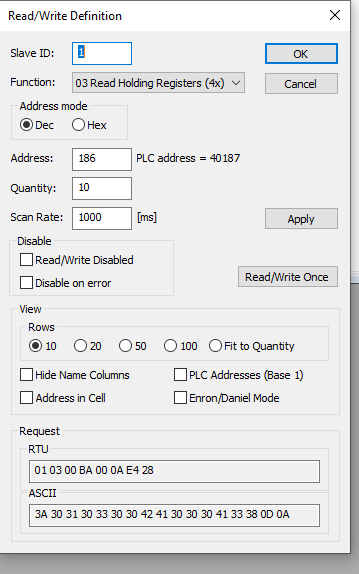
I had to dump it again last night due to worldly pressures getting in the way of serious fiddling. Anyway fresh head this morning and modbus poll seems to be giving me a sensible reading for address 186. For those that know what they are talking about ca\n you have a quick scan of my modbus set up ? I say this seems to work as line 6 which I assume is address 186 is a live reading and bar the delay on the sunsynk app appears to be tracking the solar input.. So a massive step forwards. I need to convert this in to a modbus entry in HA now and duplicate my results and I'm away.

-
A bit tricky that modbus pool. They say to run it from command line but the example does seem to do anything. I notice you can also run it in windows but not sure what I'm doing. However I found I already had it installed as I used this to see if my modbus gadget could be seen on the network .. it can so just got to figure out how to send a fetch command to address 186 ...
-
@p_i hmmm I though It did search but yep I am wrong it is there. Which is encouraging ...Is value_type: U_WORD in and slipx esp32 yaml the same thing as input_type: U_WORD in ha yaml ? @GVC ok off to read about modpoll and stuff..
-
Do you know where I can find out what type of input 186 is ? ie is it a holding in put ? I guess it isn't a coil due to it being a value rather than an on off ..
-
@p_i Ah ok. those don't appear in the slipx yaml so maybe it is different to mine.. I have the additional annoyance that doing a check configuration just locks up my Pi-4 which is very Grring..
