FFJG
Members
-
Joined
-
Last visited
Everything posted by FFJG
-
Quite a difference! And the cloud edge "pattern" matches what I see in some of my graphs. Anyway, it seems limiting the max PV charge current to 20A wasn't the solution to tripping at 40A after all. Yesterday the breaker tripped quite often, and it looks like the PV current is affected by the load the inverter has to deal with. On my day without tripping, the load was low to moderate, but yesterday there were a few peaks of heavy load and these correlate directly to high PV current. This is logical since my inverter is running in solar/battery mode. I got the 65A breaker yesterday, and installed it last night. So of course today started off overcast and gloomy - but it brightened up a while back, and I see there've been a few peaks of up to 50A PV current with no tripping, so it seems the problem might actually be over for now. A relief as I no longer need to babysit my inverter to save power during daylight. The 65A breaker temperature is about 29 C compared to others at about 22 C. This is "better" than the 40A breaker which was getting to 33 C. Lesson learned: It's easy to jump to conclusions about what's going on if you have no experience. Or real appreciation of what the words in the manual actually mean. Thanks again for helping to flatten the learning curve...
-
I'm in Grahamstown/Makhanda, known to some as Tamedogs. No smog to speak of, unless there's a brush fire in the area somewhere. It's only since having panels that I've noticed the variability in brightness, even on a seemingly clear day. The cloud edge phenomenon is something I hadn't really noticed or paid attention to, but it probably explains some of the peaks I've experienced. I need to work out a way of measuring this that doesn't depend on panels. So, even though the immediate problem seems to be sort of solved, the breaker is going to get upgraded anyway so as to give me options - in any event it's on the way. I've been fiddling quite a bit with Home Assistant and Solar Assistant, and it seems I can set the inverter max PV charge current from inside Home Assistant. Given that the load shedding schedules can be got into home assistant it should be possible to set up an automation to change the max charge up and down depending on time of day and time to load shedding in order to be nice to batteries yet allow for trying to get a full charge.
-
I've changed the Max PV charge current setting on my inverter to 20A (previously I had this set to 30A and 40A at various times) and so far on the hottest day we've had, there have been no trips on the 40A breaker. Looking at my graph of PV current, today it's been sitting at about 20A +/- 3A, with a few brief peaks to just over 30A, well below the breaker rating. Could this have been my problem all along? Nothing like learning from trial and error without burning anything down! If this is a solution, then clearly if I wanted to (or need to?) charge at more than 20A, it'd be wise to upgrade the breaker to 65A. But is a higher charge current desirable, or will it be bad for the batteries? Thanks again to everyone for the insights and info. A sort of related question - how does one measure whether it's a really sunny day independent of your panels? I'm just assuming that today is hotter'/sunnier than yesterday when I was tripping all the time, to the extent I left the panels disconnected until the sun went lower.
-
It's nice when real life obeys the laws of physics and all the theoretical bits fall into place with an equipment saving "click" at the right time. Thinking back, the current 40A breaker was chosen because the rated Isc of the panels is 9.38A, so "the system won't go above 40A". Is there some rule of thumb about what sort of fudge factor to add to this? i.e. how do they arrive at the 15A fusing recommendation for this type of panel? A further question - I'm just assuming the cabling will be OK - a set of 2 panels are connected in parallel by two "Y" connectors for the positive and negative, which is repeated for the other two panels paralleled in the same way. The two parallel sets are then linked together by a final two +/- "Y'"s which lead into the breaker. The wiring throughout is 6mm^2 panelflex. But now I'm thinking maybe the last leg from the final "Y" of each pair into the breaker should be upgraded to 10mm^2 given the temperature of the breaker being about 35 C? Also from the breaker into the inverter? I'm not clear on the rating of the solar connectors themselves?
-
Thanks for this - it seems then that a 63A DC breaker should be reasonably "safe" given what my panels can put out and what my panel wiring should handle. The inverter should be able to look after itself. The 125A job I pictured earlier deals with much thicker wires than those coming from the panels, so even if I was comfortable using it, it wouldn't fit! I'll order a 63A one tomorrow (I'm not in a major centre and things like this need to be got from elsewhere) and get it installed. Hopefully that resolves my problem. I'll give feedback either way. Thanks to everyone for the feedback/advice/ideas.
-
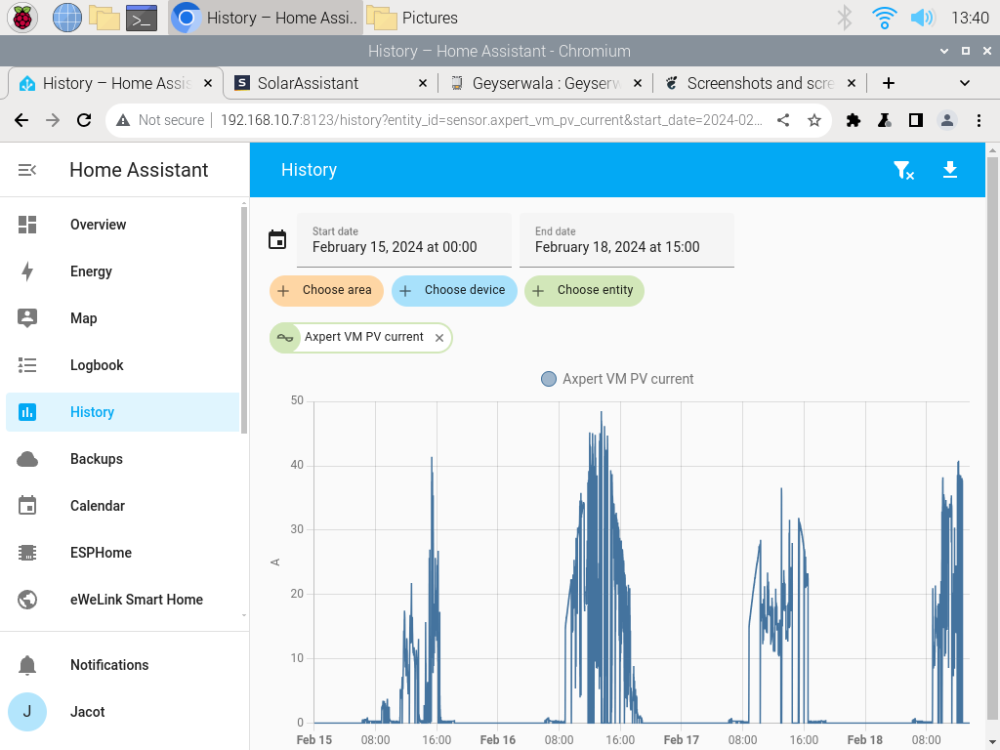
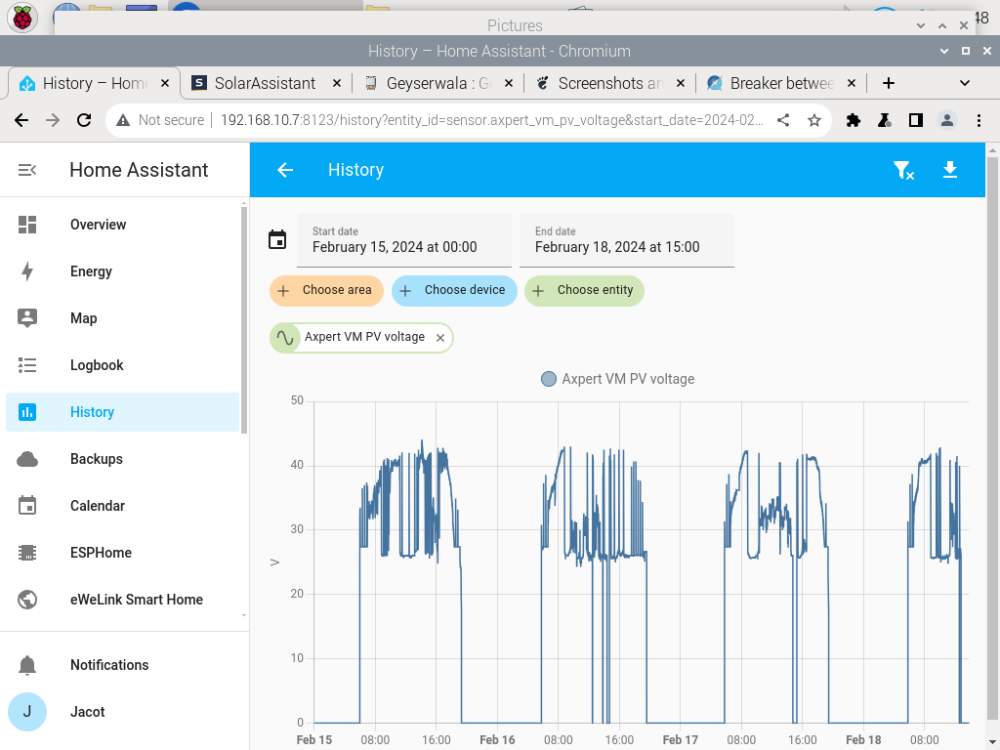
An attempt at finding peak current - Here are graphs of my PV current and voltage as exported to Home Assistant: You can see the voltage drops to zero are when the breaker trips...
-
I'm not sure how to monitor peak current on the panels? I just have a normal multimeter, nothing that'll record and store a max value.. We've had partly cloudy conditions often, but February is the first really hot and sunny month since installing my system. December and January were mostly overcast with a bit of sun every now and then. FWIW. the breaker gets warm (35 C) but not hot at the stage it starts tripping. The other breakers are about 22 C. A different, but related question: You can set the max PV charge current on the inverter, and my understanding is the inverter limits PV input to max charge current. As I understand this, it means the inverter should be able to protect itself, provided I've set up max charge current to something less than the 50A the inveter is rated for - maybe something like 30A? If I replace the breaker with a 63A DC version, it should deal with the tripping, but the inverter should be OK provided my understanding of the current limitation is correct? Or am I completely misunderstanding things here? Thanks for the previous feedback....
-
If my 4 panels in parallel are rated at 8.89A Imp each, why is my 40A DC breaker tripping out? Voltage never exceeds 47V. And would it be safe/OK to upgrade to a 63A DC breaker?
-
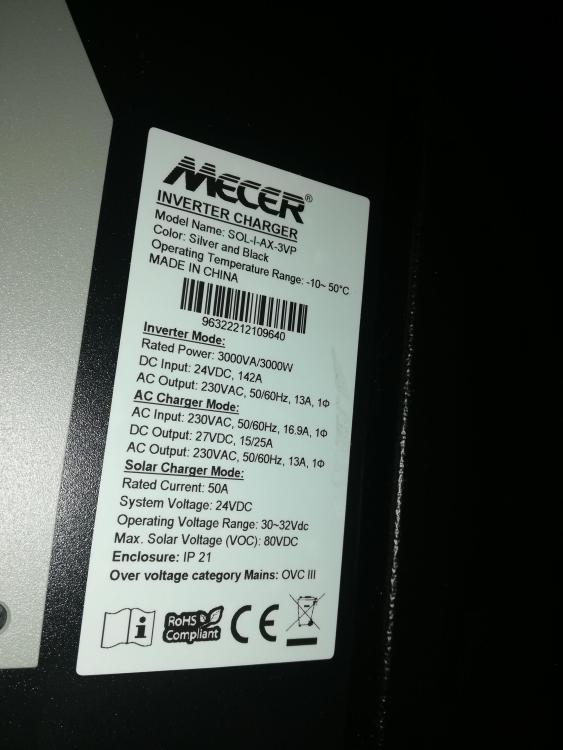
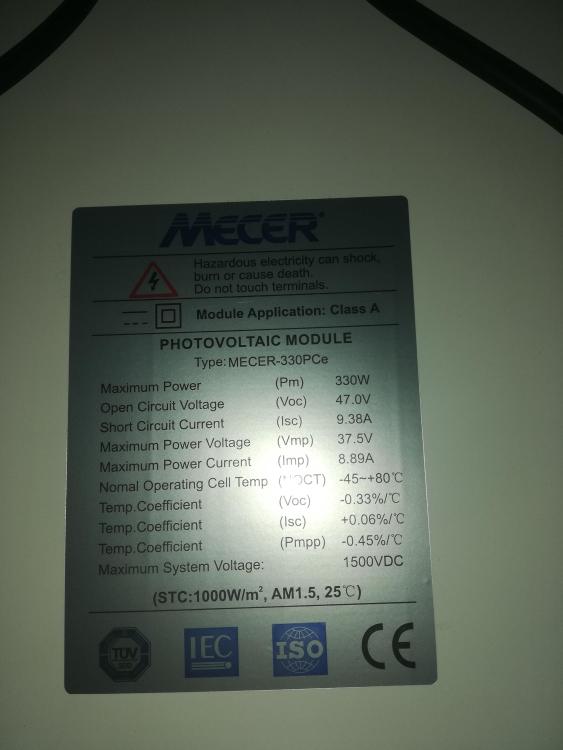
Thanks for that. My inverter says this: My 4 paralleled solar panels are rated at: This should mean my max voltage to the inverter will be 47V, and the max current 4 x 8.98 = 35.9A. In reality the voltage aspect is not going to exceed the max 80V of the inverter, but the current is another matter. My 40A breaker is tripping, but only just on a really sunny day, with no inverter error messages. My Solar Assistant shows that the PV current gets to about 45A. In addition, it's possible to configure the inverter with max charge currents of 20, 30, 40, 50A and it seems there is a "Limit PV to max charge current" seting in the inverter. So, to simplify the above, a 63A DC breaker, while on the high side will not cause major problems? I don't think it's easy to find a 50A breaker.... Thanks again...
-
All four of them are in parallel. And according to the numbers from Solar Assistant they are giving out just a bit above 40A around the time the breaker trips. I have a bigger breaker - much bigger: but while it would work, it's not obvious to me if it'd be safe to use? What ratings are available, and what amp rating should I get? Thanks...

-
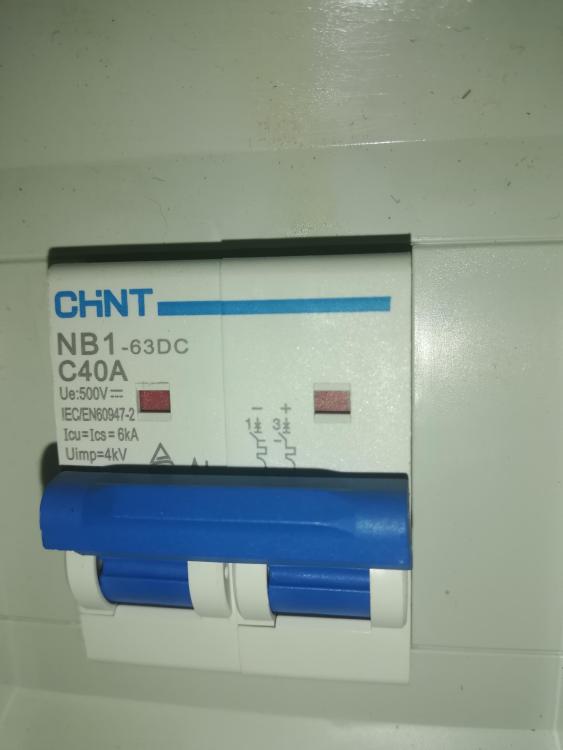
I have a Mecer Axpert 24V 3kva inverter, connected to 4 x Mecer 330PCe solar panels in parallel. Isc on each panel is 9.38A and Voc is 47V. The isolator/breaker is a 40A DC as follows: On a really sunny day, this breaker trips frequently, around midday when the panels are pumping. There's no error on the inverter, and it carries on functioning but it no longer sees the panels. To reset, I isolate the inverter from the mains and reset the breaker, then reconnect the inverter to the mains at which point the panels are again functional. I'm running Solar Assistant which gives me some visibility and control over the otherwise fairly dumb inverter. Any ideas on what might be going on, or what inverter settings might be causing this? Thanks...
-
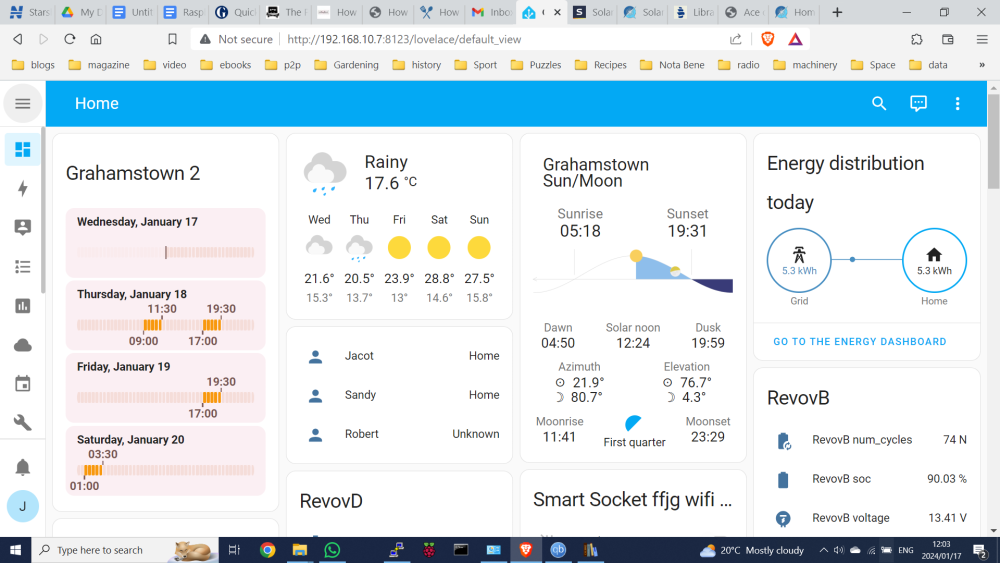
What it should be showing (from HA)
-
Not really gone again, but showing past load shedding schedule rather than future schedule.

-
In Grahamstown, using latest beta version. It seems to be fixed now, after being non-functional for a few days. The Home Assistant loadshedding integration has been working fine throughout.
-
Stopped working for me a few days ago. Anyone else seeing this?
-
The Thingwala guys have come back to me, and say the Geyserwala will plug straight into my old 2 digit Geyserwise MAX. So all questions resolved. Impressed at their response - I sent them email about ten minutes ago and got an immediate reply - not bad for 23h00 on a Tuesday night.
-
Thanks for feedback and advice to just let it switch on/off during load shedding - which is what it's doing now anyway. Good point that there's not much you'd be able to control on a dead geyser. Also appreciate the point about being able to check the historical temperature on HA. I suppose putting a tempering valve on the shower would be an out of band solution if it ever becomes a problem. Putting the geyser on the inverter and using HA to run an automation to switch it off during load shedding crossed my mind, but it's maybe an extra complication that'll involve buying and installing a smart circuit breaker, but otherwise won't really help me.
-
Hi, Thanks for the reply. My inverter is minimalist and somewhat stupid - if output source priority is set to "SBU" then if there is the smallest trace of voltage on the panels. it'll feed off batteries until there's enough power to charge off solar, if ever. It'll only go back to utility at twilight when there's no detectable panel voltage. My solar power on a moderate day just breaks even with the load, so things are marginal. On a cloudy/overcast day this is a guaranteed way of flattening your batteries. With this setting, the inverter will run basically from dawn to dusk on battery/solar irrespective of how much or how little sun there is available. What I'm trying to do is get the "SBU" setting to trigger on conditions of low solar power leading to a low battery SOC and switch to utility as soon as the sun fades away or a bank of clouds moves in to stay a while. Exacerbating all of this is load shedding, which happens at arbitrary but detectable times during the day. I don't want my SOC to drop too low during the day in case mains power gets switched off for two or four hours. Switching between SBU and Utility at a high SOC means that my inverter runs great on a sunny day and doesn't go flat on an overcast day, with sufficient reserve to cater for a load shed. There are automation rules for reacting to an upcoming load shedding cycle, but unfortunately they can't fit into what I have to implement in my output source priority automation. With some minor fine tuning of my output source priority I managed to get my inverter to do the right sort of thing for the first time without manual intervention. The log file entries above happened during a partial overcast day, with a fair amount of state switching. I'm not sure how to implement the "gap" mentioned in the log. Of course there may well be battery voltage threshold settings that could be fine tuned to get the inverter to do the right thing, but setting parameters on the batteries themselves is not that obvious. Note that my minimalist set up is usually adequate for our needs - my wife and I are both in our 70s with modest power requirements, but at present we have my son's family on site waiting to move into the house they've just bought. They have a fairly cavalier feeling for the balance of power, particularly when it's not obvious that Eskom has made mains electricity go AWOL. But it's a nice exercise for me in trying to accommodate the unexpected.
-
I have an old - ten or more years - two digit Geyserwise MAX connected to a passive {thermosyphon type) geyser system. It's worked well over the years and is on it's second geyser. It's not that obvious from the Geyserwala web site whether it'll integrate with this old set up? I know with the Geyserwise Tuya set up I'd have to replace/update the display of my Geyserwise, adding extra expense. The other thing is that my solar geyser (and electric oven, kettle and air fryer) are wired in as a non-essential loads to my distribution box, and as a result the current Geyserwise panel goes dark during load shedding - I suppose handy in that it acts as a visual reminder to my wife that load shedding is active now that the TV and all the lights are running happily on my inverter. The question is whether the panel/controller itself can get inverter power, while power to the element remains non-essential? i.e. the geyser heating capability is not available, but the control panel stays "alive"/visible? I don't know enough about the electrical connections for the Geyserwise to know if this is possible. Or is this a non-issue and the controller switching on/off with load shedding won't cause problems with Home Assistant integrations? Thanks for any feedback....
-
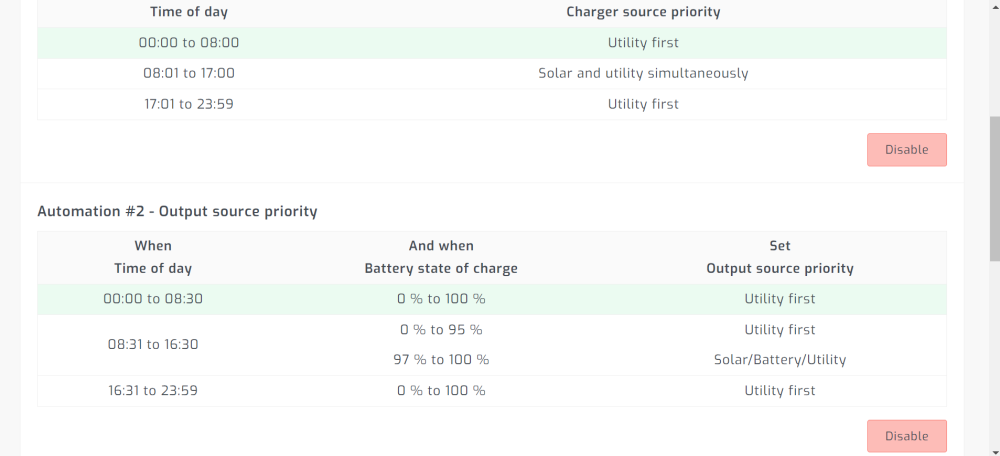
I have a bare bones entry level inverter, a Mecer Axpert 3kva 24V Solar inverter/charger, appropriate solar panels, and 4 x REVOV 100Ah 12.8V LiFePo4 batteries. These batteries have a Bluetooth BMS and their values/settings can be examined via a Home Assistant integration, but cannot be directly seen by the inverter. My system works but has limitations requiring manual intervention. I eventually bought Solar Assistant, and once I worked out how to make the new "automation" configurations visible, it seems I might be able to run the inverter hands off. The "emulate BMS" option gives surprisingly accurate values of SOC when compared to actual battery readings, but it'dbe great if Solar Assistant could cpnnect to a Bluetooyj type BMS..... A few questions, though: 1 - I have the following automations, which seem to be working: but the automation log contains the following sorts of entries: Automation log [Sun Jan 14 19:01:02] Set 'Charger source priority' to 'Utility first': success. [Sun Jan 14 18:31:14] Active table row changed twice in 15m00s. Suspending rule table automation for 10m00s. Consider adding a gap between table row end and next row start. [Sun Jan 14 18:31:10] Set 'Output source priority' to 'Utility first': success. [Sun Jan 14 18:26:06] Set 'Output source priority' to 'Solar/Battery/Utility': success. [Sun Jan 14 17:59:03] Active table row changed twice in 15m00s. Suspending rule table automation for 10m00s. Consider adding a gap between table row end and next row start. [Sun Jan 14 17:58:59] Set 'Output source priority' to 'Utility first': success. [Sun Jan 14 17:53:10] Set 'Output source priority' to 'Solar/Battery/Utility': success. [Sun Jan 14 16:34:44] Set 'Output source priority' to 'Utility first': success. [Sun Jan 14 16:22:43] Active table row changed twice in 15m00s. Suspending rule table automation for 10m00s. Consider adding a gap between table row end and next row start. I'm not sure how to "add a gap"? Question 2: The log time seems to be in GMT, not local time. The actions themselves happen at the times specified in the automation rules which are local time, and my Solar Assistant localization is set up for ZA. Any advice or ideas appreciated. Thanks.