MadeinRSA
Members
-
Joined
-
Last visited
-
To everyone reading and following this post: The last part of the reply of this morning should be ignored it was a rookie mistake the PV connection was wrong and as a result the inverter didn't pick the PV panels up once that dumb mistake was corrected the inverter picked the PV panels up and was working as good as the other inverter. I guess there are still many things I will learn, I will share the info I gather, hopefully it might help someone along the way. This is the first time I was part of a forum and what a great experience. Thank you and good luck to everyone here. I will keep you updated.
-
Good day Chris and Coulomb Guys a quick update. I did all of the work, settings, connections etc during night time to eliminate all possible power sources (AC and PV). I did this for the risk of shorts etc. The 2 inverters saw each other immediately, once I changed the settings in the correct way (sorry for me being so dumb Coulomb). After everything looked in order I connected the AC input as well as the output cables respectively in parallel to the inverters and switched on all the breakers in the DB board. The power came on and everything was working as before. As soon as the PV panels started working this morning I noticed that the SL inverter (PWM model 105V) does not show the PV icon any longer, neither does it indicate that it charges the batteries (2 x 16S 51.2V batteries connected in parallel). If I check with a multimeter it shows that there is 94VDC coming in from the PV panels (4 × 415W panels - 2 sets of panels in parallel and then connected in series, showing 94VDC at the connector block of the inverter). The other inverter(MPPT model 145VDC) has (4 × 565W panels - 2 sets of panels in parallel and then connected in series, also showing 94VDC at the connector block of the inverter). It shows the PV icon as well as indicating that the inverter is charging the batteries. Both these inverters were working 100% individually. I can think of a couple of ways to do tests by means of elimination but thought I'd wait for your input first, if you would be so kind. Once again thank you for all the help thus far.
-
-
Hi Chris Thanks a million for your advice, worked first time. My system is up an running, now I will just have to wait to see if the different solar panels connected to the 2 inverters work together. Thanks again. Regards Herlius
-
Good evening Chris Thank you for the advice, I will do that, hopefully I can report back with a 👍. Much appreciated
-
Goodday Coulomb Before I connected the 2 inverters I switched of all AC input and output breakers in in the DB board. Tonight I will wait till dark and disconnect all cables AC input and output related and as an extra measurement I will also disconnect the PV input cables. All that will then be connected will be the battery pack to the 2 inverters and the 4 cables between the 2 inverters and see what happens. I'll keep you poste, thank you.
-
Good day Coulomb I have tried to connect the 2 inverters. My process in short: I waited till night time, switched off the utility connected the 2 inverters by means of the 2 parallel cards and in total 4 cables that came with the parallel cards. I connected both inverters to the same battery, that was the only source of power. When switching the inverters on they both switched on the red fault light came on momentarily on the 2nd inverter but went off and I had basically the same display on both inverters. It looked pretty normal and the inverter that I've been using up to now supplied AC to a light connected to it's AC connection. I couldn't change any values on the inverters (setting 28), it is as if they don't "see" each other at all. I need to tell you 1 thing I haven't mentioned up to now. These inverters both came with "dummy" parallel cards which I replaced with real parallel cards bought from a solar supply company in SA. They told me that they can't guarantee that it will work om my inverters but I took the risk as I could not get parallel cards at any other supplier. I did however compared the 2 cards' appearance to the photos online and they looked exactly like the cards I should use. I am now at a point where I don't know if there are too many unknown variables and if there is anything else I can try before accepting defeat. This became more of a challenge to achieve something and I was hoping to help others with a low budget trying to get a workable system going. Trying to run a household on only 5kva is not in my opinion doable. My reason for the 2 inverters, increasing the supply and also be able to use solar pqnels with different output values connected to 2 inverters without compromising the bigger panels performance on the 1 inverter. I hope all of the above make sense.
-
Good day Coulomb I have tried to connect the 2 inverters. My process in short: I waited till night time, switched off the utility connected the 2 inverters by means of the 2 parallel cards and in total 4 cables that came with the parallel cards. I connected both inverters to the same battery, that was the only source of power. When switching the inverters on they both switched on the red fault light came on momentarily on the 2nd inverter but went off and I had basically the same display on both inverters. It looked pretty normal and the inverter that I've been using up to now supplied AC to a light connected to it's AC connection. I couldn't change any values on the inverters (setting 28), it is as if they don't "see" each other at all. I need to tell you 1 thing I haven't mentioned up to now. These inverters both came with "dummy" parallel cards which I replaced with real parallel cards bought from a solar supply company in SA. They told me that they can't guarantee that it will work om my inverters but I took the risk as I could not get parallel cards at any other supplier. I did however compared the 2 cards' appearance to the photos online and they looked exactly like the cards I should use. I am now at a point where I don't know if there are too many unknown variables and if there is anything else I can try before accepting defeat. This became more of a challenge to achieve something and I was hoping to help others with a low budget trying to get a workable system going. Trying to run a household on only 5kva is not in my opinion doable. My reason for the 2 inverters, increasing the supply and also be able to use solar pqnels with different output values connected to 2 inverters without compromising the bigger panels performance on the 1 inverter. I hope all of the above make sense. ☺️
-
-
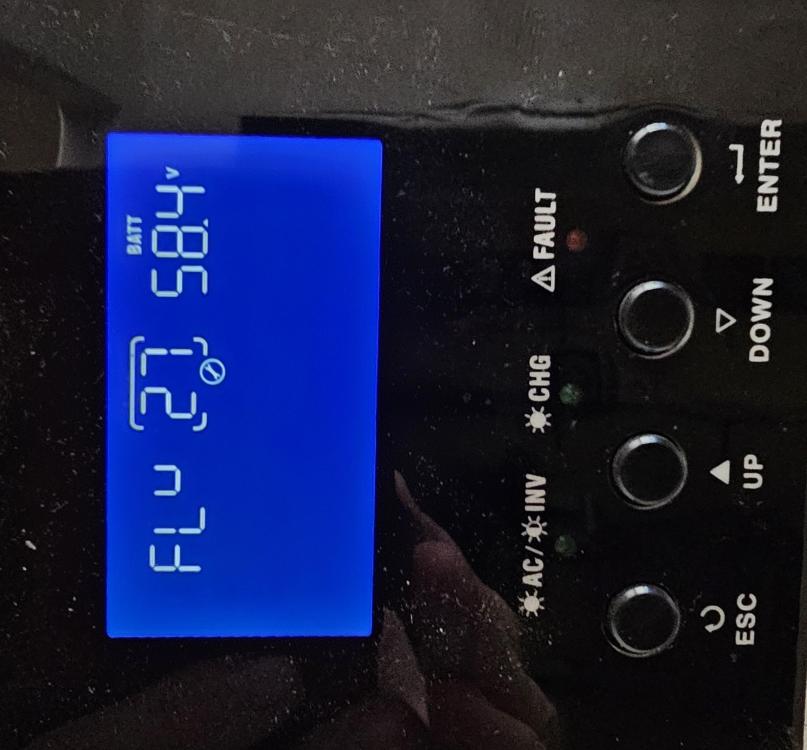
Hello Coulomb Thank you thus far for your help. Both the inverters have the same maximum voltage for settings 26 and 27 - 58.4V maximum. The maximum solar amps for loading of the "105" inverter is 110A while the "145" inverter maximum solar amps for loading is 120A. To do a simple test to see what happens if I connect them parallel do I have to connect both inverters to batteries and utility sources or will it be good enough if only one inverter is connected to all sources?

-
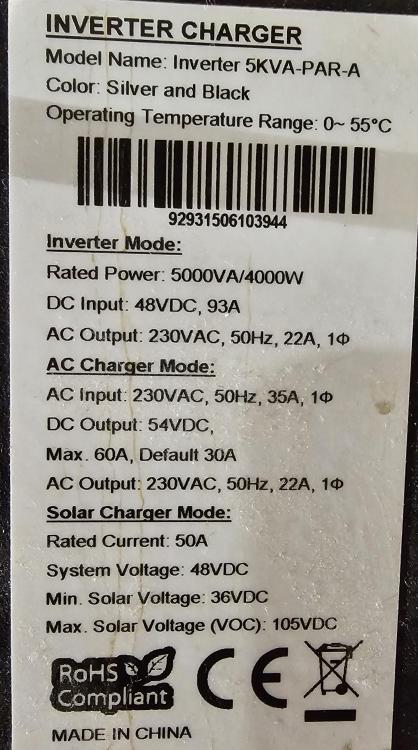
Good day Coulomb Thank you for your reply. I am attaching photos of the manufacturing stickers with specifications of both inverters, if you would be kind enough to look at them. Regards Harry

-
Good day I am a newbie on this forum as well as the whole magic of trying to beat load shedding. I have 2 Axpert Inverters each 5Kva but different models(bought at the same business). The one has the heat sinc at the top of the inverter which the other one does not have. The firmware on the 2 inverters also differ. The heat sinc 1 has 72 40 firmware while the other inverter has 32 40 firmware. I have been reading discussions on this forum for weeks now trying to get solutions for my problem, I have downloaded every firmware version that I could lay my hands on, on this forum. My problem is that I can't get my computer/inverter communication going, to try and update both inverters to the same firmware. The only communication ports on both inverters are a USB B port and a port marked RS232 but using a RJ45 connector. I don't have a RJ45/RS232 to USB cable for my connection to a computer but I bought all the items needed to1 make a cable up. I have basic knowledge of electronics and hope to be able to make such a cable up according to some schematics on this forum. I have been warned that there are firmware that once you have installed it on your inverter your inverter will stop working after a certain period of time. I have not read anything like that on this forum which makes me wonder if it is just companies wanting to make money with fake news. Last bit of info is that Watchpower sees both my inverters but the firmware update tool can't see the com ports or inverters. Any advice and help will be highly appreciated. Thank you in advance. Regards Harry