


mhd_murad
Members
-
Joined
-
Last visited
Everything posted by mhd_murad
-
can you send me this firmware (60.10) please
-
Dears @Coulomb @AMalakani @Tarek Yag my inverter (axpert vm iii 4kw) When connected to electricity, it keeps disconnecting and connecting the panels and electricity all the time. i have 4 panel electricity volt 220 and 49 hz Main v 60.89 second v 25.12
-
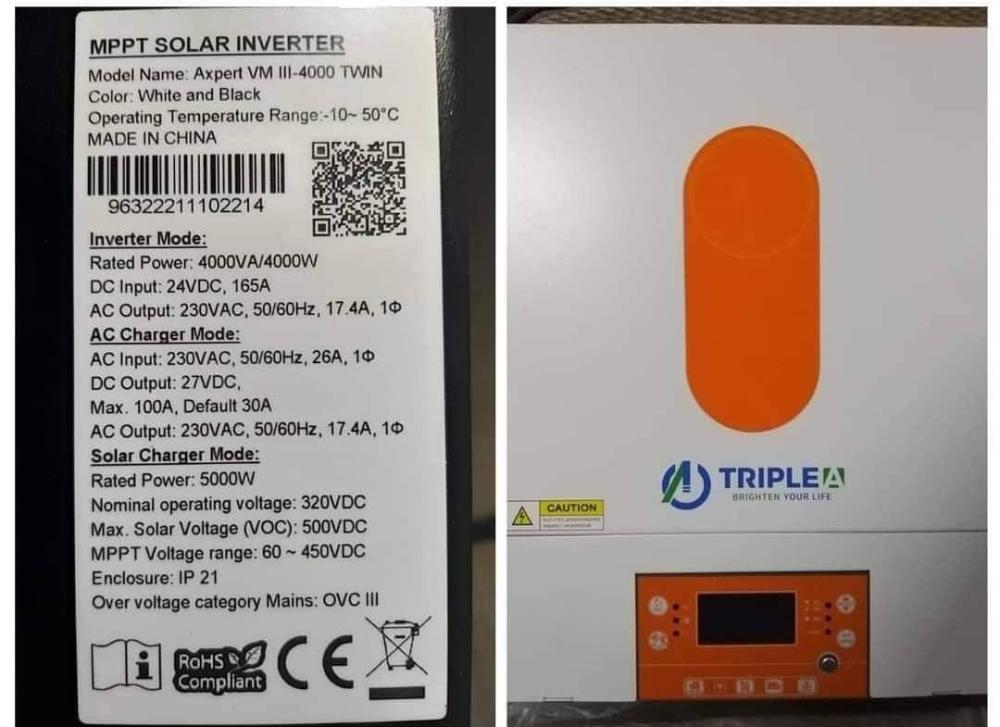
no this inverter from must mainfactor im attached image for Triple A from voltronic
-
hello i have vm iii 4kw what is the bulk charge and float charge i can set for this bug
-
maybe i need help can i still in this angel and in winter i have good watt?
-
the angle is about 45 there is no technician to ask 😕
-
Dears @Coulomb @Tarek Yag i installed 4 panels 580w longi hi mo but the maximum power is 1550w in my axpert vm iii twin (if i increase the load no extra power collected from panels more than 1550w ) is this power good for 4 panels or it's not ?
-
can you giv me more about this bug @Tarek Yag @Coulomb @pintopf
-
Is there any documents about communication with inverter by local network without watchpower app I'm searching about an method to monitor inverter in real time without his display
-
I don't know I'm just send email to the sales team [email protected] try this email
-
Of course not, I hope so, I am an IT engineer and I have some interest in my inverter My inverter name is triple A vm iii 4kw
-
you are welcome 🤗 I'm contacting with voltronic support by email
-
Dear all Here is the modification logs from 25.08 to 25.12 1. Added 2 more items in data logs 2. Supporting the inverter mode on APP for “Hybrid” or “Off-Grid” 3. Fix the bug of time delay with BMS communication. 4. Upgraded Progc.12 setting range for 44-55Vdc.
-
this is voltronic support reply for temperature @Tarek Yag @Coulomb @AMalakani Dear Mohamad We changed the firmware to reduce the fan speed but internal ventilation and hardware don’t do any change, For surely,the temperature will be higher than before. We had tested it even we reduce the fan speed,the internal components can afford the higher temperature
-
I'm not sure about this bug now i have version 60.89 and 25.12 for display and all is fine i think the problem from DSP firmware i will test it again after some days
-
@Tarek Yag after upgrade fans now slower than but after load 2kw the fan speed up for display update i don't show any changes
-
as voltronic support say This is the customized version to slower the fan operating speed for less noise.
-
Dear @Tarek Yag @Coulomb i receive this firmware for my axpert vm iii 4kw from voltronic company can any one check them Remote_VMIIITWIN_Reflash_MCU(25.12).rarVM TWIN_Ver60.95.7z
-
@Tarek Yag thanks can i install version 70.00 on my vm iii 4kw twin ? or i need 68.04? can you send it to me also
-
there is issue if battery is fully charged the system show discharing from battery
-
@Tarek Yag thanks i have axpert vm iii 4kw u1 : 60.06 is there any update ? to fix discharing from battery issue?
-
@Coulomb
-
Dears i have axpert iii 4kw twin there is bug in frameware inverter charging and discharing in same time U1 60.06 U2 25.08 is there any way to fix it?

-
I see version 70.04 in vm iv 4kw Is this firmware work on vm iii 4kw? And if you have it can you send it to me
-
My inverter version is U1 60.06 U2 25.08 Any update for it? And my problem is the fan not stop when no load on inverter , is there any solution please




