


Robbie3337
Members
-
Joined
-
Last visited
Everything posted by Robbie3337
-
Thanks a lot, Solar Assistant Support is currently busy trying to assist me, so if all else fails, I'll try that as well. Thanks a lot for the advice! I will update the discussion as we go along.
-
Oh, so I must replace my current Sunsynk logger to test?
-
Thanks, but my inverter doesn't have such a port at the bottom.
-
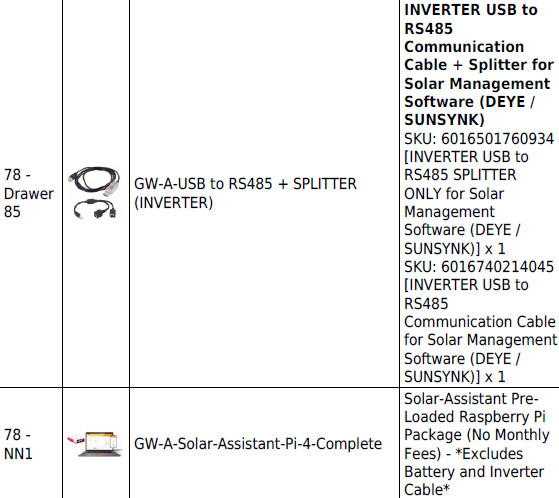
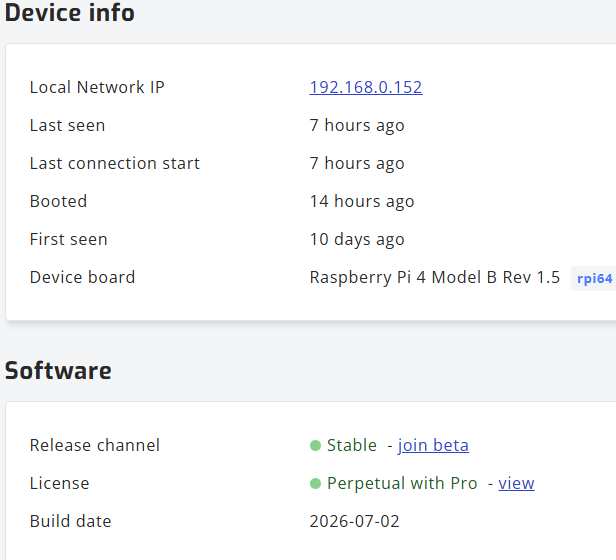
Good day all, I'm writing in hopes that someone will be able to assist me. I bought the attached from Geewiz, which had Solar Assistant already loaded on the Raspberry Pi 4. The setup was simple: I plugged in the device at my house for the configuration, loaded my account (to set up remote access), and moved to the inverter. I'm trying to use the inverter values for the battery, just to get everything working before I attempt the next step and plug in the Battery Cable in the RS232 port of my battery. I'm accessing the device without an issue, but I simply cannot connect to my inverter inside the "Configuration" menu. It just says "No response address 1 (It cycles through to 15)" and then I get the "No response, retrying in 15s" error. I have tried the following: Changed the Modbus ID on the inverter itself from 0 to 1 Plugged my RS485-to-USB cable into the RS485 port, instead of BMS2 (as instructed by Solar Assistant Support) Restarted my Raspberry Pi 4 multiple times Reinserted the cable (I used all USB ports and restarted between every change) My Hardware: Inverter: Sunsynk-50K-SG01HP3-EU-BM4 Battery: SUN-BCU-M-080H1-OT Can someone please assist? I'd greatly appreciate it. Thanks in advance!



-
Ok great, thanks a lot Muttley! I appreciate your help :)
-
Thanks for the rapid response Muttley! I bought the same power supply and DC - DC voltage buck converter as per your original post. I always ran it on 24V, but I changed it to 18V now without any success. Maybe I should just accept the new MV ranges and recalibrate?
-
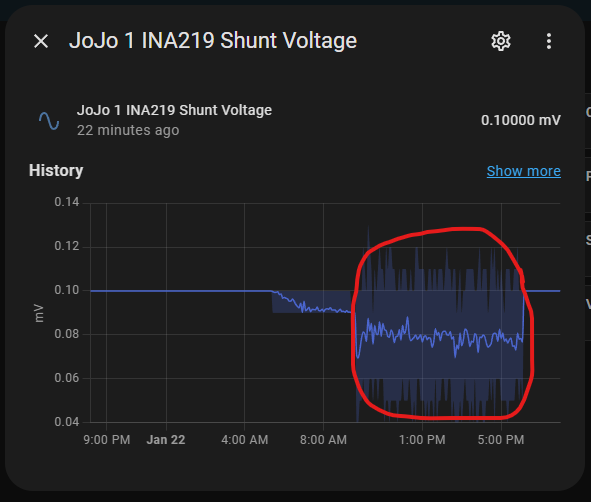
Hi all, I'm having a bit of an issue here. My tank volume stopped calculating correctly and just showed it was full (I didn't fix the calculation yet, so it shows 10284L when full). Upon investigating, I discovered that the MV has suddenly changed after months of reading the same values. We did not change the tank or anything like that. The last "loss of data" is a result of unplugging our whole network to protect our devices from lightning. After restoring power to our network equipment, the voltage had jumped quite significantly. I did not cut the power to any smart device, just a simple network disconnect and reconnect after a few hours. Does anyone maybe know what the issue could be? I can, of course, just recalibrate, but I'm really curious to find out the cause of this change. I'd appreciate any kind of insight on this.

-
Can you please link the post where one of the forum members de-soldered the chip and replaced it with an ESP32? I'm done with this Tuya rubbish
-
Hi @fourwp , I have looked at my temps from Home Assistant from beginning of June, as that was when mine was last working without the element. I have attached the results (we were using warm water as well in this timeframe. It basically took 4 hours to reach 60c from 49c I do have a question though, how did you add your Magneto / EMS to Home Assistant? I tried after receiving my replacement unit, but can't remember what I'm doing wrong haha.

-
Your suspicions about the DFRobot sensor were correct. Thanks for that! I'll be doing the other 2 JoJo tanks as well that's on out farm.
-
Update: So the issue was indeed the INA219 sensor from DFRobot. When I changed the INA219 with the suggested generic sensor, everything worked, even the tank volume started updating! Thanks especially to @Muttley for your help! I'm going to experiment on the "days of water left" and the "Tank Refill Rate" This is amazing!

-
Hi everyone, I finally got time to change the INA219 sensor and things are looking very promising. I'm just waiting a bit for more data and then I'll report back. Thanks for the help!
-
Just an update, I have received the INA219 from PiShop and will be replacing the DFRobot this weekend 😁
-
LOL, I really hope that won't be the case 🤣🤣 I will surely do so, thank you so much! 😁
-
I think it's good to have a bit of humour while we struggle with these wonderful devices. It helps taking the focus off of the frustration a bit. But yes, I definitely agree. We will get this right eventually 😂 Thanks for the tip on the DF Robot sensor! I will buy the generic INA219 as per one of your links. I agree with your approach to diagnosing the issue. It will probably only arrive early next week, so I will post back when the new INA219 has been installed. Thanks again!
-
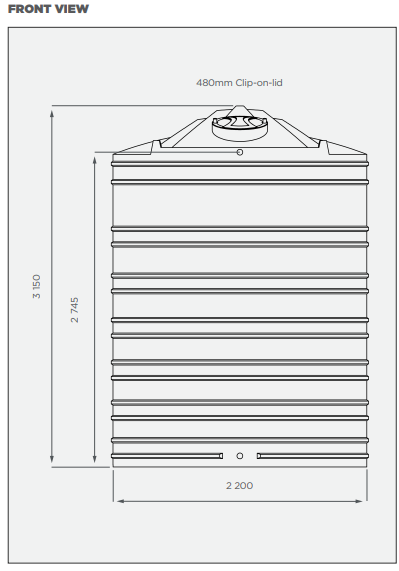
Haha yes they did 🤣 I did a reboot on my side and my power and current values were restored the same as yours, thanks! It happened twice since your reply, so the second time I added a button to reboot the ESP32 to be able to reboot it remotely which also works. It seems like the jaggered graph is a result of whenever the current and power values go down to 0 or unavailable, because when I reboot the ESP, then the graph begins to normalize after the values restored. The reason I used 2700mm as the height is due to the spec sheet. It seems that the overflow level is at that level. Please see the picture attached. Why do you think that my probe reading outside of the tank has an extra "0" compared to yours? After making the change as per your recommendation in the "Tank Volume" template section in the code, I still cannot get the "Current Full %" and "Tank Volume" readings to work. It just stays at a constant level. I asked claude.ai to adapt the template sensor code to my existing ESPHome code and this is what it came up with: template: - sensor: - name: "Water Level Template" unique_id: water_level_template unit_of_measurement: "m" state: > {% set current = states('sensor.jojo_1_ina219_current') | float(default=0) %} {% set height = ((current - 4) / (12 - 4) * 2.70) | round(3) %} {% if 0.000 <= height <= 2.700 %} {{ height }} {% else %} unknown {% endif %} Does it look fine? Here is my latest ESPHome configuration: web_server: captive_portal: button: - platform: restart name: "JoJo1 Restart" i2c: sda: 21 scl: 22 sensor: - platform: ina219 address: 0x45 shunt_resistance: 0.1 ohm current: name: "INA219 Current" id: ina_current accuracy_decimals: 5 filters: - multiply: 1000 #convert from Amps to mA unit_of_measurement: "mA" power: name: "INA219 Power" accuracy_decimals: 5 bus_voltage: name: "INA219 Bus Voltage" accuracy_decimals: 2 shunt_voltage: name: "INA219 Shunt Voltage" id: ina219_shunt_voltage accuracy_decimals: 5 max_voltage: 32.0V max_current: 400mA update_interval: 10s - platform: template name: "Water Level" id: water_level unit_of_measurement: 'm' accuracy_decimals: 3 update_interval: 60s lambda: |- float shunt_voltage = id(ina219_shunt_voltage).state; float full_voltage = 0.00012; // Voltage at full condition float empty_voltage = 0.00004; // Voltage at empty condition float max_height = 2.70; // Adjust the max height as needed // Calculate water level based on calibration float slope = (max_height - 0.0) / (full_voltage - empty_voltage); float intercept = max_height - slope * full_voltage; float water_level = slope * shunt_voltage + intercept; // Ensure water level is within bounds water_level = water_level < 0.0 ? 0.0 : water_level; water_level = water_level > max_height ? max_height : water_level; ESP_LOGD("custom", "Shunt Voltage: %.5f V", id(ina219_shunt_voltage).state); ESP_LOGD("custom", "Water Level: %.5f m", water_level); return water_level; - platform: template name: "Current Full Percentage" id: current_full_percentage unit_of_measurement: '%' accuracy_decimals: 1 update_interval: 60s lambda: |- float max_full_reading = 12; // Adjust the maximum reading at full water level float min_empty_reading = 4; // Adjust the minimum reading at empty water level float current_reading = id(ina_current).state; if (current_reading <= min_empty_reading) { return 0.0; } else if (current_reading >= max_full_reading) { return 100.0; } else { float current_full_percentage = 100 * (current_reading - min_empty_reading) / (max_full_reading - min_empty_reading); return current_full_percentage; } - platform: template name: "Tank Volume" id: tank_volume unit_of_measurement: "litres" lambda: |- constexpr float tank_radius = 1.10; // Adjust the tank radius as needed constexpr float max_height = 2.70; // Adjust the max height as needed constexpr float pi = 3.14159265f; constexpr float total_volume = pi * tank_radius * tank_radius * max_height * 1000; float percentage_full = id(current_full_percentage).state; float water_level = max_height * (percentage_full / 100.0f); float current_volume = pi * tank_radius * tank_radius * water_level * 1000; return current_volume; Please let me know if you need any additional information Thanks! 😁
-
Haha, you said it 🤣 I honestly hoped it was my problem, but sadly after updating, it did not work. It's as if the tank volume is just static. 3 Things bothering me are: My calibration value outside of the tank is indeed 0.00004V - I bought the one from DIY Electronics. I have attached a spreadsheet (history (9).csv) of the reading last year when I first connected the device. After copying your new code and adding the template sensor in the "configuration.yaml" - I still cannot get the Tank Volume & Current Full % to work. In the Developer Tools, I get an "unknown" output when testing the code for the template sensor. I attached the sensor ID I have as well as the states that Home Assistant is reading. The "Shunt Voltage" graph seemed to work fine, but after all the fiddling, it seems like I'm back to square one. Please see the "Correct" and "Incorrect" graph screenshots attached. I'm sorry to trouble you so much! I do appreciate your help though. history (9).csv


-
Thanks! I'll test and report back.
-
Thank you so much for your swift reply! Regarding the ina219 sensor - I could not find the one that you linked in stock, so I bought this one instead. According to this wiki, I matched the address with the DIP switch configuration. I added a "0" after the "2.7" Yesterday after your reply, and I think that was the problem. I'm still monitoring, but it looks positive, thank you! I'm busy draining the tank to recalibrate everything. I will keep you posted. Do you maybe know why my "Tank Volume" and "Current Full Percentage" aren't showing any data? Again, thank you so much!


-
Hi, I like it a lot! I bought all the parts and performed the installation. I am struggling quite a bit. I'm using this in a 10 000L JoJo Tank and am getting confusing readings. Please see the attached screenshots. Below is my code (I did calibrate the readings): esphome: name: jojo-1 friendly_name: JoJo 1 esp32: board: nodemcu-32s # Enable logging logger: # Enable Home Assistant API api: encryption: key: "uxBTnmmzUw6yiCtJxGYd26Qqoiivswu8GHfUO8Xr+3U=" ota: - platform: esphome password: "620d601b87d0f7bebb1365ae886fd934" wifi: ssid: password: manual_ip: static_ip: 192.168.0.26 subnet: 255.255.255.0 gateway: 192.168.0.254 web_server: captive_portal: i2c: sda: 21 scl: 22 sensor: - platform: ina219 address: 0x45 shunt_resistance: 0.1 ohm current: name: "INA219 Current" id: ina_current accuracy_decimals: 5 filters: - multiply: 1000 #convert from Amps to mA unit_of_measurement: "mA" power: name: "INA219 Power" accuracy_decimals: 5 bus_voltage: name: "INA219 Bus Voltage" accuracy_decimals: 2 shunt_voltage: name: "INA219 Shunt Voltage" id: ina219_shunt_voltage accuracy_decimals: 5 max_voltage: 32.0V max_current: 400mA update_interval: 10s - platform: template name: "Water Level" id: water_level unit_of_measurement: 'm' accuracy_decimals: 3 update_interval: 60s lambda: |- float shunt_voltage = id(ina219_shunt_voltage).state; float full_voltage = 0.00012; // Voltage at full condition float empty_voltage = 0.00004; // Voltage at empty condition float max_height = 2.7; // Adjust the max height as needed // Calculate water level based on calibration float slope = (max_height - 0.0) / (full_voltage - empty_voltage); float intercept = max_height - slope * full_voltage; float water_level = slope * shunt_voltage + intercept; // Ensure water level is within bounds water_level = water_level < 0.0 ? 0.0 : water_level; water_level = water_level > max_height ? max_height : water_level; ESP_LOGD("custom", "Shunt Voltage: %.5f V", id(ina219_shunt_voltage).state); ESP_LOGD("custom", "Water Level: %.5f m", water_level); return water_level; - platform: template name: "Current Full Percentage" id: current_full_percentage unit_of_measurement: '%' accuracy_decimals: 1 update_interval: 60s lambda: |- float max_full_reading = 12; // Adjust the maximum reading at full water level float min_empty_reading = 4; // Adjust the minimum reading at empty water level float current_reading = id(ina_current).state; if (current_reading <= min_empty_reading) { return 0.0; } else if (current_reading >= max_full_reading) { return 100.0; } else { float current_full_percentage = 100 * (current_reading - min_empty_reading) / (max_full_reading - min_empty_reading); return current_full_percentage; } - platform: template name: "Tank Volume" id: tank_volume unit_of_measurement: "litres" lambda: |- float tank_radius = 1.1; // Adjust the tank radius as needed float max_height = 2.7; // Adjust the max height as needed float total_volume_single_tank = 3.14159265 * tank_radius * tank_radius * max_height * 1000; float percentage_full = id(current_full_percentage).state; float water_level = max_height * (percentage_full / 100.0); float current_volume_single_tank = 3.14159265 * tank_radius * tank_radius * water_level * 1000; return total_volume_single_tank; Can someone kindly please assist? Kind regards, Robbie


-
Hi nk00li, I actually see that I was using the wrong "local tuya" integration in HACS. I was using this one. When I searched "EMS Waterheater Local Tuya" I came across this repository on Github. Everything except for the timers works. I set it to turn on at 7AM and off at 5PM. The timer executes, but doesn't make the device switch off. Even in the Smart Life app, the functionality isn't working after adding the device to Home Assistant. Have you also experienced this issue?
-
Thanks a lot for your reply. You aren't going to believe this, but you actually replied on the same day we received our Magneto Thermo Tank haha. So I tried the LocalTuya integration, but it wants me to pay. I extracted the local keys by using a rooted Android device and I can successfully power on and off the device. Changing the target temperature and viewing the current tank temp also works, but changing the mode does not. Do you or anyone on this forum have experience in manually configuring devices on the LocalTuya integration without just pulling the device from the cloud? I'd appreciate any assistance. Kind regards, Robbie
-
Hi @nk00li, Thank you so much for your reply! I really believe in local control since we have very unreliable internet. You have been a great help! I'm still hoping that someone on the group was enthusiastic enough to successfully flash ESPHome on it 😁
-
Hi all, I'm new to the forum and firstly want to say hi! I'm very interested in buying this tank / water heater from Magneto. I see it's WiFi compatible. I have 3 questions please: Is it possible to control the device without internet? Meaning local WiFi connection only? Can it be added to Home Assistant? I don't see any integrations available at the moment. Can you flash the device with ESPHome? I'd appreciate any help on this. Kind regards, Robbie


