


woehrl
Members
-
Joined
-
Last visited
-
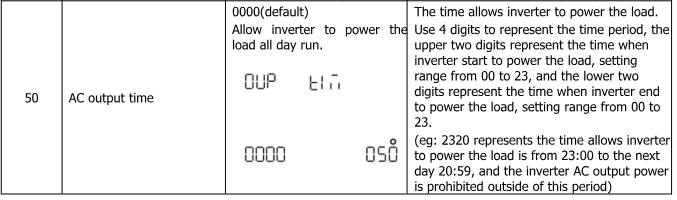
I asked Solar Assistant support if there is a chance that they would add some configuration option for the Growatt SPF 5000 ES. But maybe the task can be achieved via the automation options as well? I would very much like to have control over the AC output. So either it would be helpful to adjust the time when AC output starts and stops (Option 50, please see attachment - at least adjustable via mqtt) or a switch to manually switch on/off AC output (guess that would be difficult using MODBUS on the Growatt SPF 5000 ES). Reason is, that the Growatt inverters use a lot of power even in standby as long as the inverter circuit for AC output is active. And it depends on battery state and/or time (even daylight savings time) when AC output should be active to avoid burning energy while solar power is not available. For the time controlled adjustments there would also be need to set the correct current date/time on the inverter. (I also experienced that the internal clock is off quiet quick) Are there already any options in Solar Assistant that might help? Or does anybody have clues about managing the inverter? Thanks in advance!
-
This is an old thread, but I thought I'ld throw in my 2cents. I have not found any decent specifications for the USB port on the COMM board (PCB 530.SK00035XX) of the Growatt SPF5000 ES, there is a service manual though: https://www.amosplanet.org/wp-content/uploads/2022/04/SPF-5000-ES维修手册.pdf The RPi takes up to 3.5Ah depending on accessories and load, so I guess the SPF's USB port will not supply sufficient energy. Also choose the DC-DC converter wisely or you might have current drops. The RPi needs stable 5.0-5.1 Volt. The safest way to power your PI would probably be to attach a DC-DC converter to the battery cables and use a simple step down 5V converter like those: https://de.aliexpress.com/item/2012773152.htm https://de.aliexpress.com/item/1005005816566694.html