


StefanV
Members
-
Joined
-
Last visited
-
-
-
Only a pleasure bud. And thanks for the help with the testing.
-
-
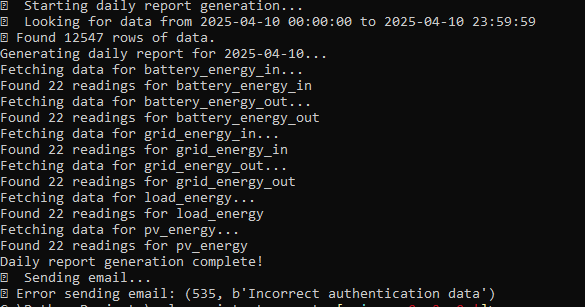
Ah I found the issue. There was an additional success message being printed from the report_generator.py where the emailer.py already handled that part. Should be fixed now. I inputted my email password incorrect to replicate your use case: Just do a pull again and rebuild and you should be good. 🙂
-
-
Please pull the new version and test. I just cannot test at the moment. The success message should not display if the email fails. Also you should now be able to set the csv attachment to 0 and should just need to restart the container to take effect.
-
-
-
Multi-recipient functionality added with whitespace support so you could add email addresses in your .env file like: For a single recipient: [email protected] For multiple recipients: [email protected],[email protected],[email protected] OR For multiple recipients: [email protected], [email protected], [email protected] To update your code, simply run the below from your cloned directory: git pull docker-compose down docker-compose up -d --build Let me know if it works for you.
-
-
Your are most welcome and I am glad it helps you. With regards to this report being sent to multiple emails, I can most definitely build in the functionality for you. I will see if I can get to that either today or tomorrow.
-
-
-
-
-
Hi everyone, so I had the need to get daily, weekly and monthly solar statistics emailed to me but after requesting this directly from the Solar-Assistant team for months, I decided to create it myself. I have made it available to all if you can find the use for it and can be found here - https://github.com/Stef1986/email_scheduler_solar_assistant Once you have cloned the repo locally, you simply edit the .env file with your Solar Assistant's MQTT details as well as your reporting preferences and run the docker-compose up. Just have a look at the README.md, it should be detailed enough to get you going. As a quick overview, basically what will happen is on the host of your choosing, you will run the docker container that will subscribe to the MQTT topic created in Solar-Assistant and will ingest all the data. It will then (based on your choosing) schedule daily, weekly and/or monthly statistic reports to be emailed to your inbox. The body of the email will contain a nice table with statistics (configurable in the .env file) with min/max/avg values as well as a csv attachment (also configurable) containing the totals for daily, weekly and monthly for stats like PV generated, Battery in, Battery out, etc etc Hope you guys enjoy and if this helped you, consider supporting my efforts with a beer or two 😁🍻
-
Hi guys, I need some advise and I am just going to apologize if this is a 💩question 🙂. I have 2 x Growatt SPF5000ES inverters hooked up to 2x LBSA Lifepo4 batteries. From time to time in my area we go down for days on end and on cloudy days, my panels just cannot get my batteries charged fast enough in order to run my things in my home. Question here then is: Could I use my generator to top up my batteries by hooking up an adequate Lifepo battery charger to the generator and connecting the charger directly to the master battery pack? Or would you recommend an additional change over switch at the AC in to the inverters and connecting the generator to the gen input thus feeding the inverter directly from the generator? (I guess the latter option might cause issues as my genny is only 6.5kva and if the inverter is directly fed, depending on my source mode it might want to power the house and charge the batteries at the same time...) too many amps I guess. Anyway, I hope you get what I am after and I am hoping someone here could give me a piece of good advise. Thanks
-
Perfect thanks.
-
-
So if I set it to USR what else do I need to change?
-
UPDATE: I am glad to report that my batteries are again 100% SOC. Thank you to all for the assistance. I finally think I understand how the batteries internal BMS work now in order to balance the individual cells.

-
Thanks for the reply. I have my home assistant connected to solar assistant via MQTT and my home assistant determines the mode that my inverters need to be in based on LUX sensors I have as well as time to loadshedding so that gets controlled automatically. I have set the battery cutoff to 48V as per your recommendation though. Thanks for that. based on the USR2 setting I have read the below and LBSA also informed me to use USR2 based on the battery type I have. Please see below excerpt from diysolar forum.

-
Thanks all for the replies, I will give it some more time to see if it gets to 100% SOC. Unfortunately I have a 4 hour lodahedding slot coming up from 12:00 - 16:00 and here where I live each time after a 4 hour lodshedding slot the substations trip and we could be off for days after so I am holding thumbs that we just have the 4 hours down. for interrest, here are my settings: PS: it is on user2 mode as the batteries could not be connected to my SPF’s directly. Solar assistant is the middleman where it reads the inverter values and the battery independently and never had an issue with it before now.


-
So funny enough as I posted this the batteries SOC went up to 90% as it constantly charges then stops again the charges again and stops etc. What I can post now is my Solar Assistant high, avg and low values on cells as I am not home at the moment. See below current readings of pack1 and pack2. PS the batteries was installed in March 2022 so very new still.


-
I have 2x SPF5000ES inverters with 2x 5.1 LBSA LifePo4 batteries with Solar Assistant managing my inverters as well as batteries via RS232/485 cable and has been working great. After a recent outage where the batteries were completely drained a few times due to cable faults directly after loadshedding, the batteries will refuse to charge to 100% SOC. It reaches the absorption voltage at 56V and goes back to 54V which would indicate that the battery is full but it will not go to 100% SOC. It seems to get to 80% and sometimes to 86% or 89% was the highest SOC reading. I checked the batteries and there are no errors and even Solar Assistant shows battery state of health as 100%. I contacted LBSA a while back and they told me per mail and via telephone call that I need to set both the bulk and float to 56v which I have done but now I am not sure what to do? both batteries are on around 500 - 600 cycles so I am far away from the guaranteed 7000 cycles that LBSA stand by. Has anyone had this before? Could it be that the batteries are trying to self balance or equalize and that is why it is not charging to 100%? Any assistance will by appreciated.
-
Hi again and thank you for the assistance. I have decided to opt for solar-assistant on raspberry pi which seems like a very similar setup to yours but just way easier for me to implement 😂 All is setup and have MQTT working beautiful with Hassio as well.


