


StefanV
Members
-
Joined
-
Last visited
Everything posted by StefanV
-
Only a pleasure bud. And thanks for the help with the testing.
-
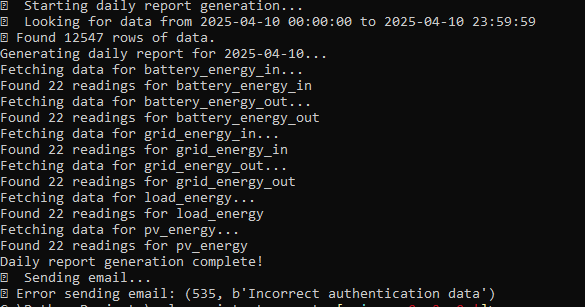
Ah I found the issue. There was an additional success message being printed from the report_generator.py where the emailer.py already handled that part. Should be fixed now. I inputted my email password incorrect to replicate your use case: Just do a pull again and rebuild and you should be good. 🙂
-
Please pull the new version and test. I just cannot test at the moment. The success message should not display if the email fails. Also you should now be able to set the csv attachment to 0 and should just need to restart the container to take effect.
-
Multi-recipient functionality added with whitespace support so you could add email addresses in your .env file like: For a single recipient: [email protected] For multiple recipients: [email protected],[email protected],[email protected] OR For multiple recipients: [email protected], [email protected], [email protected] To update your code, simply run the below from your cloned directory: git pull docker-compose down docker-compose up -d --build Let me know if it works for you.
-
Your are most welcome and I am glad it helps you. With regards to this report being sent to multiple emails, I can most definitely build in the functionality for you. I will see if I can get to that either today or tomorrow.
-
Hi everyone, so I had the need to get daily, weekly and monthly solar statistics emailed to me but after requesting this directly from the Solar-Assistant team for months, I decided to create it myself. I have made it available to all if you can find the use for it and can be found here - https://github.com/Stef1986/email_scheduler_solar_assistant Once you have cloned the repo locally, you simply edit the .env file with your Solar Assistant's MQTT details as well as your reporting preferences and run the docker-compose up. Just have a look at the README.md, it should be detailed enough to get you going. As a quick overview, basically what will happen is on the host of your choosing, you will run the docker container that will subscribe to the MQTT topic created in Solar-Assistant and will ingest all the data. It will then (based on your choosing) schedule daily, weekly and/or monthly statistic reports to be emailed to your inbox. The body of the email will contain a nice table with statistics (configurable in the .env file) with min/max/avg values as well as a csv attachment (also configurable) containing the totals for daily, weekly and monthly for stats like PV generated, Battery in, Battery out, etc etc Hope you guys enjoy and if this helped you, consider supporting my efforts with a beer or two 😁🍻
-
Hi guys, I need some advise and I am just going to apologize if this is a 💩question 🙂. I have 2 x Growatt SPF5000ES inverters hooked up to 2x LBSA Lifepo4 batteries. From time to time in my area we go down for days on end and on cloudy days, my panels just cannot get my batteries charged fast enough in order to run my things in my home. Question here then is: Could I use my generator to top up my batteries by hooking up an adequate Lifepo battery charger to the generator and connecting the charger directly to the master battery pack? Or would you recommend an additional change over switch at the AC in to the inverters and connecting the generator to the gen input thus feeding the inverter directly from the generator? (I guess the latter option might cause issues as my genny is only 6.5kva and if the inverter is directly fed, depending on my source mode it might want to power the house and charge the batteries at the same time...) too many amps I guess. Anyway, I hope you get what I am after and I am hoping someone here could give me a piece of good advise. Thanks
-
Perfect thanks.
-
So if I set it to USR what else do I need to change?
-
UPDATE: I am glad to report that my batteries are again 100% SOC. Thank you to all for the assistance. I finally think I understand how the batteries internal BMS work now in order to balance the individual cells.

-
Thanks for the reply. I have my home assistant connected to solar assistant via MQTT and my home assistant determines the mode that my inverters need to be in based on LUX sensors I have as well as time to loadshedding so that gets controlled automatically. I have set the battery cutoff to 48V as per your recommendation though. Thanks for that. based on the USR2 setting I have read the below and LBSA also informed me to use USR2 based on the battery type I have. Please see below excerpt from diysolar forum.

-
Thanks all for the replies, I will give it some more time to see if it gets to 100% SOC. Unfortunately I have a 4 hour lodahedding slot coming up from 12:00 - 16:00 and here where I live each time after a 4 hour lodshedding slot the substations trip and we could be off for days after so I am holding thumbs that we just have the 4 hours down. for interrest, here are my settings: PS: it is on user2 mode as the batteries could not be connected to my SPF’s directly. Solar assistant is the middleman where it reads the inverter values and the battery independently and never had an issue with it before now.


-
So funny enough as I posted this the batteries SOC went up to 90% as it constantly charges then stops again the charges again and stops etc. What I can post now is my Solar Assistant high, avg and low values on cells as I am not home at the moment. See below current readings of pack1 and pack2. PS the batteries was installed in March 2022 so very new still.


-
I have 2x SPF5000ES inverters with 2x 5.1 LBSA LifePo4 batteries with Solar Assistant managing my inverters as well as batteries via RS232/485 cable and has been working great. After a recent outage where the batteries were completely drained a few times due to cable faults directly after loadshedding, the batteries will refuse to charge to 100% SOC. It reaches the absorption voltage at 56V and goes back to 54V which would indicate that the battery is full but it will not go to 100% SOC. It seems to get to 80% and sometimes to 86% or 89% was the highest SOC reading. I checked the batteries and there are no errors and even Solar Assistant shows battery state of health as 100%. I contacted LBSA a while back and they told me per mail and via telephone call that I need to set both the bulk and float to 56v which I have done but now I am not sure what to do? both batteries are on around 500 - 600 cycles so I am far away from the guaranteed 7000 cycles that LBSA stand by. Has anyone had this before? Could it be that the batteries are trying to self balance or equalize and that is why it is not charging to 100%? Any assistance will by appreciated.
-
Hi again and thank you for the assistance. I have decided to opt for solar-assistant on raspberry pi which seems like a very similar setup to yours but just way easier for me to implement 😂 All is setup and have MQTT working beautiful with Hassio as well.
-
Hi all, I just got my solar assistant installed alongside my 2x SPF5000 ES inverters and also have the pi hooked up to my twin LBSA bms and I must say it is working wonders! Especially with the MQTT running beautifully between solar assistant and Hassio. My question here is, can I power the raspberry pi from the usb port on one of my inverters? As I am using the usb B ports to hook into the pi and the standard usb port is now free (meaning that bulky data logger is out of the way), would I be able to plug in a usb to usb-c cable to power the pi? Thanks in advance.
-
Hi and thank you so much for the feedback. I would greatly appreciate the assistance in getting something like this setup. I like the fact that you are then not reliant on the Growatt server data anymore and that I can keep it local. I just do not have any experience using node red and I assume I would need a raspberry pi or pc that will receive the data via the USB? Thank you once again.
-
-
Hi all, I have 2x Growatt SPF5000ES inverters in parallel with 2x LBSA 5.1KW LiFEPO batteries. (Dumb set up as my inverter / battery combo does not support the CAN to BMS hookup) I have to regularly change modes from SUB to UTIL when we have loadshedding in order to ensure that my batteries are always full as when it gets later in the afternoon and PV generation is very low (Not enough to charge the batteries), it will not use Utility to charge up the batteries to float. It seems that although my setting is set to SUB (Solar, Utility and then battery) it ignores using Utility to charge the batteries as long as there is some PV (even if it is only like 5W). So what I do now is, when it gets to say 4:30PM, I switch it over to Util in order to get my batteries full and then once there, I switch back to SUB and I would just love to automate this. Has anyone been able to switch AC output source via the Growatt API or by any other script? I currently run HomeAssistant for my automation needs and was hoping to build some sort of automation based on my loadshedding integration as well as time based automation rules. I know one can go the the Growatt Server URL, login and change the modes between SUB, SBU, UTIL and SOL by using the key code "growatt{date-today}" but I would like to automate the switching of modes based on certain conditions and a script would be ideal for this. Eagerly awaiting any assistance here. Thanks
-
Hi All, I tried searching the forum but could not find anything relevant to my issue today. Can anyone else log into https://server.growatt.com/login It says my account does not exist but I know my credentials are correct? Thanks
-
I think we can start a new thread on this issue in the correct section. I believe we might have better success there. Feel free to create a new post so long if you have not already. If not I will most likely do so later today or tomorrow as I would love to have the issue resolved as well. Ciao
-
So I had to also look as people told me the same but certain 5000ES models came with the BMS port and on others that same port is labelled CAN. LBSA told me to run cat6 cables from CAN port on each inverter into a RJ45 joiner and then into the CAN port of Battery (Master if you have two or more) then join batteries via Cat6 cable using parallel ports on battery ( Only applicable if you have more than one battery obviously) Then lastly the jumpers on battery needs to be setup correctly ( I have those settings on email). You then need to set battery mode to Li. I have not tried this as yet due to LBSA telling me that it will not work on ES models with BMS port.
-
Hi guys, just introducing myself here. New to the solar game, with twin Growatt SPF5000ES in parallel coupled with twin LBSA 5.1kW lithium batteries. So far the system is doing the job for me but I would have loved the ability to get the BMS hooked up, but unfortunately as per LBSA if my growatts do not have a CAN port I cannot get the two to talk to each other. Mine has BMS port which I would have thought is for BMS hookup but as I am still “green” in the solar game I guess I will just have to keep those puppies in USR2 mode. well I hope I get to learn a lot from the experts out there and I hope to one day also give back to the new guys…. Ciao for now uncappedshady


