


mojive
Members
-
Joined
-
Last visited
Everything posted by mojive
-
Thanks for the response. Regarding the wiring diagram(got it from the web) I see that the labels AC INPUT is shown twice which is incorrect. It is a pre-built board for the Axpert inverters. Thus it is from the LHS AC INPUT, AC OUTPUT and then Transfer Switch. I have redrawn the wiring to the best of my ability here please see attachment. Need to figure out the DB connections now. Thanks inverter_backboard.pdf
-
Hi All, To all here, Thanks for this Great forum and appreciate all the knowledgeable contributors. Need advice: Looking at installing for a friend an Axpert SOL-I-AX-5P with Pylontech US 3000 just for Backup now during loadshedding. Solar panels to be added later. The backup loads will just be lights and essential plugs. No high power consumers. Also using the SOL-I-AX-BACKBOARD for connecting the inverter.(see attachment) Questions to clear up. 1. If the inverter is connected with the DB via a changeover switch (Inverter/OFF/Bypass) and it is on Inverter will the Grid power be limited to the AC power output of the inverter? So there is no load shedding and the total loads are say 6.5 kW will this be a problem. The idea is to leave the inverter ON so will automatically backup loads during loadshedding. The Bypass is for maintenance or inverter problems. 2. The other quandary I had after reading other posts here was about the N-E bonding and if this is necessary with the SOL-I-AX-5P. And if so how this will be done. All good advice/ wiring diagrams will be appreciated. Thanks in advance Backplate-Wiring-Diagram-SOL-I-AX-BACKBOARD.pdf
-
Hi Guys, Thanks to one and all, and a special thanks to Plonkster for the earthing advice. The system is up and running at my friends farm and he is over the 🌞 moon. There is still no generator and the system is running only on Solar and batteries. Loads are being gradually added on and the inverters are still on about 25-30% load. We still have not sorted an alarm that buzzes non stop when the Sun goes down and there is no PV power. When the PV disconnect is switched off/on manually the buzzing stops. Any ideas! changed the setting 22 from AON to AOF but this did not help.
-
Hi Guys, Thanks to one and all, and a special thanks to Plonkster for the earthing advice. The system is up and running at my friends farm and he is over the 🌞 moon. There is still no generator and the system is running only on Solar and batteries. Loads are being gradually added on and the inverters are still on about 25-30% load. We still have not sorted an alarm that buzzes non stop when the Sun goes down and there is no PV power. When the PV disconnect is switched off/on manually the buzzing stops. Any ideas! changed the setting 22 from AON to AOF but this did not help.
-
@plonkster Can you maybe explain this a bit in layman terms. Will be appreciated. Would I still use the old Eskom earth , and do I connect the neutral to the earth? Does the battery also need to be grounded in this offgrid setup?
-
The connection is R63.1/day incl. (about(R2100/mth) and R1.45/kWh. I am actually putting this system together for a friend of mine.
-
Yes still have the Eskom connection, but not for long😀. So the current home wiring is using the eskom earth. So I guess I just take the Inverter output and replace Eskom input on DB board? And as @plonkster advised bond inverter N output to eskom earth. How does one bond earth and neutral and at what point in the circuit?
-
What about grounding in an Off Grid situation? I read something I think by Plonkster but that applied to grid-tied systems But in an off grid situation we do not have munipality(Eskom) grid cos we're going to disconnect from them. Advice on this front will be appreciated. Hoping to get all the components together this week and installing on Sunday.
-
Thanks for that. In the installation manual it states Generator or Utility power input.
-
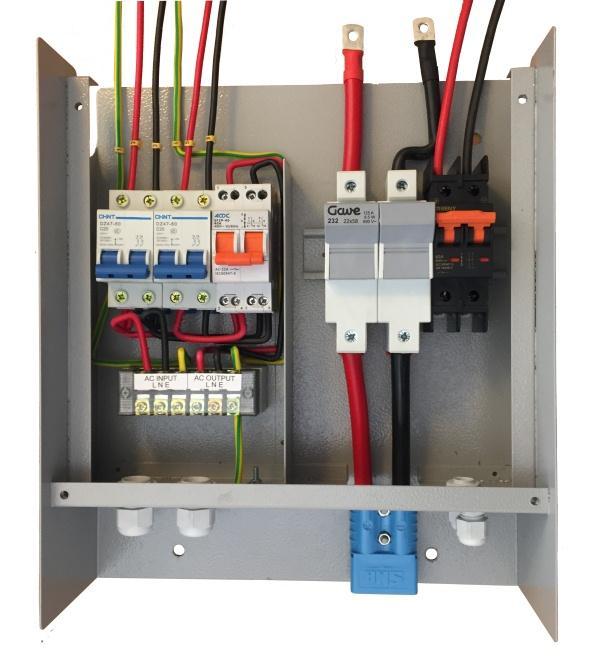
Hi everyone. Firstly thanks for all the replies.🤗 Its my first time using a forum so forgive me if I don't quote or answer a person directly. The inverter being used is the second last column on the spec sheet posted by Javi. The panels have Voc = 45.6 * 7 panels = 319.2V which is Ok as the inverter can take 450V. We're looking at a generator 7.5 kVA gennie . There is a second hand GRIP gennie available. Would the generator have to be manually operated? Is there a specific cost effective changeover switch? Still figuring out the circuit breakers and isolators and battery fuses. Did see an Axpert Pre-wired connection box, but it is for a single inverter. Would I need say double of what the box contains. Trying to keep the costs down. Thanks again guys looking forward to some more advice. Appreciated


-
Hi Guys, need some advice and recommendations for an Off grid system. Planning a system with 2 * Axpert MKSII 5k off-grid inverters in parallel, 14 * 330W Panels and 8 * 240AH 12V batteries. Still deciding on a generator for the system, no idea what would be suitable and compatible. Any recommendations would be welcome. Looking at increasing the PV panels and battery backup after a few years. Will split the 14 panels now for the inverters which have MPPT range 120-430VDC. Also clueless on how I would connect the gennie to the system and if it would be manually operated. Advice will be highly appreciated.
