kyuubi64
Members
-
Joined
-
Last visited
-
Sorry I misread, no AC at panels. Then go for option 2 and put a small battery say 12v 20ah lifepo4 battery and appropriate charge controller that is suited to charge lifepo4 and get one that also has a 5v usb out on it, it'll give you options of powering even 5v WiFi routers or switches. The locos will also run on 12v no problem pins 4 and 5 are positive and pins 7 and 8 are negative or just use those passive Poe injectors with DC plugs on to make it look nice and neat. Try buy a WiFi router that uses 12v or 5v.
-
I take it the inverter with WiFi is there with the panels. So there is AC on that side. Then cheapest option is those power line WiFi extenders that use your AC wire as a network. Some of them have a built in WiFi ap on the side you want the WiFi to be. Have seen mixed results with these devices. I have a few that are at least 5 years old never given a problem. They just have a couple ip cameras at the front gate so not to high bandwidth required and extra latency no problem for simply monitoring the inverter. Option 2 to just get 2 ubiquity loco AC units, must have line of sight. Beam angle is wide so easy to align then get a wifi router on the panel side set to broadcast WiFi
-
Also you should probably only be running one of those inverters as two in parallel could potentially pull 12kw from a 5.12kwh battery. Over current protection should hopefully trigger on battery though.
-
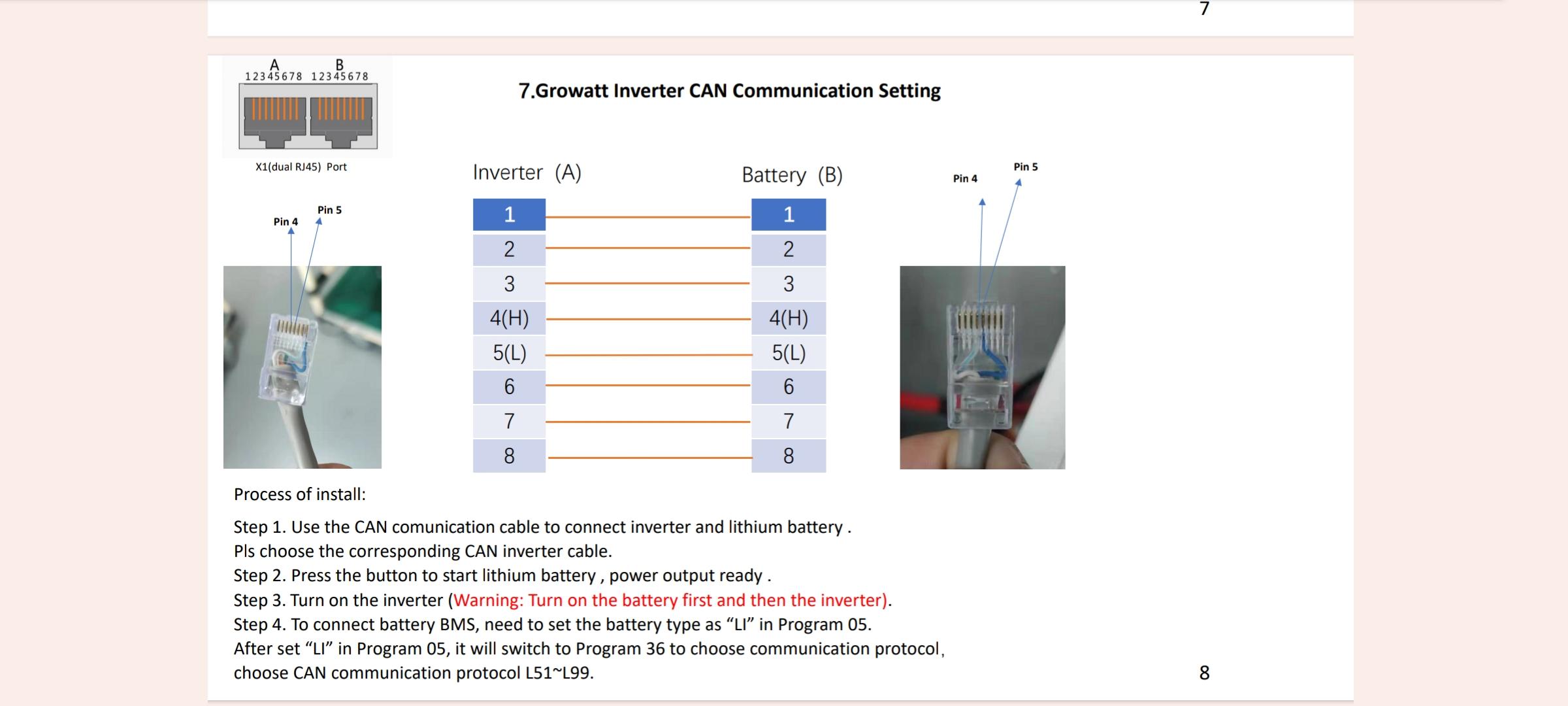
Must be plugged in to BMS port on inverter next to the RS485 port.

-
Did you already make this cable and change these settings?

-
Battery SOC graph from same time period

-
This is more a less a graph with those settings if I don't drain battery to 40% overnight you'll see no grid usage whatsoever. Downside from 15:00 solar was just chilling only powering constant loads. Now a overcast day will look a bit different hence more solar is necessary, but either way if you only charge via solar you save what you can produce from your panels

-
I would still change #14 to 050 (only solar) I don't mess around with the times at all as days light hours change day by day and weather conditions vary all the time also my energy needs change day by day. There is no point in charging with AC at night except for load shedding and power failures. Let's say for example end of day your batteries are at 99% then overnight you drop them to 50%, come morning sun comes out and your batteries continue charging and simultaneously power your loads, then cycle starts again. Scenario 2 same as above, but this time it's 01:00 and you have reached #12 40% then it'll switch back to Eskom and battery will sit there at 40% SOC until sun comes up. Sun comes up and charges batteries only with Solar then will switch back to battery mode when reaching #13 (Voltage point back to Battery) 95% then after that all loads will be powered form solar and if solar not sufficient battery. Then the power you stored during the day is used over night.
-
 deonholt reacted to a post in a topic:
Settings to use and charge batteries during daytime - Growatt SPF 5000
deonholt reacted to a post in a topic:
Settings to use and charge batteries during daytime - Growatt SPF 5000
-
https://www.builders.co.za/Plumbing-Bathroom-and-Kitchen/Geysers-and-Water-Heaters/Geyser-Accessories/Builders-Element-Spiral-Copper-2-kW/p/000000000000487992 Geyser element I used kwikpt as this is the brand of geyser I have. Obviously get whatever brand you have just installed but the 2kw variant I have 100L geyser running about 2 hours a day in summer for to adults and a toddler. https://www.takealot.com/smart-wifi-geyser-timer-with-energy-metering-smart-life-tuya-app/PLID91403075 Smart breaker. Been using a little over a year now hasn't given any issues yet. These cheap things you could get to fully utilise the extra sun when battery is idle.
-
If you wanted to stick with Growatt and add more panels for winter or very overcast days you could upgrade to the SPF 6000ES Pro and then you'll have two mppts and can more than double the quantity of solar panels you currently have. Sticking to your current 550w panels you'll easily be able to have two arrays of say 7*550w panels so total of 14 panels.
-
If you can get a geyser timer that is set to switch on during the day when you know your batteries will be more a less fully charged. Better yet a smart breaker that you can turn on and off from your phone or set a schedule via the app. Replace stock element with a 2kw one so it'll be using solar to heat it as long as you producing enough power during the time it is running. Otherwise they'll just be sitting idle once batteries are charged powering your constant loads.
-
Could try set option 1 to SBU Option 12 to 30% ( I use 40% as I'm super conservative and wand to prolong battery life) Option 13 You can leave at 95% Option 21 You can set to 20% ( Once again me being extra conservative I use 30%) Most importantly set Option 14 to 050 ( only solar charging ) Only issue you might have is if load shedding starts again.
-
If you don't come right with above and can't get the battery replaced/repaired under warranty I have a spares 8S active balancer you can have, just pay for courier/PUDO to you. So long as you don't mind opening up the battery to hook it up. If simply an imbalance it'll help get things balanced at a much quicker rate. Then once they all equal you could remove it and see if bms can hopefully keep things in check. Worse case scenario it can't and you'll have to leave it on permanently to help keep things in check. Micro cycles then can become an issue, but hopefully it won't get to that point.
-
-
Thank you, much appreciated 👍 If i don't come right with the four digit pin I'll use that reset instead.
-
Was just sold a bit earlier today off a WhatsApp swop group. Thank you