Gerswan
Members
-
Joined
-
Last visited
Everything posted by Gerswan
-
Please allow me to report that my problem was solved by a most descent human being, Theo form Just Solar in Vereeniging. He stopped by today, replaced two blown fuses, rewired the DB installed by the original “installers” and supplied a correct fuse for this DB. Charging me only for the parts. If only I had been aware of Just Solar a year ago when I allowed the original “installers” to do the job . . .
-
My apologies for barging in like this. I had a similar problem with a Mecer Axpert MKS 5K 5000VA inverter last year, but managed to overcome it by playing around with the different settings to finally keep the PV panels engaged. On Saturday, after using the electric lawnmower for about half an hour during the morning and a tumble dryer during the afternoon for about half an hour, the PV graphic on the LCD screen was no longer visible late Saturday afternoon. The SOL mode and Utl mode now seems to be similar. Sbu mode still draws power from the battery. SOL and Utl modes both charge the battery. Utility power carries the load. No power from the PV panels. Thanks in advance for any suggestions on what the problem could be?
-
The settings are summarized in Afrikaans . . . in stead of learning to speak French or Mandarin, I’m trying to teach the system Arikaans! 00.pdf 01.pdf 02.pdf
-
For what it may be worth, I have a single 2.4kWh Narada battery connected to a SOL-I-AX-5P inverter. Initially, total pv-freeze disaster. I managed to tweak the inverter settings so that for the past month the pv panels remained connected and trust to achieve the delicate panel/inverter/battery relation soon – using only WatchPower data.
-
Thank you for the explanation on SOC. Things are becoming more clear, but less shocking. To think I could have paid R40 000 or R50 000 more (which I stated perfectly willing to do) for an inverter doing the adjustments I am trying to do (for a very low load), by itself and accurately all the time and according to the particular load. (My questions beforehand were all answered either dishonestly or ignorantly.) To summarize: The back to grid voltage (which I left unchanged at default value 46.0V) seems to have kicked in correctly at one stage. The battery's internal (?) BMS, I suppose. The low cut-off voltage (originally set at 42.0V) I changed to 40.6V (should be >40.5V according to the battery specifications). With these settings, the bulk voltage set at 54.3V and the float voltage at 54.0V, this is what happens in the morning when the panels charge the battery: Battery voltage and SOC% increase gradually to 54.3V (100% SOC) (also according to the multimeter attached to the battery). This is the bulk charge (?) stage I suppose. Then there is a charge-discharge-charge stage (the absorb stage (?) I suppose) until the charging stops and voltage remains on 54.3V for a while. It finally settles at 54.0V (100% SOC) (the float stage (?) I suppose). The multimeter shows the same voltages that appear in WatchPower. The crude SOC (four LED lights) as well as the battery being fully charged (one LED quick blink, long off, quick blink) on the battery seem to be in agreement. It was during the above “absorb stage” that the panels used to disconnect and remained disconnected for the rest of the day. With the present settings there are momentary disconnect-connect incidents during the “absorb stage” and the panels finally remain connected at 54.0V (100% SOC). In the evenings, setting 01 on SOL (solar only), things happen more smoothly and there doesn’t seem to be an “absorb stage”. Again, no disconnected panels this morning. I will continue to monitor (although I am not a(n) SAPS member!) the value of setting 29 (low cut-off voltage). Thank you for the warning.
-
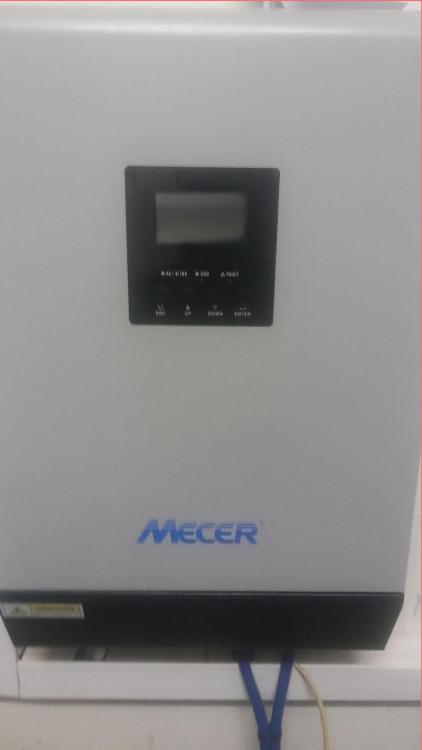
Thank you very, very much. I appreciate your sense of humour. What is left for me to do is ask a local electrician to re-install my inverter – upside down. At least it will LOOK like a hybrid then – comparing the right most photo in the middle row to the photo of my inverter! Maybe I could then spray paint it green to make it lithium battery compatible! But seriously, once I was able to use WatchPower, it assisted a lot in fine tuning the settings – float voltage, bulk voltage, charge current, back to battery voltage, low battery cut-off voltage – all within the battery’s specifications. I almost feel like ordering a second battery! I have seen a lot of complaints about the SOC % in WatchPower. Switching on the kettle made it drop to something like 50% in my case. With the present settings, no less than 98%. That’s what I wanted SolarPower for – to keep it at 100%!
-
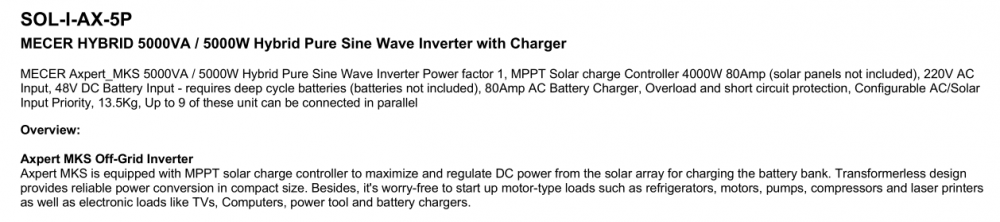
Thank you, Youda. Sjoe, I IS not still learning (as in my previous post above), I AM still learning! This is how the inverter is advertised, though. Sticker on the inverter also says SOL-I-AX-5P. Just want to make sure.
-
Thank you, flltech. I followed the links Youda provided but the sellers don’t seem to ship to South Africa. I managed to get hold of a company near Johannesburg RSA and sent them an email. They promised to contact me during the week. Good news, however. I might just have managed to pin down the correct combination of bulk and float voltages as well as charge current for the battery. (Nowhere close to the settings the installer left on the inverter.) Today is the fifth day in a row that the panels remained connected all day. The bad news is I noticed that SolatPower software has more options than WatchPower software. It does, however, not recognize the inverter via the USB port. Maybe I should use the RS232 or parallel (15 pin?) port, but I don’t have cables, yet. In a way I’m relieved that the installer’s promises to send technicians to solve the problem were empty promises. I have learned and is still learning a lot. Solar’s not for sissies – especially when you deal with Axperts and not experts!
-
I will consider the options you suggest. It’s not possible to express my gratitude in words.
-
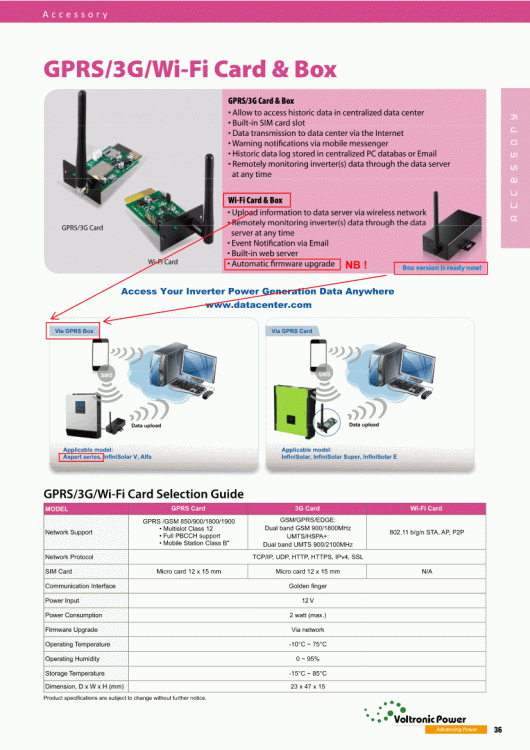
Thank you, Youda. I’ve been following discussions concerning the “pv freeze” on the forum for the last two months. My system was installed two months ago and the pv panels have continuously, except for a few days maybe, disconnected between 08:00 and 9:00 in the morning. There were suggestions that a firmware update could solve the problem. When I noticed the brochure on the Voltronics website yesterday, I thought it may be a way to communicate more successfully with the inverter. The installers supplied me with an incorrect USB cable. Once I realized that I could use my printer’s USB cable, I have been able to use Watchpower to examine the settings and change the float voltage 0.1V up and immediately 0.1V down again for the panels to connect and remain connected. for the rest of the day. They also supplied me with a battery incompatible with the Axpert, according to some. I downloaded the Wifi box user manual. I don’t know, however, if the Wifi box is available in South Africa and where to get it, if available. Maybe you know? (Maybe updated firmware will show up some day!) Thank you in advance.
-
Hello all. I was wondering if someone is perhaps using the wi-fi card and box described in the attached brochure. Would like to, if possible, attach it to a Mecer Axpert MKS 5K (sol-i-ax-5p) to help “DOOM!” the float bug. Thank you for any response.