


birdibird
Members
-
Joined
-
Last visited
-
-
Ok, got it. Is the problem that the bms communication is also not working with this inverter also in the control board?
-
Of course I paid attention. Slave and Master were set exactly the same, except for having the master on PYL and the slave on USER. The system was connected to Solar Assistant, so I could see all of both. As said above, the 2 inverters are now disconnected. Not in parallel anymore. The ´old slave' as said does not keep the settings. You change it on the slave itself, and a day or so later when the batteries were empty and the system switches off, after the system is back on the settings are back to default AGM. I have never experienced this with any other Voltronic inverter. To cross check, we now connected the 'old master' on its own to this system, and that one is working fine. So, the 'old slave' is faulty. Of course we did. After connecting the 'old master' we connected the bms cable to that one and it is working fine. So, the 'old slave' Max 7,2k has these 2 problems that I never have seen before, Is that solved you think by replacing the motherboard? Or is it something else?
-
@Coulomb Sorry, I think I wasn't clear. old situation: 2 Max's paralleled. Both connected electrical to 6 Dyness B4850. Master inverter with bms cable to batteries on PYL, Slave on USE Dit worked perfect for a long time, until suddenly F60 appeared. new situation: only 1 single Max in use: the one that used to be slave, so did not have the bms cable before problems: -Max doesn't remember settings -bms cable connecion does not work So you think both these problems can be related to a bad EEPROM? Could it be related to the F60 showing up before?
-
They have your 245.11 running. The inverter was part of a parallel setup, being the slave. (both had your 245.11) Error 60 suddenly showed on the master, so they disconnected the 2 inverters. Now they have 6 panels and 5 Dyness B4850 batteries connected to what used to be the slave and have the issue I described above. Also, the bms PYL setting is not working: error 61, while before with the paralleled inverters it did work (bms cable and PYL setting to the other: 'master' inverter)
-
@Coulomb or others: A acquaintance with a Max 7.2 has the problem that if the inverter shuts down, when it boots up again it resets to AGM defaults, with is a big problem with their Dyness Li batteries. Do you have any idea why this happens and how to solve it?
-
hmmm:

-
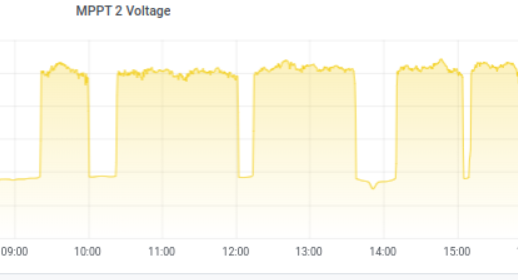
Hi @Coulomb I just encountered on your latest MAX 7.2 v245.11 the 90V bug: I unplugged the PV1 panels and had the inverter running on only the PV2. It is raining today, and ~250W was coming in (on a ~1900W series of panels). But various times the PV2 got stuck on 90V. When swapping the panels to PV1 they started to charge with ~250W again. Let's see if it happens on PV1 too.... see image below: the low line is 90V, upper line ~250V. PV current during the 90V dips was ~0,1A., PV Power during the dips ~15W
-
 Eruca reacted to a post in a topic:
BETA FIRMWARE AXPERT MAX 8 KW >>>MPPT improvement<<< (Based on stable 90.06)
Eruca reacted to a post in a topic:
BETA FIRMWARE AXPERT MAX 8 KW >>>MPPT improvement<<< (Based on stable 90.06)
-
 Coulomb reacted to a post in a topic:
BETA FIRMWARE AXPERT MAX 8 KW >>>MPPT improvement<<< (Based on stable 90.06)
Coulomb reacted to a post in a topic:
BETA FIRMWARE AXPERT MAX 8 KW >>>MPPT improvement<<< (Based on stable 90.06)
-
There is now an original 46.71 on the MPP Solar website: https://www.mppsolar.com/v3/8048maxmppt/
-
A wiring issue in what way?
-
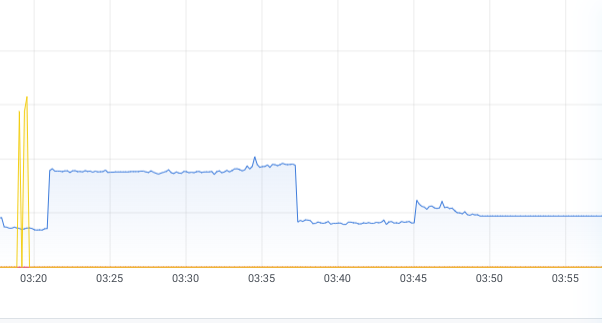
Looking at more details at 3.19AM in Solar Assistant: The highest PV power was 630W. MPPT1-V 99V 1,45A 270W / MPPT2-V 129V 1,30A 300W Sorry, I was mistaken: I meant 45.11 (your 245.11) together with Display 12.21 The batteries were new and were installed together almost 2 years ago. Dyness is indeed LFP, like Pylontech, and they use the same RS485 comm to the Axpert Max. What I do notice, looking in the history of Solar Assistant, that the batteries are not being charged full all the time. The last time that they hit 100% was on 14/4. Then you see in the 2 weeks after they are being charged up to almost every 2 days 1V less, resulting in the max SoC yesterday on 91%. The previous date they hit 100% was March 27, which was the day I installed the patched 45.11 and display 12.21. Before that they were running on unpatched 45.07 and display 12.13 and the last date before March 27 that they had 100% charge was January 17. Is this something Dyness is doing in their BMS? And why then fault 71 now, while they have been charge 'full' the day before. Update: They say now that the 3rd battery is charging less. That this morning it was almost empty while the others were on 50%+ or 75%. They also said that has been going on for months now, but only this is the first time #71 is given. Also there appears in the night regularly (sometimes every 10 min) a peak of 1 or 1,5 kW. A fridge? A leaking tap -> pump starts automatically? They are looking into the cause of that. So, there is an unbalance between the batteries. And the 3rd battery must have given the #71 signal as protection. I see that at this moment the batteries are not charging further than 91% again. (If I set the Axpert to user, it does continue to charge.) Do you think going back to patched Georgs patched firmware (without your patches) or even the normal 45.07 would make a difference? And this might be a case to notify Dyness to ask them about the imbalance?
-
@Coulomb A friend got a strange thing this night at 3.19 am with the patched 45.07 firmware: There is a strange double peak of the panels visible and then at 3.50 am they got warning 71: (If battery status is not allowed to discharge after the communication between the inverter and battery is successful, it will show code 71 to stop discharging battery.) And lost their power. They couldn't make it work anymore afterwards during the morning: every time they restarted the inverter it immediately jumped to 71. Only after the sun came back on the panels the system works again. Any ideas? (batteries are 6 x Dyness B4850. Battery SoC was around 60%)
-
Yes, summers in Spain can get quite hot indeed 😃 🌞 Multiple people here have their panels lying on the roof, and I never heard anyone else having problems with overheating, cables etc. It keeps being a mystery why F51 happened....
-
I understand. The only thing is that there is only a bare concrete roof there. They chose not to use frames or SolarBlocs (solarbloc.es, which I often recommend on flat roofs), the panels are lying flat on the roof with the cables underneath. When the red Sahara storm with rain came, I guess some of the connectors were lying in a tiny pools of irony water, as the roof is not perfectly flat. Now it has been dry since December here in Spain (!), and only recently F51 and sometimes F59 and now F09 showed up. I can't phantom how some earth connection could have happened, you?
-
Yeah, that's my take on it too. He is just talking bull. I am not going to use that seller anymore. Still is it a mystery why this happened. Can you electorate a bit more on your idea about how the panels could have been in contact with earth?
-
@Coulomb Update: The inverter now gives F09, so it is definitely broken and needs a new motherboard. The seller keeps insisting that for 35m 17,5A 270V a 6mm2 cable is the cause of the problem. I cannot believe that and have never experienced that in all the years on any other project. (The loss is as I calculate 0,85%.) What do you guys say about this story and the cable thickness? Can that cause the inverter break?