


CliveS
Members
-
Joined
-
Last visited
-
 CliveS reacted to a post in a topic:
Issue with running off Solar with Synapse 5kVA with 2 x US3000 Pylontechs
CliveS reacted to a post in a topic:
Issue with running off Solar with Synapse 5kVA with 2 x US3000 Pylontechs
-
-
I've got a Synapse 5kva system, i believe it's the same as the Axpert brand,
-
Hi Barry, Yes, my issue is that the PV cuts around 11am and starts up again around 2pm.
-
Thanks Guys. I've got them back here later this week to fix this issue.
-
@francoisConfirmed that they are 345 Watt panels that were installed.
-
Hi Francios, 12 x 335W panels - that's all I know.
-
Hi Francios. Thank you for taking the time to check out this issue. According to my quote, I had 12 x 335 watt panels fitted - and they are fitted in strings of 3. I checked the side of the inverter, and the max voltage is 145V. I also checked my little user manual, and i see a max of 115V for PV Array MPPT Voltage Range. On the user manual, the Max PV Array Open Circuit Voltage is 145VDC Here is the little specification sheet from the user manual:

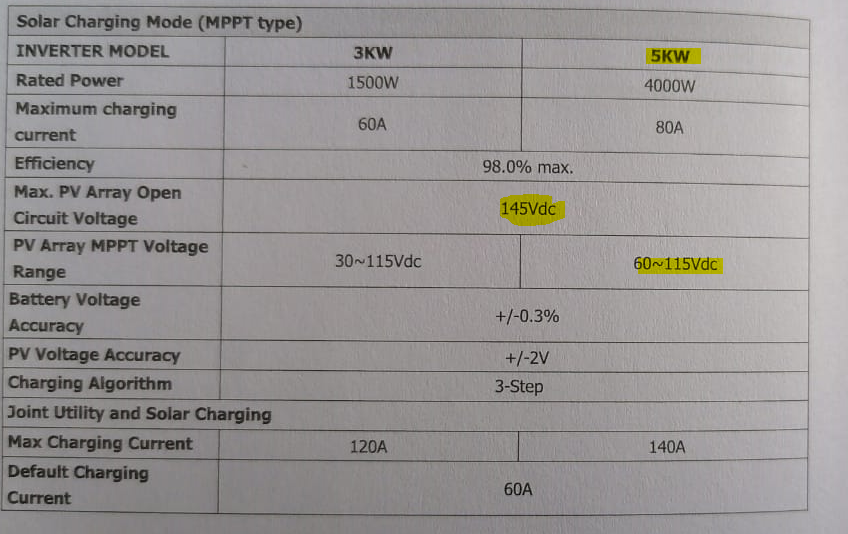
-
I called the installer to get the actual numbers, and he says he connected them in groups of 3, so there are 4 groups panels, each with 3 per group.
-
so my problem has come up again - batteries were fully charged at around 11am. I could hear the inverter fan going on and off and watched the ICC and could see that PV Watts was increasing and decreasing all the time. now, finally, it's done it again. No PV showing, but it's working off the battery and no charge is going to the battery on the LCD of the inverter. We can see that the battery is draining as well.

-
I should mention - there are 12 x 320 Watt panels installed as well
-
Yes, that's what should be happening, but it's not doing what it should. I had a Raspberry Pi fitted as well after the initial inverter and batteries were done, but the problem started prior to the Raspberry being installed.
-
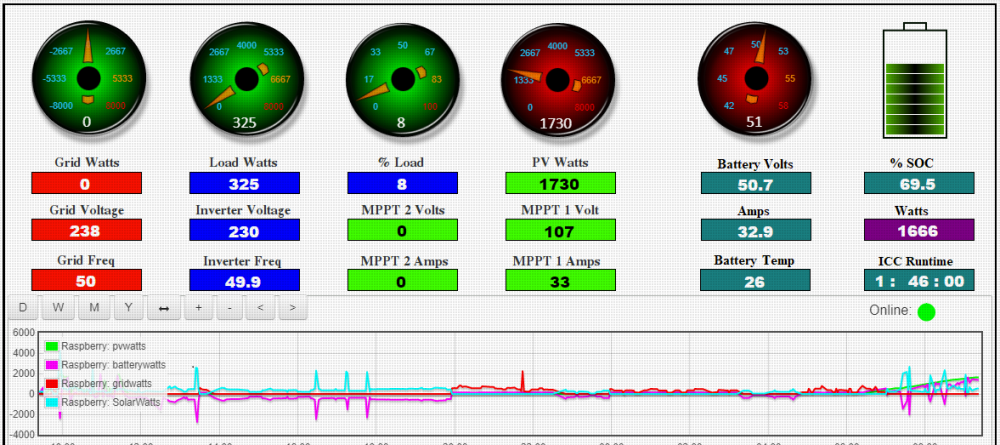
Thanks for the reply. This is the current situation on my system below. the system is generating over 1.5kW, and we're using 325 Watts. The PV goes up even more later on in the day, so I can understand that there are times when we'll need to draw on battery power, however, not to the extent that it's running the entire home off batteries. i
-
Thank you for replying. I mean the above - there is full sun, and the house is running off batteries.
-
Hello, I'm a total newbie to solar and am still within 2 weeks of having the system installed. I have picked up an issue with the system which I am concerned about. The batteries are fully charged by the PV panels by 11am or 12am everyday, and once full charge is reached, the system runs off batteries for the rest of the day. The installer is unsure what is wrong, and they are trying to find a product specialist at their supplier to assist. The installer advised me that the system will run off Solar until the load cannot be managed by PV and then batteries will kick in which is not happening. What does work is to reset the entire system, which then kicks in the PV system and it begins to charge the batteries and supply power to the home. For example, it's just after 4pm currently, and it has been almost 5 hours since the system stopped charging via PV, and my current SoC of the batteries is 70%, which is not sufficient to last the entire night. Any advice would be appreciated. I'll have to google your acronyms, but I'll learn. Thank you.

