Dylanjiva
Members
-
Joined
-
Last visited
Everything posted by Dylanjiva
-
Thanks Coulomb, for taking the time to answer my questions. The sharing of your knowledge and advice are appreciated. Sounds like it is not a simple fix and I think I will be going the replacement route.
-
My Axpert 3Kw inverter recently blew. AC IN and Battery terminals are now short circuited. I opened it up to take a look and it looks like a capacitor labelled MOV6 near the AC connectors has blown. I cannot see any other obvious damage, but have not stripped the unit completely. For those with experience in repairing these things, do you think this is an easy fix to replace this one component, or is it likely to be a number of components that need to be replaced? Is it worth sending off for repair? Any recommendations? Thanks!

-
After over a week of testing I'm afraid this method of calculating SOC has not proven to be very accurate. I have found that when the battery is fully charged and at float voltage for a few days the kWh going into the battery slowly accumulate until the SOC from the Kwh feed is reporting over 120%. Unless you keep zeroing the “batterykWh” feed the SOC gets increasingly inaccurate over time.
-
Hi Chris, I have also been trying to get a software based SOC. Thought you might be interested in this post:
-
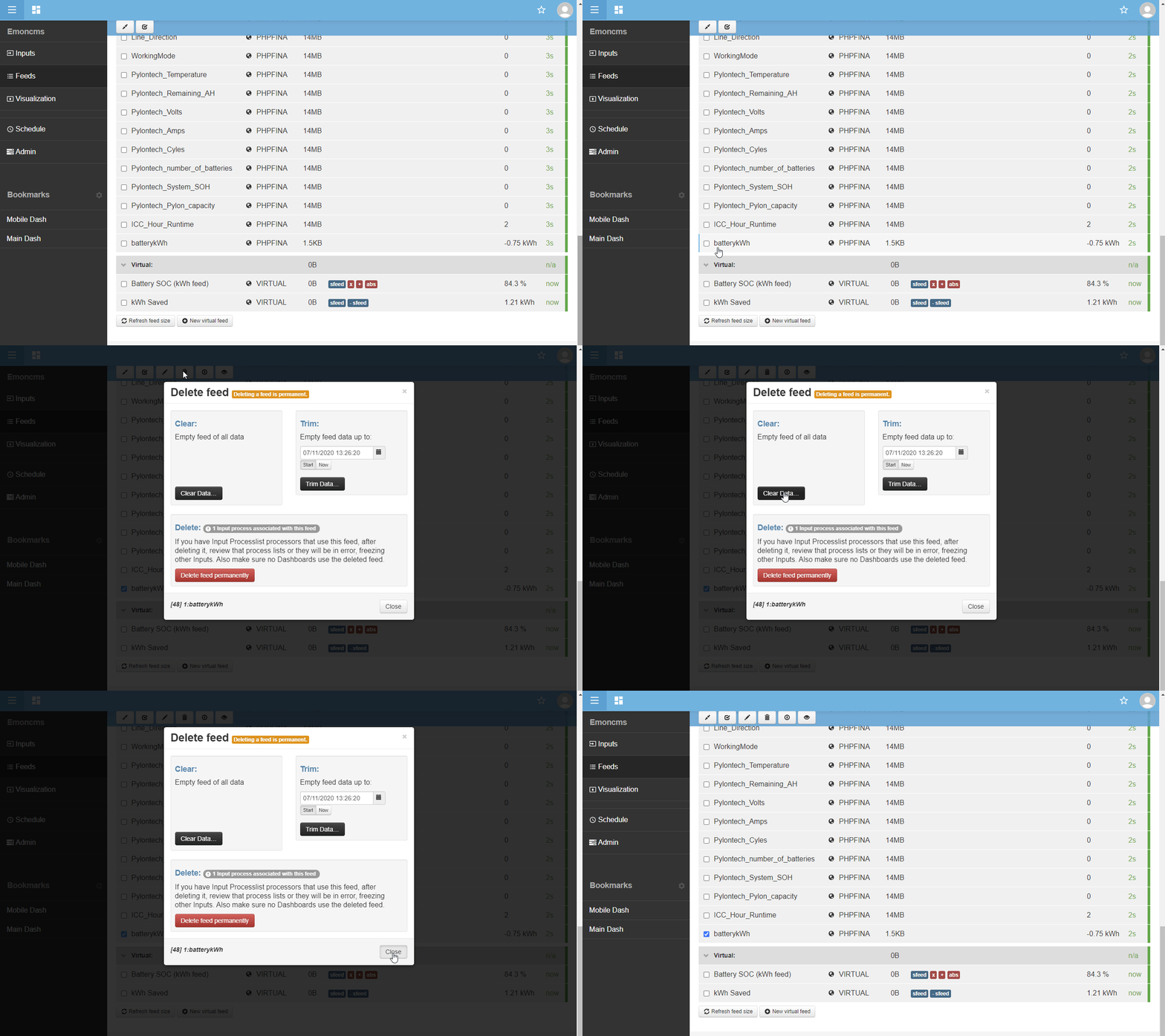
I’ve learnt a lot from this forum through others sharing their experiences so I thought I would give back and share what I have learned. I have a 3kW Axpert inverter connected to a raspberry pi running ICC and Emoncms. I have been frustrated with not being able to get accurate State of Charge information from the Axpert because it uses voltage to estimate SOC values which is unreliable. I have looked at getting a Victron battery monitor but held back because I was sure there must be a way to get a true SOC by using the ICC and Emoncms software to track kWh of charging and discharging from the battery. After some tinkering, I have finally found a way to get an accurate state of charge reading and thought I would share this with others. Basically, it involves setting up some feeds in Emoncms in order to track battery kWh and then processing this feed to convert it to a state of charge percentage. This does not work if you use utility to charge your batteries as the Axpert does not seem to log this. This only works if you use solar exclusively to charge your batteries. Here are the steps to follow: 1. Create cumulative battery kWh feed: In Emoncms go to Inputs where you will see a list of various inputs that are logged. Find the input named “batterywatts” and click the spanner icon. Click on “Log to feed” and select “Power to kWh”. In the feed drop down box select “Create New” and give it a name such as “batterykWh”. Click add and then save. 2. Create a State of Charge Virtual feed: In Emoncms go to Feeds where you will see a list of various feeds. Scroll down to the bottom and click on “New Virtual feed”. Give it a name such as “Battery SOC” and click save. Tick the check box next to the newly created virtual feed and click on the spanner icon on the top of the page. In the dropdown box select “Source Feed” and the select the “batterykWh” feed you created in step 1, click add. Now we need to do some maths to convert the cumulative Kwh feed into a state of charge percentage: Calculate your battery bank capacity in kWh (eg. I have a 24V 200Ah bank of batteries: (200x24)/1000=4.8kWh) Calculate the scale to convert kWh units of your battery into a percentage (eg. 100/4.8=20.8333) Set up processing steps in the State of Charge Virtual feed: To convert KWh to percentage: In the dropdown box select Calibration “X” and then in the value box put the negative of the scale value calculated above (eg. -20.8333). Click Add. To invert the percentage scale: In the dropdown box select Calibration “+” and then then in the value box put “-100”. Click Add. To make sure the percentage value is always a positive value: In the dropdown box select Calibration “Absolute Value” and then then in the value box put “100”. Click Add. Click Save 3. Zero the State of Charge Virtual feed when the battery is fully charged: Go to the feeds page of Emoncms and select the checkbox next to the “batterykWh” feed created in step 1. Click on the dustbin icon at the top of the page and press “clear data”. Don’t delete the feed by mistake. You may need to do this calibration occasionally or after using utility to charge your batteries. 4. Now you are ready to add the State of Charge Virtual feed values to your Emoncms dashboards. I have attached some GIF files showing the process. Hope someone finds it useful.