LandyMan
Members
-
Joined
-
Last visited
Everything posted by LandyMan
-
I know you already saw , but for the rest of the guys here who were following, and might be interested:
-
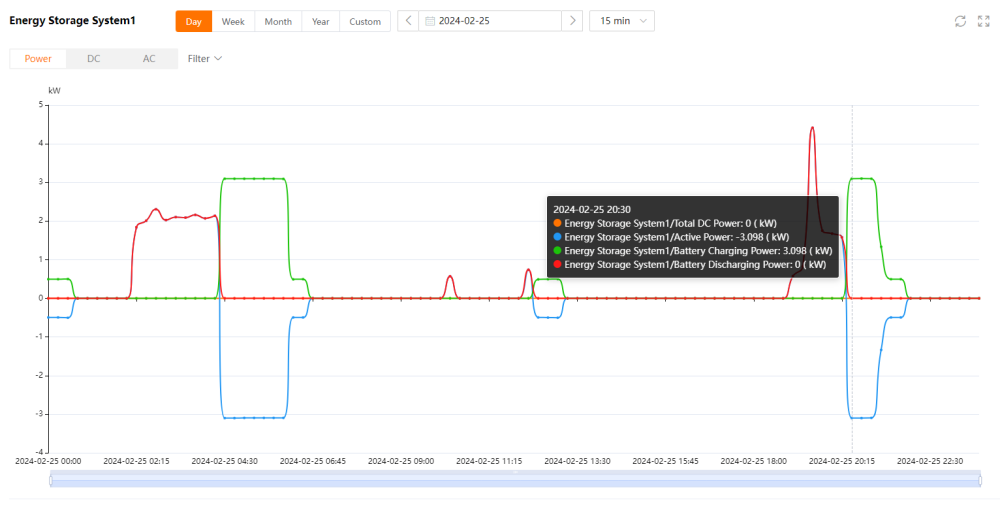
Yes I am, thanks man. Battery bank is much smaller than I initially thought, had some fine tuning to be done, but the installer was excellent in getting it resolved remotely with Sungrow support. Curves look, well, curvy
-
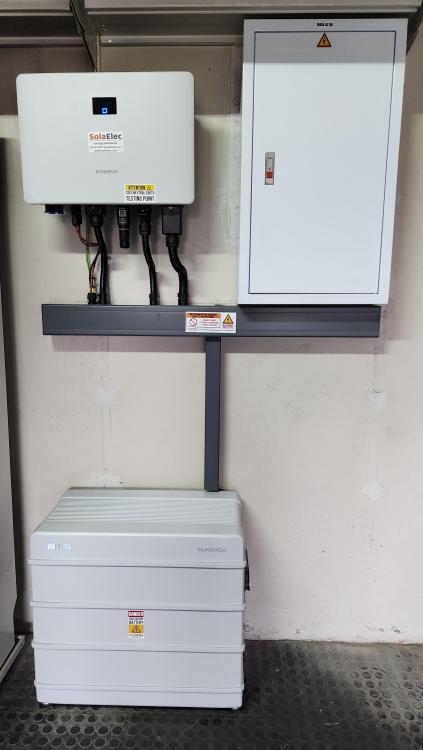
After being lucky enough to win a Sungrow kit, I had it installed today (no panels yet).
-
Thanks @TaliaB Out estate requirement is to have anything done signed off by their Master. COC issued by Installation Electrician, then that and paperwork submitted to our Electrical provider, to be checked and signed off by their Master.
-
Single phase
-
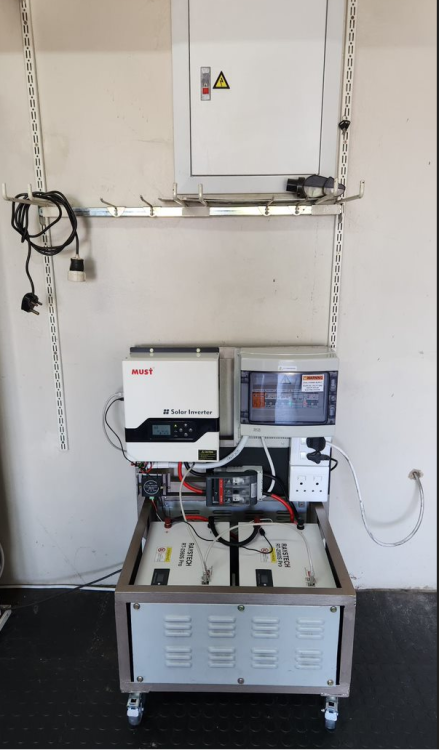
So where this trolley is now, the batteries will be stacked, and the inverter to the left and slightly lower than the DB board. Yep, it is pretty much plug and play, especially the batteries. In process to determine what is the Estate requirement in terms of their Master Electrician sign-off and any other requirements
-
Yes it is
-
That is possible, and I have considered it, but now looking at doing panels as well, the landscape changes to a bushy field way above my paygrade
-
Solar Geyser and gas stove was already done when we moved in 11 years ago, so that is luckily covered
-
I hear you, and after your initial post, I am now considering this ... trying to work out what my Eskom savings will be should I manage to cycle between PV and batteries
-
BUT, that is just the panels ... installation for 12 of those are R23k ... I have the quotes already
-
Because panels will add and additional R50k to the bill, which I don't have
-
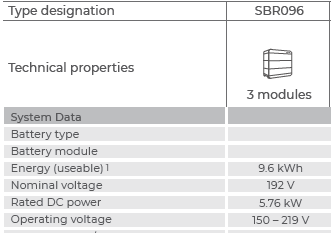
Howdee. Inverter and 3 batteries. Come as a plug an play solution. I do understand that there are ancillary components (Built my own 5.2kwh trolley, so get what is involved) but the price for DB rebuild seems high - above R10k in each instance. I am definitely not looking any gift horse in the mouth, just looking for the most affordable installation option, and some feedback if this appears to be correct for going rate on installation costs. This is the kit: https://jcsolarpanels.co.za/shop/battery-backup-kits/5kw-backup-power-kits/6kw-sungrow-inverter-with-9-6kwh-battery/
-
Hi all We are in the lucky position to have won a Sungrow system towards the end of last year. Couldn't contain my excitement, until realising it is excluding installation, and what the installation costs are. So I got 4 quotes (3 of which are certified to install the system), ranging from R20k to R35k. Is this the going rate for installations (most expensive portion is the DB rebuild/split to essential/non-essential)?
-
Not going to go into too many details, and a lot was already shared in other threads, but thought I would create this thread, should someone want to get some inspiration or ideas when it comes to building your own "Inverter Trolley". History During the December 2023 holidays, my dad and I were discussing options to combat loadshedding, having a little 555W portable unit (which worked remarkable well to keep the TV and DSTV on) as well as a 1440W Ellies trolley with 2 X 10⁵Ah LA batteries (standard pre-assembled). Obviously these two were not enough, so we started toying with the idea of building our own trolleys ... and thus the project started Design Building off of the trolley concept, with a couple of changes: 1. 3KW inverter needed - to keep at least the fridge going, and to be able to fire up additional appliances, like coffee machine while running the entertainment area. 2. Definitely Lithium batteries, no contest there 3. Increased battery capacity, so we opted for 2 X 200Ah batteries 4. Battery equaliser to make sure everything stays nicely aligned The Kit (Note: I am in no way associated with Energy Tech Store, or posting this for financial gains/compensation) The easiest way to get what we wanted, was to go for a "DIY Kit" option from Energy Tech Store (https://energytechstore.co.za/3kw-24v-must-backup-kit-with-5-12kwh-revov-2life-12v-200ah-batteries/) I initially looked at getting a trolley from the likes of Geewiz, but their trolleys are not big enough for the batteries, so this will be a full-on DIY job REVOV did not have batteries in stock, so we ended up with RAYSTECH 2560S Pro 200Ah batteries (https://energytechstore.co.za/raystech-2-56kwh-lifepo4-battery-12-8v-200ah/) The Build Not wanting the inverter to be mounted flat, the trolley would need a "chair style" design. The trolleys were built using what my dad had in his workshop, including the panels and back that were cut from old Computer/storage boxes The original design was modified slightly, as when you have the parts on the same panel, things are different to what you expected For the rest I am not going to explain, as it is quite self explanatory how things progressed Last pic shows comparison to the Ellies Trolley Final installation spot:
-
Hi all Anyone familiar with this setup: https://jcsolarpanels.co.za/shop/battery-backup-kits/5kw-backup-power-kits/6kw-sungrow-inverter-with-9-6kwh-battery/ Advice/feedback on it please (my wife won it in a competition, and I need to start sourcing potential installers)
-
Hi all Not sure if this should go here or in inverter section So I tried to assist my dad to get is datalogger on his PV18 MUST inverter going, with zero success. I manage to get the datalogger on the WiFi network, and I can see it connected to the network when I do a network scan. The logger is added to the app, however it keeps showing as offline (sorry, no screenshots) Anyone have similar issues with the MUST datalogger (or dataloggers in general)? Thanks
-
I have the same problem with mine on Windows 11 ... just keeps searching
-
Hi all So I come from an IT/Tech background, but never dabbled in Electronics/Electrical goodies. During the December holiday period, we (my dad and I) came to the realisation that these Ellies/Mecer trolleys are useless with Lead Acid batteries after a couple of months. For our two households, it would not necessarily make sense (based on our own situations and evaluations - might not be the same for all) to install big systems (R60k+), and we ended up doing some research (hence the "some reading") to get to a comfortable cost vs. benefit solution. And this is what we came up with: 3KW 24V inverter 2 X 200ah LifePO4 batteries Of course all the trimmings like fuses, holders, balancers, etc Custom built trolleys with heavy duty wheels for both (My dad is a demon in a workshop, and has all the tools to DIY this :)) Next step will be to look at non-fixed solar panels for each of the boxes. Its been an interesting journey thus far, and the knowledge picked up by wanting to do this is insane. It is like everyone always say: I learned more about Ohm's Law when I started vaping, than in my whole school career I will share some pics when we get closer to the end result Ciao
-
Also no stock
-
No stock ... was going to get from them, but yesterday said they out of stock
-
Item Wanted: As per title, looking for 4 200ah 12V Lithium batteries (Preferably Revov or Hubble - Yes, I know stock is an issue :)) Packaging Essential: N/A Desired Age: New Location: Gauteng preferably Willing to accept a shipped item: Yes Ballpark/Budget Amount: Market related
-
Good day, I want to replace my SUL 181H timer with a SONOFF basic, but I am unsure about the exact wiring, and don't want to mess it up, obviously I see I can't upload pictures here, but my setup looks like @Jack Kitley's Thank you