


ViperGTI
Members
-
Joined
-
Last visited
-
-
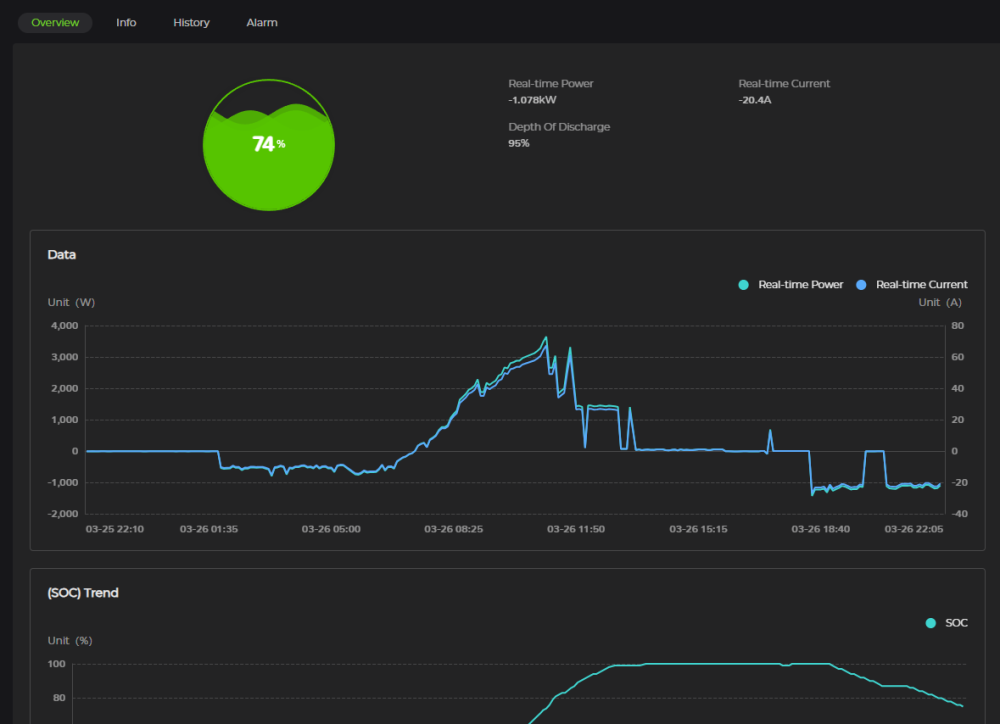
For anybody interested, I went ahead and bought 2x Dyness Powerbricks. Thus far they seem to be working great. Obviously I can't access the detailed battery information in Solar-Assistant, BUT the Dyness app is very good to see that kind of detail. If I really want that, I can just log into the Dyness app and see detail that is about on par with 1what I used to be able to see in Solar-Assistant. I've attached some screen prints below. On top of everything, it comes with a built-in fire extinguisher system that responds within 5s. I replaced 6x 5.5kw batteries with 2 of these and while the total power is about 4kw less than before, I get more usable power out of these since it can discharge to 95%. I am planning to get another one in future though (which is part of the reason for the upgrade... out of wall space). Thus far I'm very happy with the upgrade, but will have to see if I still feel the same way 2 years down the line.

-
I have the exact same question as the original poster. Looking to replace my 6x 5.5kw Hubbles with 2 of these (maybe a 3rd later on). I'm leaning more towards the Dyness since it is slightly cheaper, better warranty and can discharge to 95%. My question is: How is their warranty? Has anybody ever needed to use it and how good and fast was the support received? Also, I see that Dyness has an Android app where you can monitor the battery. Any idea how detailed that thing is compared to Solar Assistant? Does it give both an overview of all the batteries connected to it as well as individual batteries? As for the 0.5C, 140A/h @ 51.2V translates to 7.1kw/h per battery. I pull at most 5kw in a short burst on the entire system (if I have to microwave something for 3 minutes) since my heavy power usage is during the day, so I should be fine... unless my logic here is flawed?
-
-
-
I use a custom computer (SolarAssist) where it lets you look at each individual battery's details. Don't think you can view that level of detail just on the inverter.
-
I've had this before on a different brand. Can you somewhere check your State-of-Health? In my case, when the SOC dropped like that, it was due to a short circuit within the battery and then afterwards, my SOH showed as 40-60ah. After a firmware upgrade it was restored to 100ah temporarily, but the SOC would drop like that again after a week or so (or sometimes after a day). The issue only got solved after the batteries were repaired (with a bit of fighting, but it was done under warranty). Short circuit was caused by loose cells within the battery that only got noticeable when the SOC dropped to certain levels.
-
Today I'm running fine again. Like I said, it is just certain random days.

-
At 50%, the batteries are usually charging so then I'm generating around 9kw/h while the load is significantly lower than that. However, this issue doesn't happen every day, but it is happening more often. And even if it is generating less PV, then it should take the balance from the grid, not the batteries (since they need to be fully charged before going into the evening.
-
I seem to have a issue that is occurring on some days, but today it is worse than usual. Essentially there is more than enough sun, but the PV that generates is less than the load and then instead of taking from the grid, it takes power from the batteries. I know there is enough sun because if I increase my load, my PV generation increases accordingly (but still leaves a gap between the PV and load). My setup is 2x 5.5kw Sunsynk inverters with 13kw Solar panels and it is configured for this time of day to use grid when there isn't enough sun (time table is set to 100%). So firstly, the PV generation shouldn't be lagging behind the load and secondly, if there wasn't enough sun, then power should be used from the grid, not the batteries. Below are the screen shots from my app that shows with high and reduced load. Between the two screen prints, I basically plugged my car out which dropped the load by 2.4kw, but also my PV generation. Alternatively, if I turn the toaster on while the car is plugged in, it increases both the load and PV generation. It seems to maintain the gap of 800-1600W difference between load and PV generation. For reference, on a day like to day, I can easily generate over 5kw/h of PV at 5pm and during the day (like now), easily around 9kw/h. So the amount of sun / PV generation isn't the problem. Then, as I was typing this message, the sun went behind a cloud and the following happened (screen print below... it started using grid and battery). Then after the sun came back, my PV generation jumped to 5.5kw/h with no battery being used... and then it now adjusted downwards back to have a 1.2kw/h gap / battery usage. So it seems to me that the inverter is maintaining the gap between generation and load. And now finally, after a couple of times that the sun went behind clouds, it is back to normal. But how do I fix / resolve this on days where there are no clouds?


-
-
Hi Which BMS version is it running on? When was it purchased? What is the maximum discharge you've done on the battery and how often have you discharged it to below 30%? Have you had any issues with it?
-
I'm using 5x Hubble 5.5kw Lithium AM-2 batteries. My load is about 7-8kw, the PV generation (which is sometimes around 1kw higher) is around 9kw. Note that this (the high load with alarms during switchover) is my 2nd issue though. My PC (1st issue) restarts regardless of the load, even if the total load is under 1.5kw. With the UPS that I bought, the PC now only restarts if the PC is drawing more than 700W load. That happens even if I'm already running off the batteries so technically there shouldn't be any switchover. I have actually not tried simulating a power cut. What you say in your ventured guess sounds plausible. Any idea how to overcome it?
-
Hi I have two issues with my solar system that I could use some advice with. I have 2x 5.5kw Sunsynk inverters with more than enough solar panels and battery storage. From around 9am until 15:50, I run on solar with grid for backup (so that I don't need to check the sun while running the geysers and other heavy loads). From 15:50 until the next morning, I run completely off-grid with a 20W grid trickle feed. The system was installed in November when we finished building the house. I very rarely use grid power: Only when it has been raining non-stop or very cloud and even then, mostly to heat the geysers. So my first issue is that if loadshedding hits, then I can see the light in my house slightly dim and fans running slower (even if I'm running off-grid), but more importantly, if my computer is running a slightly higher load than just idling (i.e. using the GPU), then my computer would actually restart during that dip. I even bought a small 700W UPS but if I use the GPU, then obviously the PC is using more than that and restarts anyway. This happens whether I'm running on-grid or off-grid and this is now becoming a frustrating issue. The other problem is, although I'm managing it manually now, is that if I'm running a high load and loadshedding hits, then the whole system would shut down and restart. The first time I was running about 7-8kw load (and I was generating more than enough from the sun), then when loadshedding started, the PV power suddenly dropped from 9kw to around zero, things started beeping and then everything shut down and rebooted. The second time it happened, I was running around 4-5kw load with more than enough solar power and then all the previous things started happening about 10 minutes after loadshedding started. I've mostly mitigated this for the 4pm loadshedding session by changing my timer to go off-grid from 15:50 instead of 16:00, so that solved the common 4pm slot, but now I still have issues if loadshedding starts at 12 or 2pm while I'm running heavy loads.
-
Well, since I was building a new house, the prices for some reason just started to skyrocket while I was building. (In 3 months, the price for my solar panels rose by R30k). So I started buying the solar components while we were still building. I can't remember exactly about the tiles, but I think they also worked out more expensive and it probably would have delayed the building project that was already way behind schedule (due to municipality). Then I also have a lot of things on my roof so that would have negated the effectiveness of the tiles. On the north side, my roof is full of solar panels and EV tubes for the geyser and on the south side, most of the roof is covered by panels for pool heating.
-
No, ended up going traditional panels.
-
-
@JayMardern What I ended up doing is to switch from off-grid mode to "on-grid" from 8am to 4pm and I make sure the geysers are on in that timeframe. This seems to mostly work correctly. If there is enough sun, everything will come from solar and if there isn't, it will draw from Eskom instead of shutting down. I can't remember the behaviour now in the event that the geyser is on during loadshedding, but I think it will only drain the batteries until 94% and then turn off (like I wanted). However, I manage the geysers manually so that it nevers runs off the battery. The only issue I have running "on-grid" is that when loadshedding hits, the inverter has to switch from Eskom to batteries and that dip sometimes restarts my PC. I've also had issues while I'm running a heavy load (i.e. over 4kw) and loadshedding hits, then it would sometimes make alarms go off and restart the inverters. Both issues that I don't have if I just run plainly off-grid.
-
I noticed the following two settings on the Sunsynk app that isn't on the inverter's display. Wouldn't one of these resolve my issue? Not sure what they do though. (The two AC couple settings at the bottom)


