douwgza
Members
-
Joined
-
Last visited
-
Hi all, Lets say I am using the 3KVA Axpert with PV and Batteries sized right for my application. As I see it program 1 setting would be SOL/SBU and inverter will then automatically change between LINE and BATTERY MODE depending on the voltage setting you set in programs 12 and 13. In program 1 you can select SOL, UTI or SBU. SOL would seem to be the right option but would there be a reason to choose SBU? SBU would seem to mean that even if the panels can supply the load, if the battery levels are low it must use the grid and PV to charge the batteries and grid to supply the load. SOL seems to mean that if the panels can supply the load, continue supplying the load even though the battery levels are low - does the PV charge the batteries as well in this mode if there is sufficient power? Is it basically a priority of charging (SBU) over supplying the load (SOL)? Can the PV supply the load AND charge the battery when program 1 is set to SOL? So, if your load is low during the day you will see the benefit of using the excess stored energy at night. For the guys that have this unit installed with PV - how has this been working out for you? Can someone clarify this please - have I got it right? Cheers Douw
-
Thanks Carl, drawings would be awsome!!
-
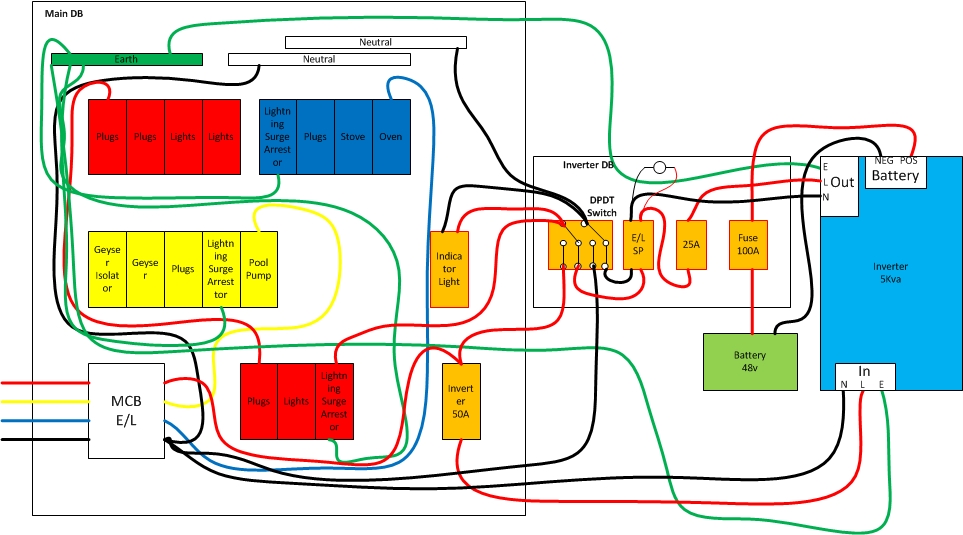
THANK YOU for all the guidance - will help a lot to give the to the electrician as I am sure it may help a bit with the install price if planning has already been done - what do you think - was thinking if I did this leg work I might get a bit better price... But in any event at least I have a MUCH better understanding of how the inverter connects to a DB. I am assuming single phase would be the same - you would just create two seperate circuits with two seperate neutrals. Attached is the final final version.

-
I notice your indicator light is on the sub-db - do you also have one in the main DB then?
-
Yeah , because currently that 3 phase breaker and the two at the top are hanging loos and being kept in place by the wiring pretty much. Not good I assume...
-
So is my E/L and CB on the Inverter DB the right way around? From your thread it seems they should the other way around or doesn't it matter?
-
And... is it possible to convert these old boards to DIN-Rail? Also as mentioned - its a flat roof house so not easy to reroute wiring. Had to remove the ceiling the last time work was done on the DB.
-
Thanks Eugene, Now this opens another discussion - attached is a picture of my DB - bear in mind this is a very old house - (35 years). Is the MCB where the City Power feed comes in not an E/L. It has that test button.

-
Got it, So mine as per the other thread didn't need the Main switch because it is next to the main DB.
-
-
Very nicely done! - why is there a UPS out and Plugs breaker? EDITED LOL
-
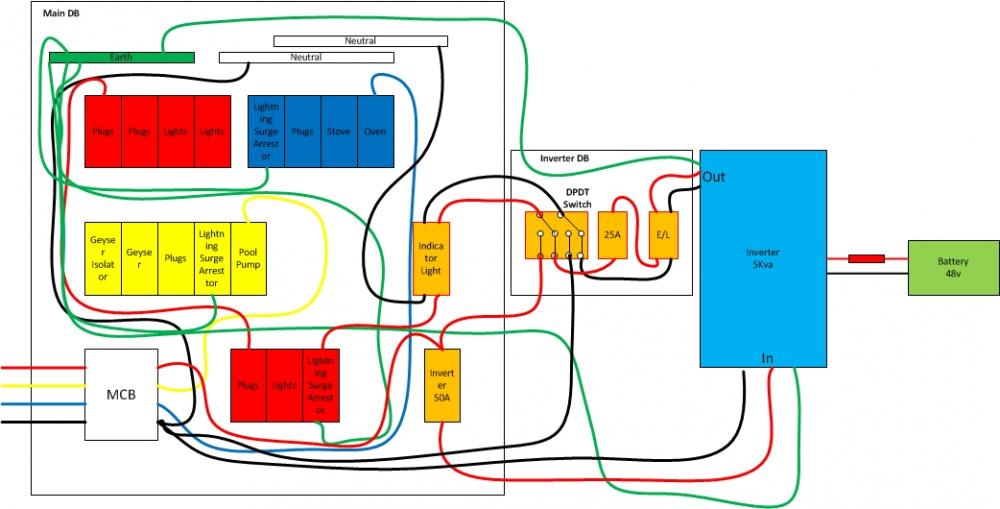
Yes, the plan is to have it right next to the current DB - flat roof house so not much space to work in the roof Like this??
-
Final version - I think I have covered all areas...

-
Added earth leakage and indicator light. Is this looking right now? Once again thanks for looking at this for me super and chris. my field of expertise is IT but I am finding this so interesting - always nice to learn new things

-
Superdyi I think I got it... See attached