Skip to content
View in the app

A better way to browse. Learn more.

Power Forum - Renewable Energy Discussion

A full-screen app on your home screen with push notifications, badges and more.

To install this app on iOS and iPadOS
  1. Tap the Share icon in Safari
  2. Scroll the menu and tap Add to Home Screen.
  3. Tap Add in the top-right corner.
To install this app on Android
  1. Tap the 3-dot menu (⋮) in the top-right corner of the browser.
  2. Tap Add to Home screen or Install app.
  3. Confirm by tapping Install.

purce1m

Members
  • Joined

  • Last visited

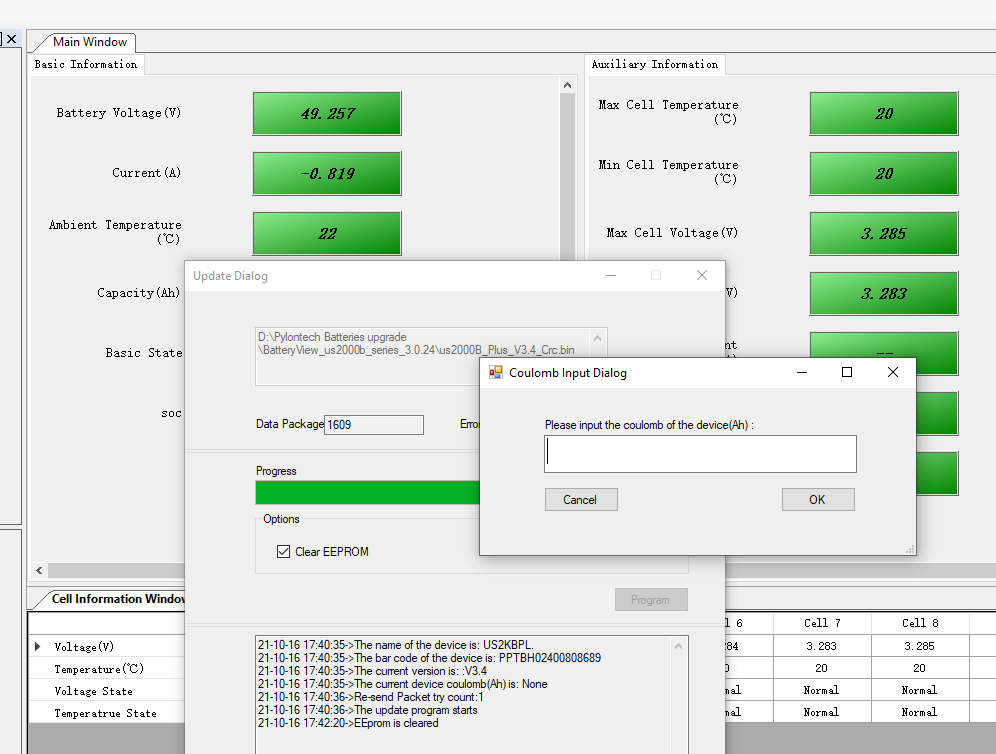
  1. Can anyone please tell me what this setting should be? I am installing the latest version of the firmware for UC 2000B batteries.
  2. @Coulomb I have been upgrading the firmware on the first of my Pylontech batteries using the leaflet from Pylontech and the correct leads. V2.3 and v2.4 to V3.4. I have however hit a dialogue box which does not appear on the sheet. Can you advise what value should be put in this currently defaulted to 0. Thanks
Account

Navigation

Search

Search

Configure browser push notifications

Chrome (Android)
  1. Tap the lock icon next to the address bar.
  2. Tap Permissions → Notifications.
  3. Adjust your preference.
Chrome (Desktop)
  1. Click the padlock icon in the address bar.
  2. Select Site settings.
  3. Find Notifications and adjust your preference.