gav
Members
-
Joined
-
Last visited
Everything posted by gav
-
Hi all, I need to ground my solar panels but can't seem to find many options for ground lugs/clips in SA. The only thing I find is a ground clip that seems pretty straight forward to install e.g. - https://battery24.co.za/shop/solar/araymond-edge-clip-screwless-idc-earth-connector/ At first I thought I could just use any old nut and bolt but apparently aluminium and copper don't get on that great and corrosion will occur. A few questions spring to mind when looking at this clip - Is this the only option available? Is it corrosion resistant? Can I use bare copper wire or must I use a jacketed wire for earth? Thanks!
-
-
Hi, I want to size my array to try and get as close to maximum as possible. Can someone help to confirm my calculations and thinking are correct? I have the following specs on my inverter (Luxpower SNA5000WPV): Max. PV Array power: 6400W Start-up Voltage: 100Vdc+-10Vdc Max. PV Array Open Circuit Voltage: 480Vdc Max. PV Charging Current: 110A This inverter has two MPPT inputs which can be set up either as "S: two independent String inputs" or "P: same string input for 2 MPPTs". If I get 14 x 455W solar panels e.g. Ja solar (Voc 49.85), create two strings of 7 and set the inverter to P: same string input for 2 MPPTs (which I assume takes the strings in as parallel but not 100% sure and it could be other way round) I should get the following results: Per string - PV string power: 3185W PV string Voc: 348,95Voc PV string Amps: 10.92A Since the inverter takes these two strings in as parallel the end result should be: power: 6370W Voc: 348,95Voc (important not to exceed inverters max 480Vdc) Amps: 21.84A Does this seem feasible? Any comments are appreciated.
-
yip that's what I was missing, thanks SuperStan!
-
Hi @nightbyte could you share the manual you have for your battery or point me in the direction of the importers please? I never received manuals from the installer of my shoto & luxpower setup and am trying to figure it out but can't find any proper manuals online. I have the 16 cell version though but hopefully I can gain some insights and do some simple maths to get my set up working like it should.
-
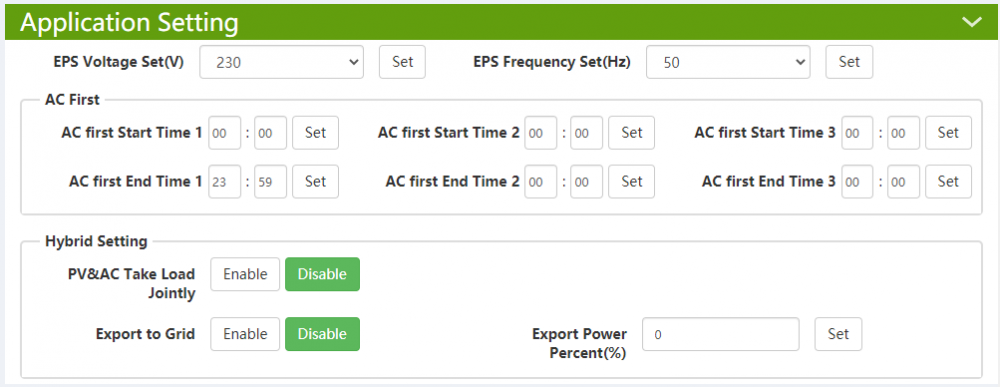
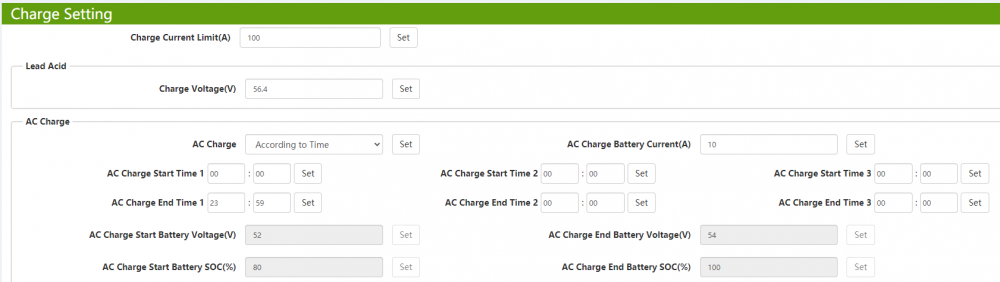
Hi All, Total noob here...any help will be greatly appreciated. I recently got the Luxpower SNA 5K WPV inverter and SHOTO SDA10-48100 5.12kwh battery installed with the goal to use it as an UPS/EPS while I save up to add panels later. I'm just trying to understand how it should work. AC charge is set to run 24/7 which makes sense since its the only source of power right now. The battery is also set to charge 24/7 and this causes a constant power supply of +-51W (varies) to the battery. If I understand correctly this shouldn't necessarily be a bad thing for the Li-ion battery but I wonder if this is the way it is supposed to work? The status indicator light on the battery is constantly blinking and from what I gather in the manual is that the blink sequence means over voltage protect. Should I change the battery charge settings to rather be based on SOC(%) or voltage e.g. SOC 90 and what is the effect on battery life by doing this? Below are screenshots of the only settings I seem to have on this inverter - Constant charge shown going to battery: Lastly what does "on Grid EOD voltage" do in the discharge settings? I thought it might be something to keep the battery topped up without the constant charge but it doesn't seem to have any effect.