MarcFe
Members
-
Joined
-
Last visited
-
 MarcFe reacted to a post in a topic:
Two similar Hubble AM2 batteries on Sunsynk, one seems to only have 50% of the capacity of other?
MarcFe reacted to a post in a topic:
Two similar Hubble AM2 batteries on Sunsynk, one seems to only have 50% of the capacity of other?
-
Hi @P1000, thanks, that's good to know. I was assuming that the protocols used would assign different addresses to different consumers. But if it might cause issues when two nodes want to read (or especially: write) to the batteries, I can understand that this is not the best of my ideas. Do you, by any chance, know, if the RasPi can also read Hubble AM2 data using the RS485 (RJ45) port? I reckon I'd have to get a cable from RJ45 to USB (similar to the one the SunSynk is attached to the RasPi) first, but would only do if I know it will work. Reading the SolarAssistant information here, I'm not 100% sure if the RasPi can read the RS485 port of the Hubble batteries: https://solar-assistant.io/help/configuration/battery My current thinking, if everything fails, is, to only use the SolarAssistant software, and unplug the CloudLink, as i'ts less useful to me. I'd occasionally plug it around to get potential updates from Hubble to the batteries, and wait until the inverter is fully integrated into the CloudLink sphere... Marc
-
 MdF reacted to a post in a topic:
Two similar Hubble AM2 batteries on Sunsynk, one seems to only have 50% of the capacity of other?
MdF reacted to a post in a topic:
Two similar Hubble AM2 batteries on Sunsynk, one seems to only have 50% of the capacity of other?
-
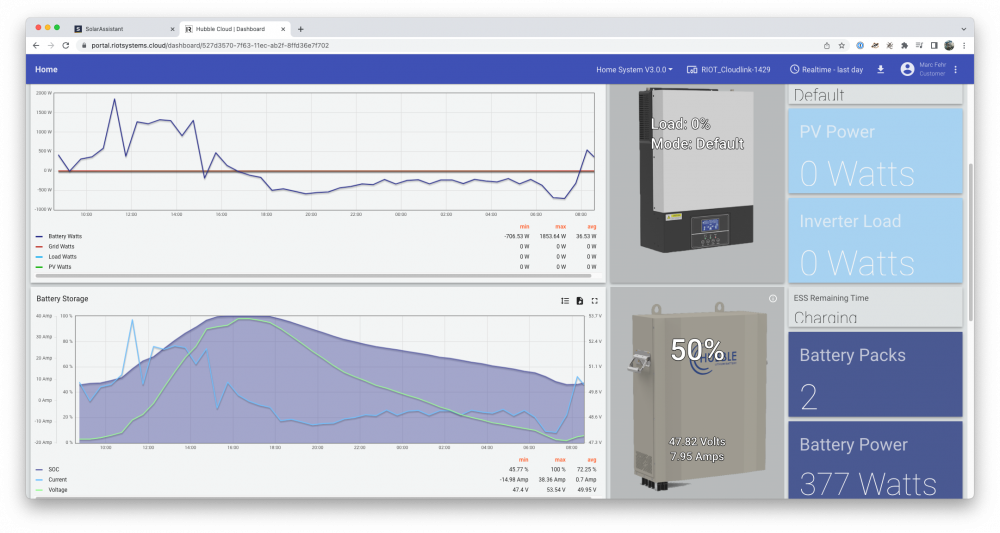
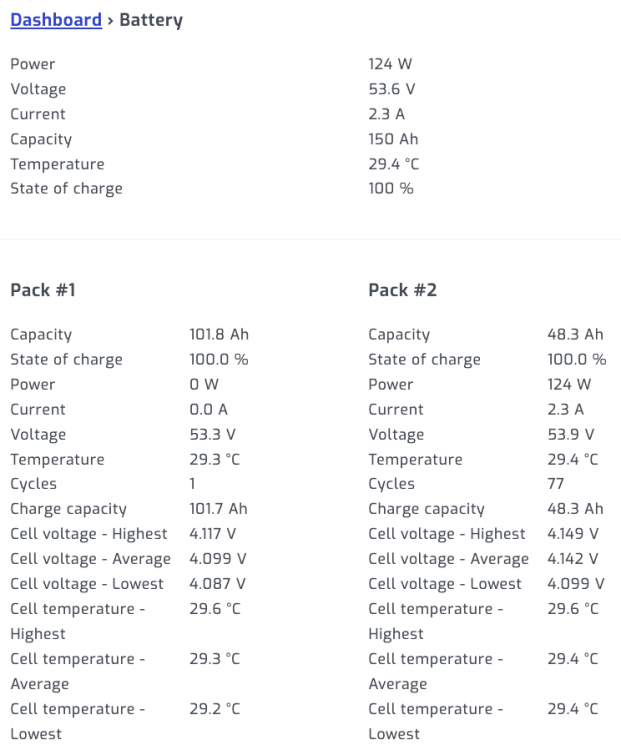
Hi everyone, Thanks again for all the replies. TL;DR: The issue was resolved by updating the firmware on the older battery. The firmware it had loaded made the battery think that it only holds 48.3Ah instead of 100Ah. Now it's working perfectly, and SoH is still at 100% (also showed as 48.3%, for some reason). A Hubble technician and the battery person from our installer came here earlier this week and checked out the issue with the battery described in this post. As a first step, they updated the firmware on both batteries, and pretty much instantly the SolarAssistant recognised both batteries with 100% SoH and 100Ah total capacity. So far, so good. They also installed a CloudLink device to the main battery, which now makes sure that the battery firmware gets updated automatically in future. It's a cool little device, although I must say that the SolarAssistant's UI is way more advanced than what I can see in the CloudLink dashboard as a customer. I'm sure they'll get there – but don't underestimate the open source community behind the Raspberry Pi / Solar Assistant product! 🙂 As both the SolarAssistant and the CloudLink want to be connected through the RS232 port using an RJ11 cable, I can't connect them both properly. I'm now waiting for a phone line / RJ11 splitter to arrive so I can try to attach them both to the main battery, wondering if that will work. Anyway, SolarAssistant can actually read battery data through the SunSynk inverter, but it's not as detailed as when it was hard-wired to the battery. I can only see SoC, Power, Current, Voltage and Temperature: (Compare this reading to the battery snapshots I posted before – they're way more detailed...) Not too bad, but will update once the splitter arrives, to see if I can set hard-wire the RasPi and the CloudLink to the same RS232 port. Long story short, I now have two batteries with 100Ah each, and they last as long as I would expect them to last. We're finally making it through the night without using any grid, at all, and it feels great! 🥰 A snapshot from my SolarAssitant dashboard, showing the last 24 hours from now: And the view from the CloudLink user dashboard, which (as I menioned) isn't as pretty, and not as detailed, either. Plus, at the moment, our 5kW SunSynk inverter is still in beta phase –– the CloudLink should eventually be able to also connect to the inverter, once the necessary cable and software are available. The Hubble technician will reach out to me once it's possible, so we can hook up the inverter to the CloudLink as well. For now, it only reads the battery data, and also updates the firmware on the batteries whenever Hubble rolls out any new software: All in all, I'm super happy with the support from Hubble but also with our installer, and the system is finally working the way I was hoping it would. My next goal, and I'll post another thread sometime, will be to automate our solar geyser using the SolarAssistant MQQT mechanism – my idea is to only allow the geyser to draw energy whenever the SoC of the batteries is at a certain level... Stay tuned! 🤩 Marc


-
Hi @P1000, Thanks for your input. So when I changed the voltage settings, I left it at Lithium, and didn’t select AGM on the Sunsynk inverter. Should I have done that? And yes good point — might try to rinse the battery down before letting it float at full charge again 🧐 Marc
-
Update on 2 April, 06:54am – from SolarAssistant:

-
@TimCam, Update after one day, things still look about the same to me:

-
Hi @YellowTapemeasure, Thanks for your input. Interesting, I logged the issue with Hubble online but haven’t heard back from them, yet. On Monday next week, given the problem persists, our installer will come here to test both batteries. To be honest, I don't really know how much they know about the topic, so I'm not fully convinced they will help me sort this out... Regarding Cloudlink… Would you recommend installing this with my Sunsynk 5kW / 2x Hubble AM2 batteries? They both say RIOT ready. I‘d be keen to get Cloudlink, if it gives me more control and insights. How is your overall experience with it? As far as my research goes, the current Cloudlink solution doesn't yet work with the 5kW Sunsynk inverters, but only with the 8kW versions... And if I'd buy it anyway – where would you recommend me to buy it from? Thanks, Marc
-
MarcFe reacted to a post in a topic:
Two similar Hubble AM2 batteries on Sunsynk, one seems to only have 50% of the capacity of other?
-
-
MarcFe reacted to a post in a topic:
Two similar Hubble AM2 batteries on Sunsynk, one seems to only have 50% of the capacity of other?
-
Hi @TimCam, Thanks, I followed your instructions –– and turned off timer mode: So now the battery is on 100%, always, will keep it up for three days and see if anything happens. So far, the capacity of the older battery has not changed, which I guess was to be expected ↑ Screen grab of SolarAssistant, taken on 31 March 2022, 08:52am. Battery voltage settings on inverter, also as instructed, are now: Fingers crossed! Marc

-
mzezman reacted to a post in a topic:
Two similar Hubble AM2 batteries on Sunsynk, one seems to only have 50% of the capacity of other?
-
mzezman reacted to a post in a topic:
Two similar Hubble AM2 batteries on Sunsynk, one seems to only have 50% of the capacity of other?
-
Hi @TimCam, Thanks for this. Will go through the settings and adjust to what you have set there. When you say don’t discharge for three days, as in, keep them at 100% and grid-charged for three days? Marc
-
Hi @mzezman, Thanks for your reply. No, SA only gets the master battery by cable. The batteries are then chained, with DIP on 1-0-0-0 for master and 0-1-0-0 for slave. The older battery may have been at about 60% when the second/new battery was added to the pack today. They then both charged up to 100%. The new battery was lower than that I reckon. I‘d love this to be a BMS or software issue — so is there a good way to reset/restart the BMS, or would turning batteries on and off help? Or to find out if the issue is just about balancing loads in the BMS? I‘ll check this with the installer and guess that they‘d take this to Hubble for me. Just the fact that the older battery on its own already had shown only <50% capacity on both SOLARMAN and SA made me wonder if there is something wrong with it. Thank you, Marc
-
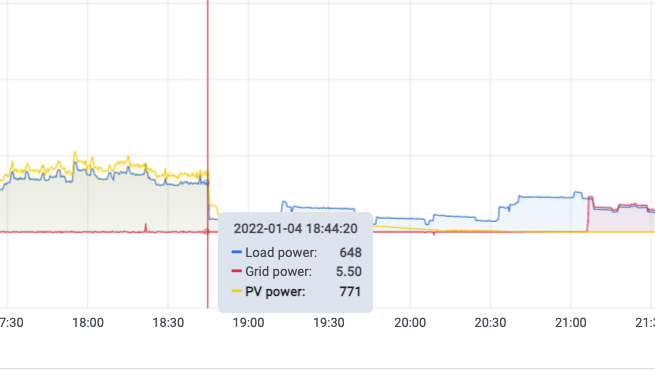
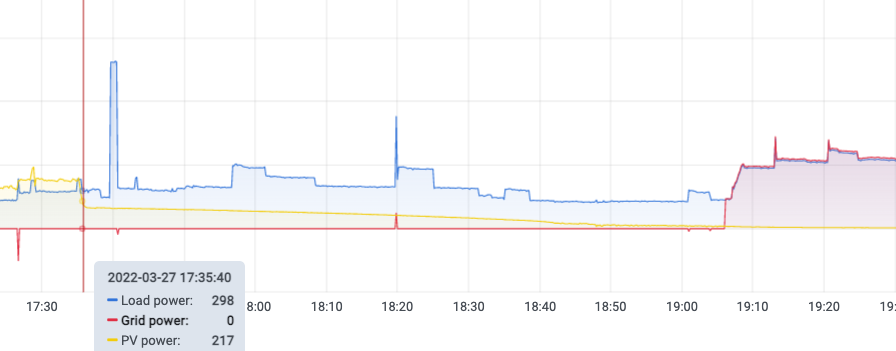
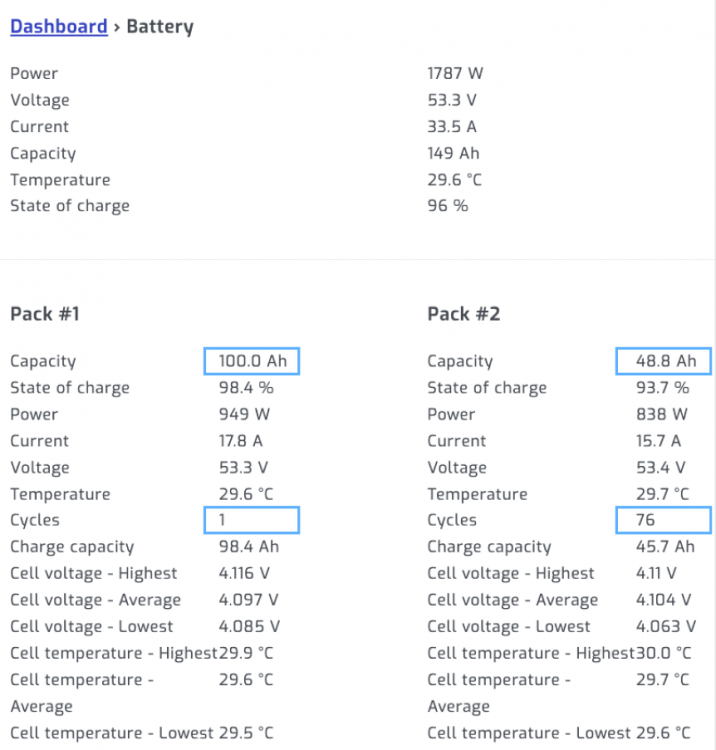
Hi everyone, We've been running our house on a Sunsynk 5.5kW inverter – in combination with solar panels (~5kW) and one Hubble AM2 (~110Ah) battery for about three months now. I have been watching the battery data over time on the SolarAssistant dashboard, and always found it a bit odd that the "capacity" there was recently shown as 48.8Ah (see screen grab below). I didn't bother to find out more about it, though, as the system was doing all we needed it to do – despite the fact that I had a feeling that the battery is emptying a bit quickly when the sun is down... Today, we installed a second, new Hubble AM2 battery, the same model like the one we had. When I now check the dashboard, I do still think it's a bit weird – one battery is showing the full 100.0Ah, the other is still lower, with 48.8Ah: For the other stats on the battery, things seem to look alright, see: And these are my battery settings on the Sunsynk inverter: And comparing how long the battery lasts once the sun is down, there seems to be quite a drop from what it did in January (first screen grab) this year, when the system was installed, to what it does now (one evening this week, second screen grab). We run the battery (only, I know) down to 80% SoC, to cater for load shedding –– and this is how long it keeps the house going without grid: -> No grid used (house on battery power until SoC == 80%) in January, between 18:44 and ~21:10. The grid line above the yellow line on the left is 1kW, only one Hubble AM2 110Ah in use -> No grid used (battery power until SoC == 80%) in March 2022, between 17:35 and ~19:35. The grid line above the yellow line on the left is 1kW, only one Hubble AM2 110Ah in use And here, check now the first evening after sunset. Both batteries started at 100%, and now already have 5.5% difference in SoC: My questions now are: Are these settings okay? Did I have to double the Ah valur in the inverter settings, as I did, and give it 220Ah in total? Plus: Do I need to be concerned about the battery with capacity 48.8Ah? It should in fact also have 100/110Ah capacity and is only three months old, why I'm not sure if something is wrong with the battery – or if this is just an odd reading of SolarAssistant (which I personally don't think it is). Wondering if that‘d be a warranty case… Thanks a lot, Marc


-
StepbyStep reacted to a post in a topic:
Sunsynk inverter constantly discharges Hubble battery lower than setting
-
zsde reacted to a post in a topic:
Sunsynk inverter constantly discharges Hubble battery lower than setting
-
Hi @wolfandy, Thanks for your reply. Agreed on all you're saying, I'd like to be using my battery (batteries) further down, too. And, having more Ah capacity, I think I'll be able to cater for load sheddings without keeping the SoC as high as 80% –– given the system (as you mentioned) charges the batteries by 9am every morning. And yes we're barely drawing enough power from the panels, since the geyser is already on solar and our household is fairly optimised for low consumption. In any average moment, I'd say we're using ~500W, with peaks going up to 4.5kW. Nothing that the inverter couldn't handle. Cool thanks, I'm going to buy a battery, then! 🔋
-
MarcFe reacted to a post in a topic:
Sunsynk inverter constantly discharges Hubble battery lower than setting
-
Hi @MdF, Thanks for this, I found the posts useful, indeed. One thing I need to make sure is that there is enough power in the battery for the (solar) geyser to top up on electricity if there is load shedding between 4am and 6am –– as we have tenants who want to have hot water for their showers when they get up. I'm currently quite happy having 80% SoC around the clock, though. Over the daytime, the solar panels (~5kW in two arrays) feed the inverter with enough power to charge the battery and run the house at the same time, even on a cloudy/rainy day. So once the sun goes down, the battery discharges to 80%, and eventually ends up at 55-65%, before it gets filled up by sunlight again. But still, I'd love to have another battery – and more storage – as it seems that the rest of the system is stronger than what I can store, and it could perhaps make us go through all night on a regular day, if I'd then also set the SoC allowance further down, let's say to ~50%, having 200Ah storage capacity. Also, reading the articles you mentioned, I gather that the lifespan of the battery is long when only charged down less far. I was actually wondering how the Lithium batteries work, I heard that also having them charge all the way to 100% isn't necessarily good for all type of Lithium batteries, either? Thanks!
-
MarcFe reacted to a post in a topic:
Sunsynk inverter constantly discharges Hubble battery lower than setting
-
Hi @zsde, Good question, and well spotted! I don't know how my solar peaks show 50V throughout the night, to be honest. But looking at the seven-day charts, it does indeed seem a bit odd: I just updated the Solar Assistant software, hoping that it was a bug (once it showed me the battery temperature * 10 for a while –– and I wasn't in the country, hence thought my battery is about to burn –– until I figured out that the softwared needed updating, and it therefore was only showing all temps with factor 10. Ha!) Anyway, whoever knows why this could be the case, let me know. And, to make sure it's not a bug of the SolarAssistant software, here's a screen grab from the SOLARMAN app on my phone, which is part of the same system. It also shows the ~50V over night:


-
MarcFe reacted to a post in a topic:
Sunsynk inverter constantly discharges Hubble battery lower than setting
-
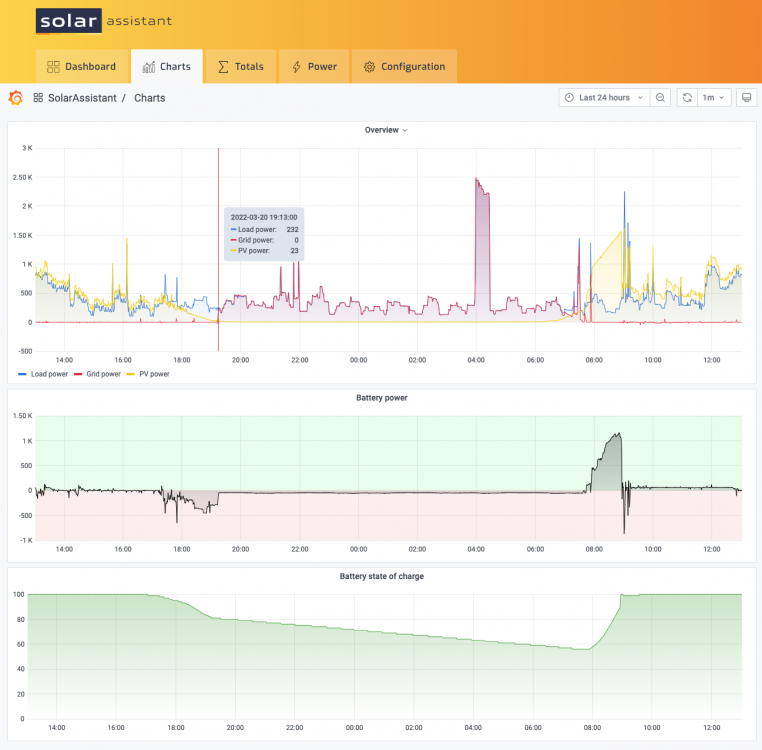
Hi @zsde, Thanks for your reply. I'm staying above 80% SOC because the battery isn't big enough to cover more then ~3-4 hours of load shedding, while our household relies a lot on being online for work. Therefore, I tried to keep the battery full enough to cater for load shedding situations. Is this a really bad idea –– or why did you ask? Secondly, I don't really want to charge the battery from grid, if I can avoid it. My idea is to charge the battery while there is sun, and use it at night, when the sun is down. As mentioned, the battery is (by far) not big enough to get us through the whole night, but again, that's why I'm not letting it go down all the way. To add another graph, this is a view of the last 24 hours –– including grid power (red), load power (blue) and the two MPPT solar inputs (yellow): Also, I am currently thinking of getting a second Hubble AM2 battery so I could allow the discharge to go lower, without risking not having juice in the battery for load shedding moments. Any suggestions on this? I was going for a second 5.5kWh battery, making it 200Ah. Thanks, Marc
-
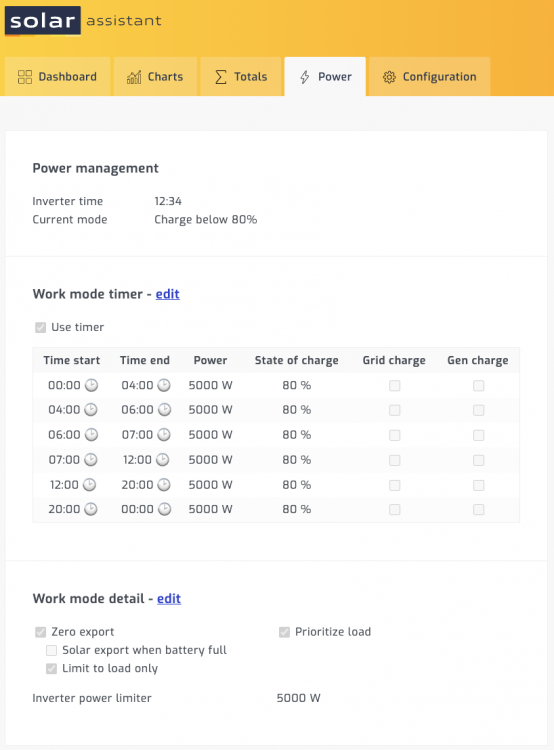
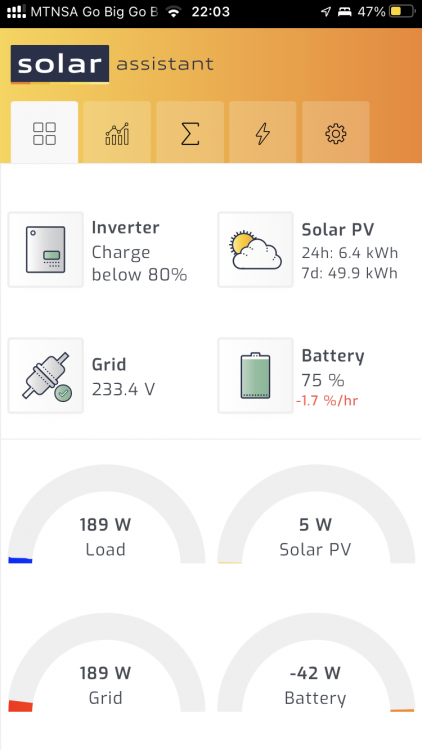
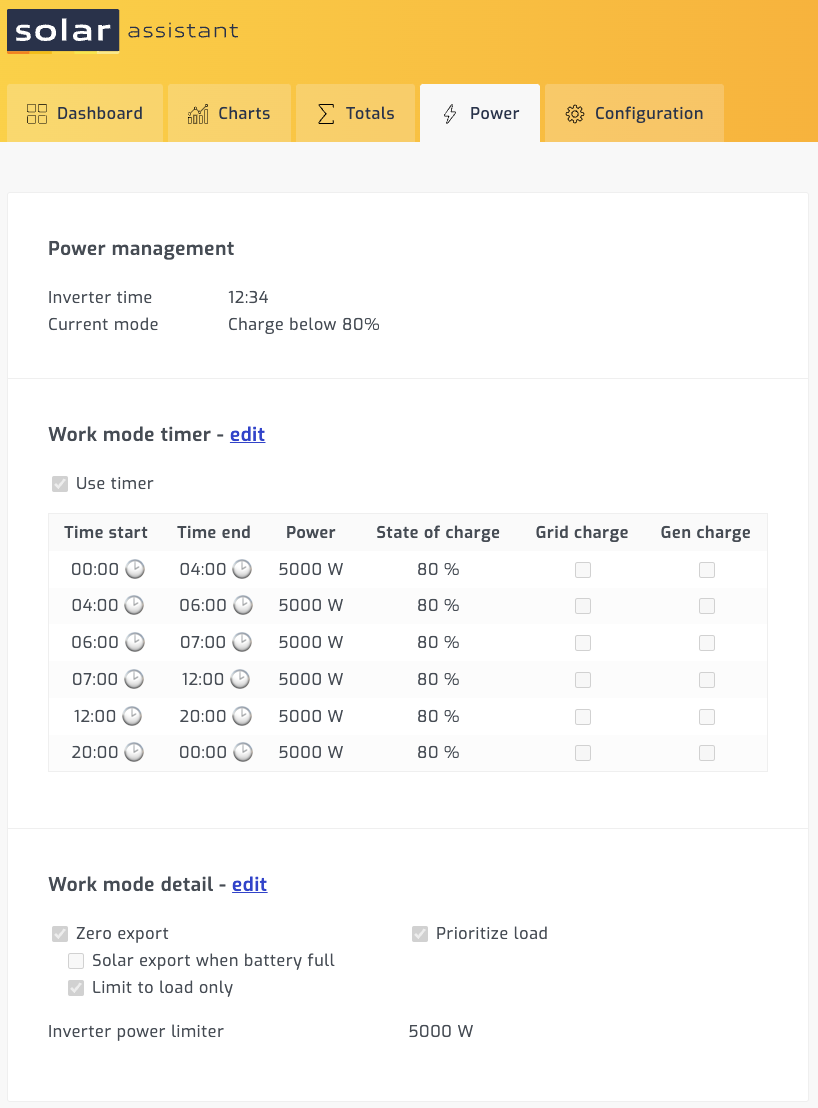
Hi everyone, I joined the solar world by the end of 2021 and am still super happy about the investment we made. While watching the SolarAssistant charts and graphs, I see that our inverter (it's a Sunsynk 5kWh) discharges the Hubble AM2 battery to less than 80%, although the timer settings on the inverted do basically say "charge under 80%". See screen grab here: And here, on the chart side of things, you can see that it discharges quite quickly down to ~80%, but then keeps consuming the battery for much longer, basically until the sun kicks back in at ~8am: And last screen grab, here, you can see that the battery is being discharged at night time, despite it being already under 80%: My question: Is it normal that the battery keeps discharging [at a low level] throughout the night, or is there something wrong with my system? Thanks so much for your expertise – and your thoughts, Marc