MdF
Members
-
Joined
-
Last visited
-
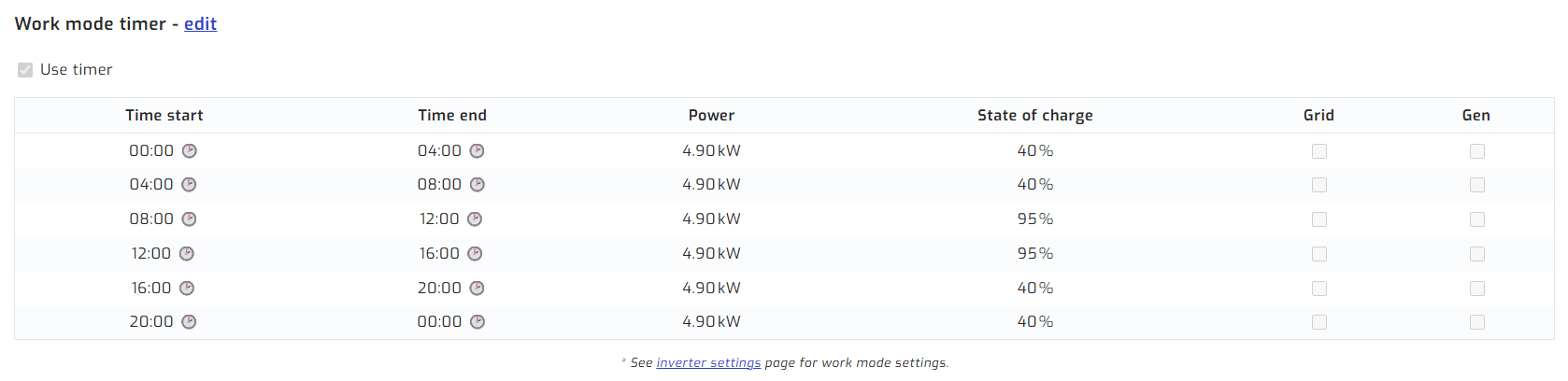
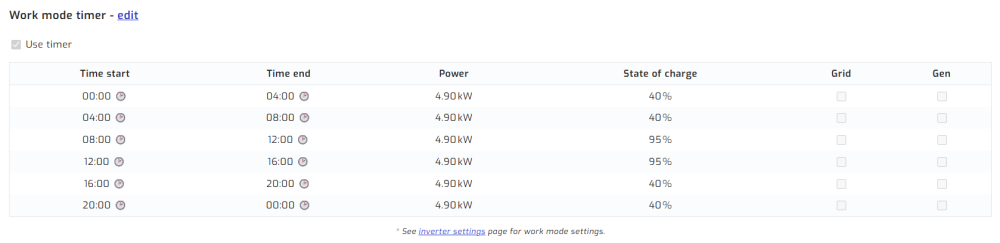
This has been my setup since Day 1 with loadshedding at its peak. Haven't changed the system at all. Uses battery for the house all night and then solar when the sun comes up. MdF
 Chris, that is a shame, cos SA really is a great system and one that works exceptionally well for a lot of users. I am surprised you have had bad comms luck with them. TBH, any email I have sent through has usually been answered within a day. MdF
 MdF reacted to a post in a topic:
Sunsynk 5kw and prepaid meter - interruptions to power same time every day.
MdF reacted to a post in a topic:
Sunsynk 5kw and prepaid meter - interruptions to power same time every day.
MdF reacted to a post in a topic:
Sunsynk 5kw and prepaid meter - interruptions to power same time every day.
Hi, We have just had pre-paid installed here at home on a rooftop system as per my signature below. Not sure if your question above can be solved by my response below. Many months ago, when the municipality started doing this in our area, those with solar were experiencing issues with their control units for the pre-paid meters. They were simply not working when they plugged them in to a wall socket anywhere in the house. The advise then was that a single plug point should be installed at your DB connected directly to the incoming power feed from the municipality. We installed such a plug at our DB, and when the municplaity installed pre-paid, we had no issues with the control unit communicating with the pre-paid meter outside. Hoping that this may solve your problem. MdFMorning Krok, I have two LBSA batteries since install for over 3 years now and these batteries are inbcredibly robust. So my comment might be a bit biased since I have not used Hubble before. However, my suggestion is why not try the R4k fix on the LBSA's and see how they perform. Yes. it is R4k but you may well get a simple and relatively cheap fix that gives you a good set of working LBSA batteries. Let us know whichever way you decide to go. MdFYip, I saw that too. It was a bug in the system a while back but now they are going forward in that direction. The costs is minimal though at $14 per year. That being said, I upgraded from the Pi3b from 4 years ago to the new Pi5 2.4Ghz unit. I made payment on Thursday at 14:30 and the new Pi was delivered the following morning at 8am. Amazing service indeed. And the quality of the product and packaging is exceptional. MdFI hear your hesitance to move over to Solar Assistant. But with ICC / ICM not being supported anymore, that proves a long term risk for solutions that you may need going forward. Take the jump and move across now to Solar Assistant. It does work very well and is very well supported with ongoing upgrades happening all the time. I am sure your system will run just as somethly. All the best. MdF
Nive-LBSA reacted to a post in a topic:
LBSA Battery discharges from 100% to 5% instantly when using Kettle or Microwave - Deye Inverter
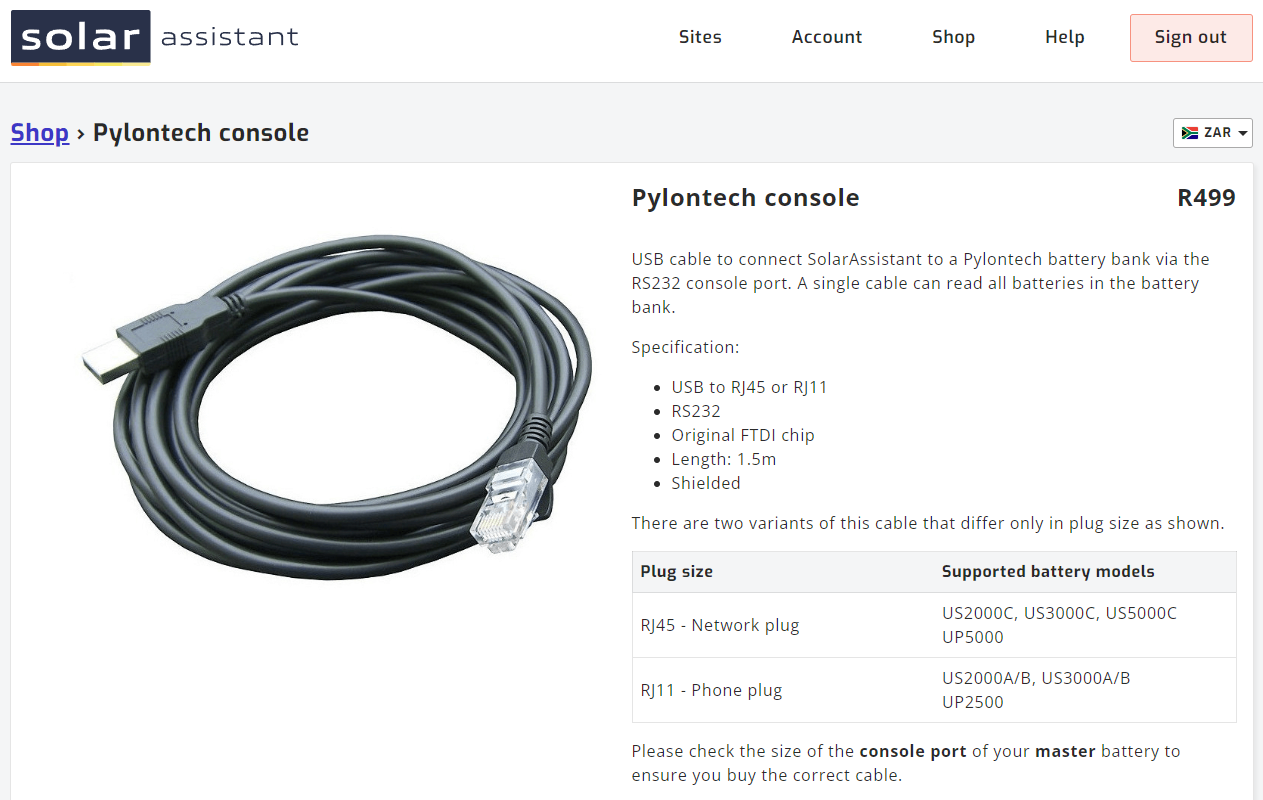
Morning All, I had an issue with two LBSA units a few years ago where the one unit was showing almost double cycles per day compared to the older one. I contacted LBSA and after buying their cable as posted in the reply above, I connected via Teamviewer with them. Their technical assistant remotely check the system and we came up with the simple fix that the firmware for the batteries were not the same. A quick download of the latest firmware was done remotely and the problem of cycles was fixed. Now both batteries are tracking the same in terms of cycles per day. So, get hold of the cable and install the software and let LBSA connect remotely. I am sure they will sort your issue. MdFOk, so I bought a cable from SA for direct connection of my batteries to the SA Pi. It never did work as my batteries were not supported by SA, but I just wanted to see if it would work. Have at look at the link below as per the attachement. This cable will connect directly from the battery into SA: https://solar-assistant.io/shop/products/pylontech_usc
MdF reacted to a post in a topic:
Sunsynk 5kw and prepaid meter - interruptions to power same time every day.
MdF reacted to a post in a topic:
Sunsynk 5kw and prepaid meter - interruptions to power same time every day.
MdF reacted to a post in a topic:
Sunsynk 5kw and prepaid meter - interruptions to power same time every day.
Hi, We have just had pre-paid installed here at home on a rooftop system as per my signature below. Not sure if your question above can be solved by my response below. Many months ago, when the municipality started doing this in our area, those with solar were experiencing issues with their control units for the pre-paid meters. They were simply not working when they plugged them in to a wall socket anywhere in the house. The advise then was that a single plug point should be installed at your DB connected directly to the incoming power feed from the municipality. We installed such a plug at our DB, and when the municplaity installed pre-paid, we had no issues with the control unit communicating with the pre-paid meter outside. Hoping that this may solve your problem. MdFMorning Krok, I have two LBSA batteries since install for over 3 years now and these batteries are inbcredibly robust. So my comment might be a bit biased since I have not used Hubble before. However, my suggestion is why not try the R4k fix on the LBSA's and see how they perform. Yes. it is R4k but you may well get a simple and relatively cheap fix that gives you a good set of working LBSA batteries. Let us know whichever way you decide to go. MdFYip, I saw that too. It was a bug in the system a while back but now they are going forward in that direction. The costs is minimal though at $14 per year. That being said, I upgraded from the Pi3b from 4 years ago to the new Pi5 2.4Ghz unit. I made payment on Thursday at 14:30 and the new Pi was delivered the following morning at 8am. Amazing service indeed. And the quality of the product and packaging is exceptional. MdFI hear your hesitance to move over to Solar Assistant. But with ICC / ICM not being supported anymore, that proves a long term risk for solutions that you may need going forward. Take the jump and move across now to Solar Assistant. It does work very well and is very well supported with ongoing upgrades happening all the time. I am sure your system will run just as somethly. All the best. MdF
Nive-LBSA reacted to a post in a topic:
LBSA Battery discharges from 100% to 5% instantly when using Kettle or Microwave - Deye Inverter
Morning All, I had an issue with two LBSA units a few years ago where the one unit was showing almost double cycles per day compared to the older one. I contacted LBSA and after buying their cable as posted in the reply above, I connected via Teamviewer with them. Their technical assistant remotely check the system and we came up with the simple fix that the firmware for the batteries were not the same. A quick download of the latest firmware was done remotely and the problem of cycles was fixed. Now both batteries are tracking the same in terms of cycles per day. So, get hold of the cable and install the software and let LBSA connect remotely. I am sure they will sort your issue. MdFOk, so I bought a cable from SA for direct connection of my batteries to the SA Pi. It never did work as my batteries were not supported by SA, but I just wanted to see if it would work. Have at look at the link below as per the attachement. This cable will connect directly from the battery into SA: https://solar-assistant.io/shop/products/pylontech_usc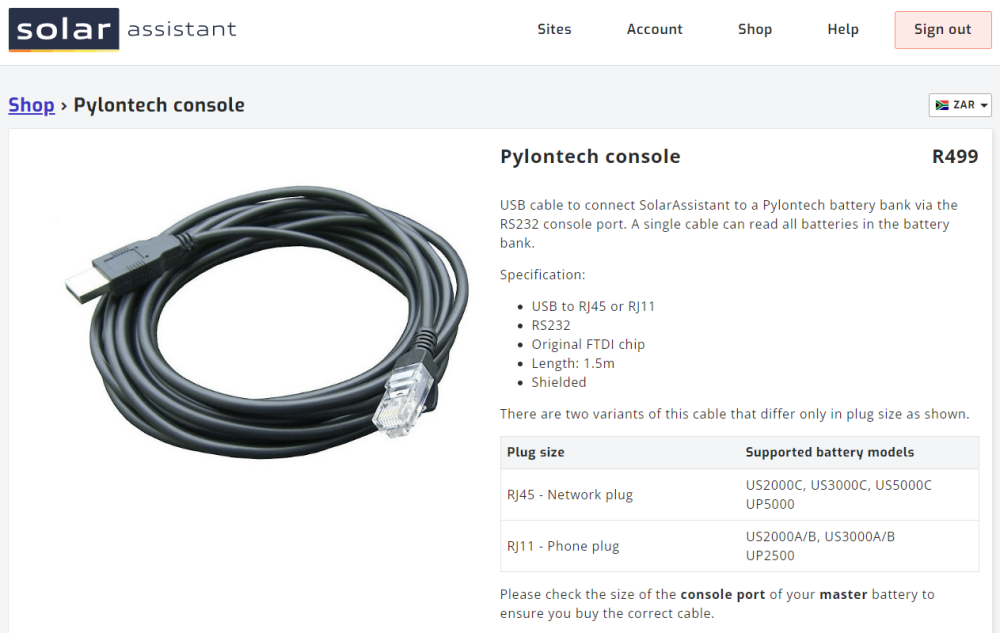 If I may ask, did you not rather want to buy the correct cables etc directly from Solar Assistant instead of making your own? I ask this cos I tried using a cable of my own (different usage) and it didn't work properly. the SA recommended one worked perfectly. Also, does the Pylontech battery have those 8 little dip switches? Are they too also correctly configured for Master and Slave? What about feeding the batteries directly into SA instead of via the inverter? MdFI fully agree, don't change it unless something broken. My system was installed a number of years ago. Have never updated firmware. MdFCheck on their website that you have a correct type of SD needed for SA to run properly? MdFHad the same issue last year. When we installed the system a few years ago, we thought it was "cool" to provide some nesting options for birds. But then the large pigeons moved in. Their shyte and noise started becoming a problem. They nested under there and reared three sets of young. We decided it was time for them to move on. But that took some effort to accomplish. First I hosed down under the panels to try and get rid of their mammoth nest. Then we had to try and get the new chicks out. They were fully fledged but refused to budge. Even spraying them directly with water did not make them move. Then one day I was up on the roof having a think about what to do next when the two chicks flew out. Well, we initiated exercise Solar Panel Freedom. This operation involved me shouting and waving my arms around on top of the roof to prevent any of the birds returing to the site. It must have been a real site for the neighbours. My wife then went and got some plastic bags and a couple of pool noodles that we forced into the gap between the panels and the roof. It worked. But to make us feel bad, all the birds returned to the site and were strutting around looking for access to their nest. This went on for a couple of days with much cooing going on. We felt bad, but then that passed. After that, I went to Builders and bought a roll of plastic mesh, the hardy type with about a 2cm square in it. I rolled these up into sausages and "stuffed" then in the gap between the panels and the roof. This worked perfectly and was very easy to install. Obviously I used plastic mesh so as to allow free flow of rain water under the panels. Since then we have been bird free. Hope this helps. MdFYes, that is correct. MdFHiya All, Anyone know what the function of the Cycle USB Power option is on Solar Assistant Configuration > USB Devices. I get the following output after running it just now: Kernel log (UTC time) [Fri Oct 25 12:16:10 2024] WARN::dwc_otg_hcd_hub_control:3809: DWC OTG HCD - Unknown hub control request type or invalid typeReq: 8006h wIndex: 0h wValue: f00h [Fri Oct 25 12:16:10 2024] WARN::dwc_otg_hcd_hub_control:3809: DWC OTG HCD - Unknown hub control request type or invalid typeReq: 8006h wIndex: 0h wValue: f00h Any idea what this is saying? MdF