H1771
Members
-
Joined
-
Last visited
-
-
Any reason you don't drain lower than 40%? Most lipo batteries these days have discharge depth down to like 10%. Your power values for all time slots are max for your inverter. My use case is a little different. At night after dinner all the way to 6am, my house base load is about 1kw or less. But as it's winter and I have someone that is ill in the house, I keep an aircon on through the night, what I was trying to do is set the power value to 1kw, to let the battery supply the base load, but when the aircon comes in, the grid can supply it. This is my use base for wanting to split the supply between battery/grid.
-
-
It does work 😁 After setting all to zero, battery is at 95% in the morning. So it used the grid the whole night. Not sure why when I tried it yesterday I could not get it to split between battery/grid, maybe it takes some time to take effect after changing the setting and I was being too impatient. Thanks for the replies, sorry for the noise.
-
Hi, Ah okay so then it did work for you, 50-60W is just as good as zero I've set all my time slots power field to 0, I will see tonight what it does. Thanks.
-
Thanks, I will try changing the time slots so none have the same values anywhere. So if you set "power" column to 0, it pulls full load from the grid even though battery soc is higher than percent in that time slot?
-
-
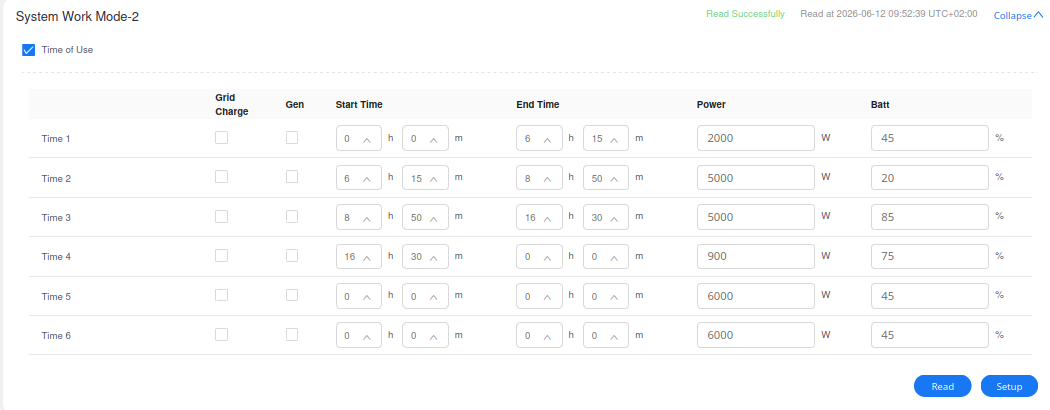
Hi all, The deye/sunsync inverters time of use setting, each time slot has a "power" column, is this power column only for battery charge power? Not discharge? My time of use setting is attached. As seen, I do not charge via grid nor gen. I only charge via solar, so I leave the check boxes for grid/gen empty. Using it this way lets me put in the battery percentages at which I switch to grid consumption. It works well. My only issue is, say at night time there is no solar. Say I am at slot "Time 4" and it is 7pm. Say my battery is 90%. Now I set the "power" column to 900 because I want my battery to supply 900w. If my house is using 1.5kw, then I want my battery to supply 900w and the grid to supply the remaining 600w. Setting the 900w in the "power" column with 90% battery does not restrict the battery to 900w though, it ends up supplying all 1.5kw my house is using. Is the "power" column only for charging and not for discharge? Thanks.

-
Late reply sorry. I am running a 14.3kwh power brick with a 12kw deye single phase inverter, for about 2 months now. Still early but no issues so far. I think there was a new version of the power brick released, because mine is a 1C charge/discharge, and the website also says it is rated for continuous 200A or 10kw discharge (https://dyness.com/powerbrick-low-voltage-storage-batteries-for-household-use). But my house mostly never gets that high, I have geyser times to make sure geysers don't turn on together etc. Only gripe with it really is that one will get about 85% of the rated capacity. It's rated for up to 95% discharge, so if you in theory drain it to 5%, you should have gotten about 13.5kwh from it, but you'll get 12.1kwh odd. I tried to raise it with dyness but decided it's not worth the hassle of sending it to midrand for a load test. Installer tells me all batteries have this behaviour so it's not really unexpected. Other than that, I have no complaints with it so far on 2 months use.
-
-
So after a firmware update to the inverter, my discharge power and consumption power align very closely, with battery discharge very slightly higher (which is what I expect, not the other way around as it was before the update). But from https://github.com/slipx06/Sunsynk-Home-Assistant-Dash/blob/main/ESPHome%20Configs/ESPHome-1P-Sunsynk-Deye.yaml If I use these: Then I see what kwh was discharged from the battery over certain hours, the kwh used does not match the battery % used per battery capacity. Eg. I ran the battery from 100% to 17% (used 83% of the battery), then check the kwh from those same timestamps, it worked out to 10.0kwh. But the battery is a 14.3kwh dyness power brick, which means 83% of the stated capacity should be 11.86kwh. Does not seem like I get the kwh from the battery per the capacity.


-
-
Some searching shows people saying the deye inverter watt values for the battery charge/discharge can be wrong. Also on the deye inverter app, the battery power draw watt value is lower than the ups-load watt value (at night with no solar and no grid pull) which makes no sense. There's no grid use and no solar at night so I'm quite sure the ups-load is running fully off the battery. I image the battery power draw should be larger than the ups-load given the inverter itself must use some power. So the app showing battery power draw slightly less than ups-load value, leads me to think the inverter is reporting the battery power draw wrong. I'm going to see if there is a firmware update for my inverter that maybe fixes the issue, if not, I'll probably try engage deye support on the issue. @Deye
-
Hi all, I have a new one of these, rated at 14.3kwh: https://dyness.com/powerbrick-low-voltage-storage-batteries-for-household-use I monitor discharge via rs485 on inverter modbus to home assistant. Inverter is the sun-12k-SG02LP1-EU-AM3 deye. (Modbus address 190, register type: holding). This should be the watt in/out of the battery. I filter all negative values (charge) so that I can see only discharge. Battery configured for BMS (dip switches 0010) and the inverter confirms dyness BMS. If I charge the battery to 100% then drain it to 16%, (having used 84%) I should have gotten 12kwh from that 84%. My inverter measures the power output over that cycle to be 9.6kwh. If I charge the battery to 100% then drain it to 5% (max rated battery discharge per battery spec), I have then used 95% and should have gotten 13.6kwh from it, but the inverter has measured output of 11.0kwh from that cycle. Even looking generally for every 10% of battery use, where I should have gotten 1.4kwh, the reading shows it is much less. I know all batteries have some variance, but is the above expected? Seems too off the target? I contacted @Dyness support, they offered to do a load test for me, but that involves disconnecting the battery and taking it to midrand etc (a huge pain). So I figured let me ask here to see if the above is expected before I go through the pain of a load test on it. Does anyone else have a power brick I can compare output with to find out what is normal and expected output of this product? Thanks.
-
Okay you were right, I made the cable and tested it. 1+2 on battery and 7+8 on inverter did not work I turned the cable around so it was 1+2 on inverter and 7+8 on battery - boom inverter is happily talking BMS Thank you for this thread it helped me sort out my issue.
-
according to this, the pins on the battery are 1 and 2? 1 - RS485B 2 - RS485A https://www.elleyhillpower.co.za/pages/greenrich-communication-with-growattspf-5000-es-spf-5000tl-hvm-p-spf-5000tl-hvm-wpv-p I have a Growatt sp5000 es and a Greenrich U-P5000 and trying to figure out what cable to use for the BMS Any advice appreciated. Thanks
-
H1771 joined the community
-
Hi, which end of the cable are you counting as 1 and which end 8? Holding cable with clip away from view, is left most pin 1?